

Most Adobe Commerce migrations don’t fail because the platform is difficult. They fail because of how the project is structured: who owns what, who talks to whom, and what happens when something breaks at 2am three days before go-live.
You’ve probably read the official migration guides already. This isn’t that. It’s a frank account of where projects actually go sideways, based on running 27 live storefronts through builds, migrations and the operational aftermath.
The vendor fragmentation problem
Before the specific failure modes, it’s worth naming the structural issue that makes most of them worse.
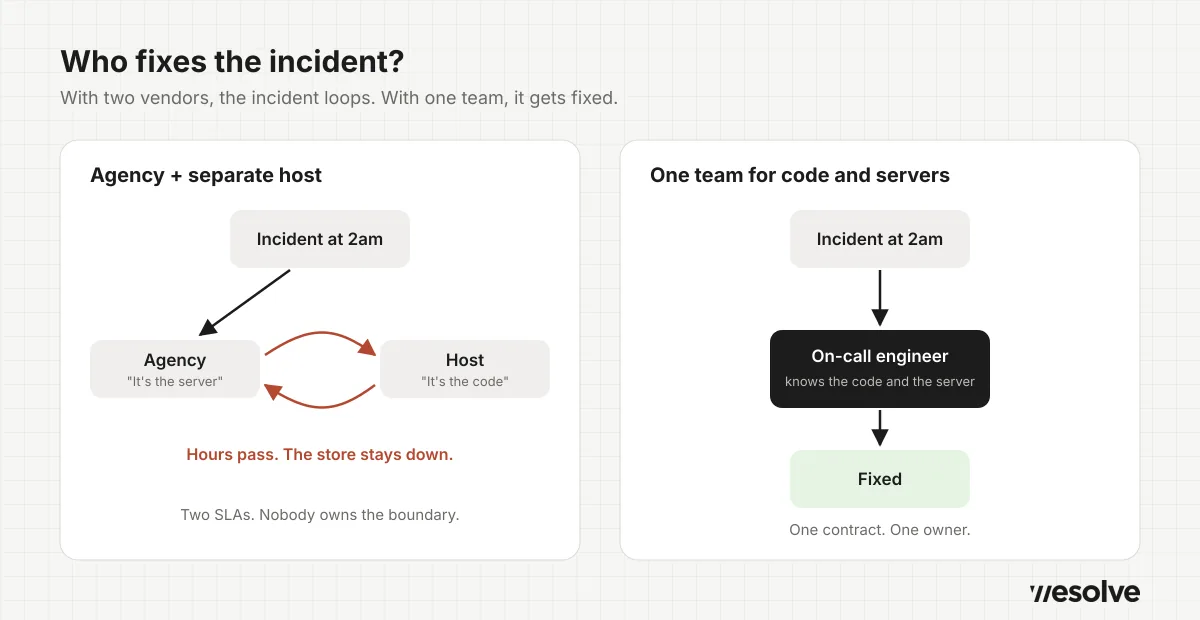
A typical mid-market migration involves a dev agency writing the code, a separate hosting provider running the infrastructure, and sometimes a third party managing integrations. Each vendor has its own SLA, its own escalation path and its own definition of “not our problem.”
When something breaks during cutover, and something always does, you get a loop. The agency says the server is misconfigured. The host says the code is wrong. You sit in the middle, losing revenue, while two vendors argue over whose ticket queue owns the incident.
Failure mode 1: data loss and silent corruption
Product data, customer records, order history and pricing rules all need to migrate cleanly. The problem is rarely a catastrophic wipe. It’s silent corruption: records that look fine until a customer tries to reorder something that no longer exists, or a B2B price tier lands on the wrong customer group.
What causes it
- Attribute sets that don’t map cleanly between source and target schemas
- Custom ERP fields the migration script doesn’t account for
- Incremental syncs running during the migration and overwriting half-migrated records
- No validation step that checks counts and spot-samples records afterwards
How to avoid it
Run a full data audit before you write a single migration script. Document every custom attribute, every ERP-sourced field and every pricing rule. Build a checklist that compares row counts and samples specific records in the source against the target. Run the migration at least twice in staging before you touch production.
When the agency and the host are separate teams, this validation step tends to fall into the gap between them. Neither owns it completely.
Failure mode 2: ERP and PIM integrations break
This one causes the longest post-launch pain. The storefront goes live and looks fine. Then orders start flowing and the ERP doesn’t receive them, stock stops syncing, or the PIM pushes product data in a format the new store doesn’t handle.
Why it happens
ERP and PIM integrations are almost always custom. They depend on specific endpoints, authentication methods and data formats that may have changed between your old Magento version and Adobe Commerce. Treating the integration as a black box (“it worked before, it’ll work after”) is how migrations break in production.
The other cause is timeline pressure. When the go-live date is fixed and development runs long, integration testing gets squeezed, edge cases get skipped, and those edge cases become incidents.
How to avoid it
Map every integration before development starts. Document the data flow in both directions: what the ERP sends, what the store expects, what the store sends back. Test against real data, not synthetic records. Give the ERP integration its own QA phase, separate from frontend testing.
Failure mode 3: deadline slippage and scope creep
A move to Adobe Commerce is not a small project. Mid-market retailers routinely underestimate it, because the estimate was based on a requirements document that missed half their customisations.
The typical pattern
Discovery produces a 12-week estimate. Development starts. Someone finds a custom module that wasn’t in scope, then another. The ERP integration turns out harder than promised. Go-live slips by four weeks, then six. The launch finally happens under pressure, with known issues deferred to “post-launch”. Those issues become the first three months of support tickets.
How to avoid it
Invest in a proper discovery phase. Not a two-day scoping call, but a structured technical audit that inventories every custom module, integration and non-standard setting. It should produce a risk register, not just a feature list.
For projects that need PIM, OMS, CIAM or DAM, wesolve’s CommerceSuite reduces this risk directly: those systems arrive already connected to Magento instead of being integrated from scratch. When you don’t build that integration layer, launch timelines shrink from quarters to weeks.
Failure mode 4: performance gets worse after launch
The new store goes live. Someone checks Core Web Vitals and the scores are worse than the old site. LCP has doubled and mobile conversion drops.
This happens when performance is treated as a post-launch task instead of a design constraint, or when the frontend is rebuilt on a theme that wasn’t built for Adobe Commerce’s rendering.
What to do instead
Building on Hyvä gives you a head start. It replaces the default Luma frontend with a much lighter stack that reliably scores green on Core Web Vitals when it’s implemented well. “Implemented well” matters: a Hyvä build with heavy third-party scripts or unoptimised images will still be slow.
Test performance in staging, on production-equivalent infrastructure, with production-sized data. Not on a dev server with 50 test products.
Failure mode 5: security gaps in the cutover window
The time between staging sign-off and go-live is a security risk. Settings get changed. Patches applied in staging don’t reach production. Test admin credentials don’t get rotated. The payment gateway still points at the sandbox.
None of these are exotic, and all of them have caused real incidents.
The checklist that matters
- Every security patch applied in staging is also in production
- All admin credentials are rotated before go-live
- Payment gateways point to live endpoints, not sandbox
- Test accounts and debug modes are off
- WAF rules are active in production
- 2FA is enforced on every admin account
If your host and your agency are separate teams, this checklist needs a named owner. “Someone will handle it” is how things get missed.
A realistic migration timeline
For a mid-market Adobe Commerce migration, a realistic plan looks like this:
| Phase | Duration | What happens |
|---|---|---|
| Technical discovery and audit | 2–3 weeks | Module inventory, integration mapping, data audit, risk register |
| Environment setup and staging migration | 2–3 weeks | Infrastructure provisioned, first data migration, integrations connected |
| Development and customisation | 4–8 weeks | Custom features, Hyvä frontend, ERP/PIM integration testing |
| QA and UAT | 2–3 weeks | Regression, integration and performance testing |
| Cutover preparation | 1 week | Security checklist, DNS plan, rollback procedure confirmed |
| Go-live and hypercare | 1–2 weeks | Monitored launch, engineer on call |
That’s 12–20 weeks in total, depending on complexity. Projects that compress discovery usually end up at the long end anyway, with more pain on the way.
Why one team matters
Every failure mode above gets harder when the team is fragmented. Data validation falls between dev and ops. Integration testing slips when agency and host run on separate timelines. The security checklist has no owner. Incidents trigger an escalation loop instead of a fix.
The structural answer is simple: one team that writes the code and runs the infrastructure. When the engineers who built the store are also the ones paged at 3am, the incentive to cut corners on testing changes.
That’s how we work at wesolve, and it’s why 99.98% uptime across 27 production storefronts comes from production logs, not a sales slide. Planning an Adobe Commerce migration? Book a discovery call and we’ll talk through the technical scope before you commit to a timeline.
FAQs
How long does an Adobe Commerce migration take? For a mid-market store with custom modules and ERP integrations, expect 12 to 20 weeks from discovery to go-live. Projects that skip a proper technical audit almost always run longer, not shorter.
What data is most at risk during a Magento 2 migration? Custom product attributes, B2B customer group pricing, order history with custom fields, and anything that originates in an ERP or PIM. These need explicit mapping and validation, not just a bulk export and import.
Why do ERP integrations break after a replatform? Usually because API or schema changes between the old Magento version and Adobe Commerce weren’t handled in the integration. The second most common cause is too little testing with real data before go-live.
What is CommerceSuite? wesolve’s PIM, OMS, CIAM and DAM infrastructure around Magento, already connected. It’s used on projects that need those systems, where it removes most of the integration work and shortens launch timelines.
How do I avoid a performance drop after migrating? Treat performance as a design constraint from day one. Use Hyvä for the frontend where your stack allows it, test on production-equivalent infrastructure with real data volumes, and audit every third-party script before go-live.
Should I migrate to Adobe Commerce or Magento Open Source? It depends on your B2B needs, budget and how much of Adobe’s native feature set you’d actually use. For most mid-market retailers in Greece and Southeast Europe, the question is whether the Adobe Commerce licence is justified against a well-built Magento Open Source store. A discovery call with your requirements on the table is the right place to decide.