

Replatforming is one of the most disruptive projects a digital team takes on. Done well, it sets you up for years. Done badly, it costs traffic, revenue and customer trust, sometimes all at once.
Most teams spend their energy on the platform choice: features, demos, pricing. That matters, but it’s rarely where projects fail. Problems live in the details that were skipped in planning or handed off without an owner. This checklist covers the steps experienced teams take and first-timers miss.
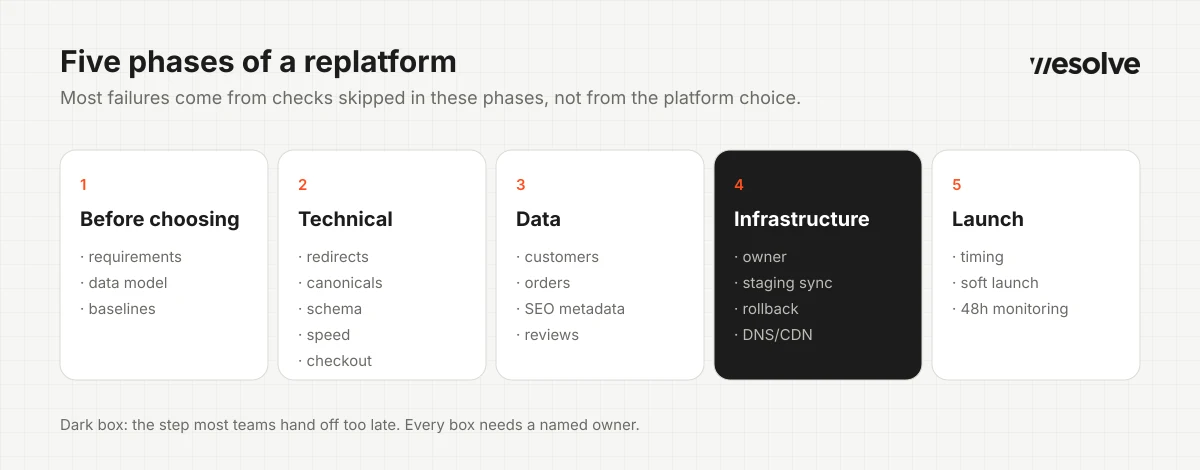
1. Before you choose a platform
Map real requirements, not a wishlist. Audit your current store: live customisations, active integrations, and the workarounds your team quietly built around platform limits. Document every integration (ERP, PIM, OMS, CRM, payments, shipping, loyalty). Each one needs a migration path before you commit.
Understand your data model. Configurable products, bundles, custom attributes, tiered pricing and customer groups must all map cleanly to the new platform. Export a sample of your most complex products and test the import before you sign anything.
Record your baselines now. Organic rankings, page-level traffic, Core Web Vitals and crawl coverage. Without them, you can’t tell a seasonal dip from a migration-caused drop.
2. The technical checklist
- [ ] Redirects. Every changed URL needs a 301 to its new equivalent: products, categories, blog posts, filtered URLs and anything with backlinks. This is where organic traffic goes to die. Build the map before go-live, test it, and verify it in Search Console after.
- [ ] Canonicals and pagination. New platforms often handle canonicals differently. Check paginated categories, filtered results and variants.
- [ ] Structured data. If your store shows rich snippets for products, reviews or breadcrumbs, make sure the new theme does too. Losing schema lowers click-through even when rankings hold.
- [ ] Speed and Core Web Vitals. A new platform isn’t automatically faster. Theme bloat, heavy images, blocking scripts and bad caching can leave it slower. Test on staging, not after launch.
- [ ] Checkout. Map every path (guest checkout, address validation, each payment method, confirmation emails) and test each one before launch.
3. Data migration
- [ ] Customers and orders. Accounts, hashed passwords, order history, addresses and loyalty points. If the hash algorithm changes, plan a password-reset flow from the start; customers who can’t log in notice immediately.
- [ ] SEO metadata. Titles, meta descriptions and alt text don’t always migrate. Write a script if the formats don’t match.
- [ ] Reviews and ratings. They’re both SEO assets and trust signals. Some platforms import them natively; others need scripts or an app.
4. Infrastructure and hosting
Most teams hand this off too late. Hosting must be ready before load testing, not after. Answer these early:
- Who owns infrastructure during and after the migration?
- How does staging stay in sync with production data?
- What’s the rollback plan if go-live fails?
- Who handles SSL, CDN and DNS changes?
Splitting the agency that builds the store from the team that hosts it creates a gap. At 2am you don’t want to be coordinating two vendors. More on that in Magento managed hosting in 2026.
5. The launch window
Pick the timing deliberately. Stay well clear of November, December and any locked-in campaigns. Early Q1 or mid-year is usually safest.
Soft launch if you can. Going live without an announcement gives you time to catch issues before your whole customer base sees them.
Monitor from minute one. Set alerts for 404s, checkout failures and payment declines before launch. The first 48 hours are when problems surface, and you want to catch them in minutes, not days.
The organisational checklist
- [ ] Name an owner for every workstream: data, SEO, integrations, QA, infrastructure, content. Shared or assumed ownership is how things fall through.
- [ ] Train the team on staging. Nobody should learn the new admin on launch day.
- [ ] Brief customer support on login issues, missing order history and changed URLs before customers call.
What a specialist changes
Experience shortens replatforming timelines and lowers risk, because a team that’s done it dozens of times has already hit the edge cases you haven’t thought of.
At wesolve, the same team writes the code and runs the infrastructure, and where a project needs PIM, OMS, CIAM or DAM, CommerceSuite provides them already connected. There’s no handoff between development and hosting, and the people who built your store keep it running across 27 live storefronts in 6 countries. See how we work, or start a conversation.
FAQs
How long does replatforming take? A straightforward migration takes two to three months. Complex ones with custom integrations, large catalogs and several storefronts can take six months or more. A ready stack like CommerceSuite shortens that.
Will it hurt my SEO? It can. The main risks are URLs without redirects, missing metadata, lost structured data and slower pages. A thorough pre-migration audit and a complete redirect map reduce them a lot.
What data needs migrating? At minimum: products, categories, customers, order history, CMS content, SEO metadata and reviews. Each needs its own plan, and some need custom scripts.
What’s the biggest mistake teams make? Underestimating redirect mapping and data migration while focusing on design and features. Most post-launch problems start there.
Do I need to rewrite all integrations? Not always, but you must verify each one against the new platform and rebuild those that don’t fit. Start the integration audit early; some third-party systems support certain platforms poorly.