

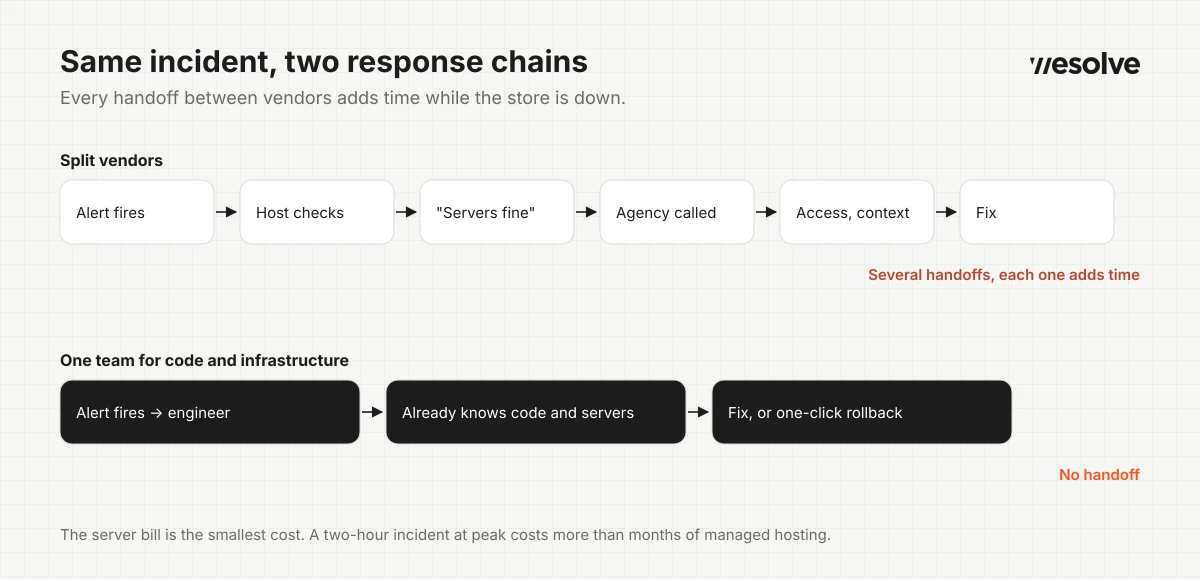
The store goes down at 2am on a peak night. You open a ticket with the host; they escalate to your agency; the agency says it’s infrastructure; the host says it’s code. That’s not a worst case. It’s the predictable result of splitting hosting across vendors who don’t share context or accountability.
Here’s the real cost of each model: not just the server bill, but engineering hours, incident exposure, security overhead and operational drag.
What “self-managed” means
Your team, or a generic cloud provider, owns the infrastructure: servers, OS and PHP updates, Nginx, Redis, Varnish, and responding when it breaks.
Some teams do it well; most don’t, because Magento infrastructure isn’t generic. It has its own caching layers, indexer queues, cron dependencies and session behaviour that general DevOps engineers don’t know by default. Getting it wrong doesn’t throw an obvious error. It produces slow pages, failed checkouts and indexer backlogs that only appear under load.
The appeal is control and lower apparent cost. That holds until something breaks.
The real cost buckets
Engineering time. OS patches, PHP updates, Varnish tuning, scaling before campaigns, reviewing suspicious traffic. In-house, it comes out of your product roadmap; outsourced, you pay someone who doesn’t know your code.
Incident response. A Black Friday incident isn’t a restart. Someone has to know whether it’s PHP-FPM exhaustion, a database deadlock, a failed deploy hook or an integration timing out. Generic on-call engineers read runbooks; Magento engineers read the code.
Security patching. Adobe’s patches sometimes fix critical vulnerabilities with a short window before exploitation. Self-managed, every patch means staging tests and checks against your customisations, and the store is exposed meanwhile. A team that built your store already knows what’s custom.
Scaling. Traffic isn’t flat. Self-managed forces a choice: over-provision and pay for idle capacity, or under-provision and slow down when it matters. Autoscaling helps only if it’s set up for Magento: scaling the web tier without sessions, cache and queue workers just moves the bottleneck.
Backup and recovery. Daily backups are the baseline. Rollback is restoring the database, reverting code and clearing caches in the right order, and if your team has never rehearsed it, the first time under pressure will take longer than you expect.
When self-managed makes sense
- You have an in-house DevOps engineer with real Magento experience, available outside office hours. That’s a specific hire, not a general sysadmin.
- Your store is early-stage, with low traffic and low revenue at risk.
For mid-market retailers with meaningful revenue, a two-hour peak incident, a delayed patch and diverted engineering time add up fast.
When managed hosting earns its cost
Only when the team providing it actually knows Magento. A generic provider gives you a server, a control panel and a ticket queue. They won’t know why indexers are slow or why the Varnish hit rate dropped after a deploy. They’ll tell you the server metrics look fine, because they do. The problem is in the application.
The model that closes the gap: the engineers who built the store run the infrastructure. That’s how wesolve works: 24/7 monitoring with engineer response, patches within release windows, daily backups with one-click rollback, and autoscaling tuned for Magento. More in managed Magento hosting.
Side by side
| Self-managed | Managed by the build team | |
|---|---|---|
| Incident response | Several vendors, slow escalation | One team with full context |
| Security patches | Manual; needs testing time | Within release windows |
| Scaling | Manual, or misconfigured autoscaling | Autoscaling tuned for Magento |
| Recovery | Manual restore | Daily backups, one-click rollback |
| Engineering overhead | Ongoing internal or contractor cost | Included |
| Accountability | Split | One point |
| Magento expertise | Depends on your hire | Built in |
The server bill is the smallest part
For a store with meaningful revenue, one two-hour peak incident costs more than months of managed hosting. One breach from a delayed patch costs more than years of it.
So the question isn’t whether managed hosting is cheaper than self-managed. It’s whether the team providing it knows Magento well enough to actually lower your risk, or whether you’re paying for a server with a ticket queue attached. For pricing models, see Magento hosting pricing.
Reviewing your setup? Talk to us.
FAQs
Is managed Magento hosting more expensive? The monthly fee is higher than a bare server. Total cost, including engineering time, incidents, patching and scaling, is usually lower for any store where downtime costs real revenue.
What should I look for in a managed provider? Magento-specific knowledge, autoscaling configured for Magento, patching within Adobe’s windows, engineer-staffed monitoring, and a clear answer on incidents that span code and infrastructure.
Does autoscaling work differently for Magento? Yes. Web, sessions, cache (Redis, Varnish) and queue workers must scale together, or the bottleneck just moves.
When does self-managed make sense? With an experienced in-house Magento DevOps engineer available out of hours, or for an early-stage store with low revenue at risk.