

A customer asks for their data to be deleted on Friday afternoon. By Monday, legal wants confirmation. The store has thousands of orders, customer accounts and sessions across several cookie categories, and nobody knows exactly where all that data lives, which third-party scripts fire or whether your consent records would survive a regulator.
That’s the default for most Magento stores built without GDPR in mind. Here’s what compliance actually takes.
This is practical guidance, not legal advice. Confirm specifics with your data protection adviser.
What GDPR asks of a store
GDPR applies to anyone processing personal data of people in the EU, wherever the store is hosted. For Magento that means accounts, orders, browsing data, marketing consent and everything passed to third parties. Five obligations matter most:
- A lawful basis documented for each kind of data you collect
- Informed, specific consent, especially for non-essential cookies and marketing
- Data subject rights: access, portability, correction, erasure and objection must actually work
- Retention limits: no keeping data forever “in case”
- Breach notification within 72 hours to the supervisory authority
Fines reach 4% of global annual turnover or €20 million, whichever is higher. In Greece, the authority is the Hellenic Data Protection Authority, which has fined domestic businesses.
What Magento gives you, and what it doesn’t
Magento has a few building blocks, not a compliance module:
- Cookie Restriction Mode: a basic cookie notice that holds Magento’s own non-essential cookies until accepted
- Customer account management: admins can delete customer accounts, and customers can edit their details
- Newsletter subscription status per customer: the minimum record for email consent
What’s missing:
- A real consent manager. Cookie Restriction Mode isn’t a CMP: no categories, no blocking of third-party scripts, no consent records.
- Self-service data export and anonymisation. Customers can’t download all their data or trigger erasure that anonymises orders while keeping accounting records. That needs an extension or custom work.
- Consent versioning: which privacy notice version someone agreed to.
- Third-party visibility: every pixel, analytics tag and chat widget collects data on its own.
Cookies: where most stores fail
A banner on first visit isn’t compliance.
Consent before firing. Non-essential cookies must not load until the visitor actively agrees to that category. A banner that appears after Google Analytics has already fired isn’t compliant. In practice you need a CMP connected to your tag manager, blocking scripts by category until consent is recorded.
Categories. The accepted convention:
| Category | Examples | Consent needed? |
|---|---|---|
| Strictly necessary | Session, cart, login | No |
| Functional | Language, currency | Recommended |
| Analytics | Traffic, heatmaps, A/B tests | Yes |
| Marketing | Retargeting, ad pixels, affiliates | Yes |
Map every cookie to a category, and review the map whenever you add an integration.
Records. Keep proof: what was agreed, which notice version, when, and how it links to a returning visitor, plus any withdrawal. That’s what you show a regulator.
Withdrawal must be as easy as consent. A “Cookie preferences” link in the footer that reopens the CMP is the standard.
Data subject requests
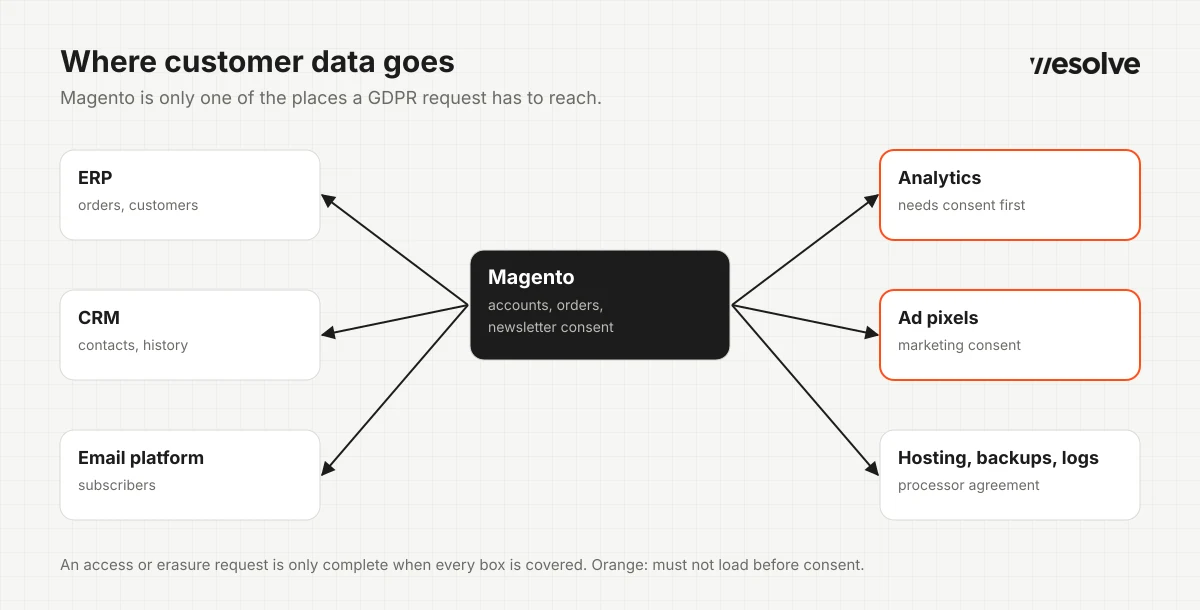
Access. A customer can ask for everything you hold. The hard part is that data doesn’t stay in Magento: ERP, CRM, email platform and analytics all have copies. You need a documented data map of every system, or your answer is incomplete.
Erasure. Anonymise the Magento records (keeping orders for tax purposes, unlinked from the person), then reach every downstream system. Build a deletion checklist per system.
Portability. Provide data in a machine-readable format. Check the export is complete, especially with loyalty data or long order histories.
Objection to marketing. An unsubscribe that works, tied to a suppression list your email platform applies before every send. Test it.
What an audit looks for
An audit reviews documents, not assurances.
- Records of processing (Article 30): what you collect and why, the lawful basis, who you share with, how long you keep it and how you protect it. Update it whenever you add a payment gateway or analytics tool.
- Data processing agreements with every processor: hosting, email, analytics, payments. No signed agreement means get one or stop using the service.
- Retention schedules, for example: inactive accounts anonymised after a set period (often 2–3 years), orders kept as long as tax law requires then anonymised, server logs 30–90 days. Document and automate them.
- Security measures: HTTPS everywhere, access controls on customer exports, encrypted backups, an incident procedure and security patches within release windows.
Patching deserves emphasis: a breach through a known, unpatched Magento vulnerability is very hard to defend. When the same team owns code and infrastructure, patches don’t wait on a handoff. See managed Magento hosting.
Third-party data flows
- Analytics: consent before firing. Server-side tagging reduces cookies but doesn’t remove the need for consent.
- Ad pixels: marketing category. Server-side conversion APIs still need a lawful basis.
- Chat tools: often persistent cookies and conversations stored outside the EU. Check the agreement and data location.
- Payments: usually separate controllers, but disclose the sharing and have an agreement.
- ERP and PIM: include them in your records and privacy notice.
An audit, step by step
- Map data flows: every system that receives customer data
- Crawl the store for cookies and categorise each one
- Check the CMP blocks non-essential cookies before consent
- Collect processing agreements for every processor
- Test an access request and an erasure request end to end
- Update your records of processing and retention schedules
- Confirm Magento is supported and fully patched
- Write the incident procedure: who’s told, in what order, and how you meet 72 hours
It isn’t one-off. Compliance has to keep up as the store changes.
Infrastructure affects compliance too
The 72-hour clock doesn’t pause while your agency and host work out who has the logs. When code and hosting are split, breach response and access requests need cross-vendor coordination. One team owning both answers faster and more completely. That’s one reason wesolve runs the infrastructure for every store it builds.
Start with the data map: every compliance gap traces back to data you didn’t know you collected, or a system you didn’t know received it. Talk to us about yours.
FAQs
Does Magento have built-in GDPR features? Some building blocks: Cookie Restriction Mode, account deletion and newsletter status. No full consent manager, self-service data export or anonymisation; those need extensions or custom work.
Do I need a cookie banner? Yes, if you set non-essential cookies for EU visitors, and it must block them until consent is given.
Do I need a processing agreement with my host? Yes, with every service that processes customer data for you.
What if there’s a breach? Notify the supervisory authority within 72 hours if it risks people’s rights, and assess whether to tell affected customers. Have the procedure written before you need it.