

Adding a second store to Magento feels simple, until you realise the decisions you made for store one are now baked into everything that follows. Hierarchy, database strategy and shared catalog data all compound. Get them right early and scaling feels natural. Get them wrong and every new store becomes a negotiation with your own architecture.
Here are the decisions that matter most, in the order to think about them.
1. Understand the hierarchy first
Magento organises stores on three levels, and where you place a requirement decides how it behaves.
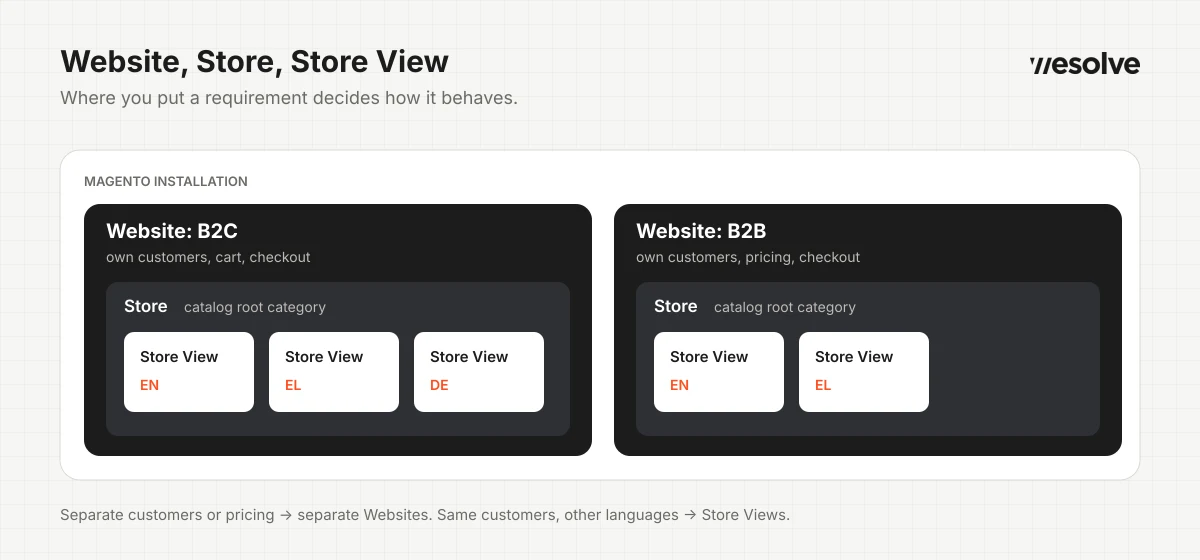
- Website: the top level, with its own customers, cart and checkout. Two websites don’t share customers or orders unless you build that in.
- Store: sits inside a website and sets the catalog’s root category. Stores under one website share customer accounts.
- Store View: controls language, locale and display. It’s what most people picture as “multistore”, but it’s the lightest level.
In practice: a B2B store and a B2C store that must never share accounts or pricing belong on separate Websites. The same store in three languages for the same customers belongs in three Store Views under one Store. Mixing these up is expensive to untangle later.
2. Shared or separate databases
For most mid-market setups, one database is enough. If you plan more than five or six stores, or stores with very different traffic patterns, think about segmentation early.
Split database mode (separate databases for checkout, orders and products) requires Adobe Commerce. On Open Source you have one database, so indexing, queries and cache invalidation all compete as stores grow. The real question is whether your infrastructure can stop one store’s traffic spike from slowing the others. If it can’t, database design alone won’t save you.
3. Shared or per-store catalog
This is where most multistore projects hit real friction.
- Same products, different prices or descriptions: use a shared catalog with store-scoped attributes. Define attributes globally and override values per website or store.
- Different product ranges: use separate root categories per Store, and plan how product data reaches each store.
Without a PIM, managing product data across stores in the Magento admin becomes a burden that grows faster than your store count. CommerceSuite’s PIM is built for exactly this: one source of truth for product data, pushed to each store on its own schedule.
4. URLs and domains
| Approach | Example | Pros | Cons |
|---|---|---|---|
| Separate domains | example.de | Clearest market and brand signal | SSL and DNS overhead, run_code/run_type setup |
| Subdomains | de.example.com | Easier than domains, clean international targeting | Needs correct hreflang |
| Subdirectories | example.com/de/ | Simplest to run | Harder per-store caching or auth rules |
There’s no universal answer. What matters is picking one approach before your third store and using it consistently. Changing URL structure later affects SEO, redirects and every hard-coded link.
5. Caching and performance isolation
The full-page cache is scoped per store, but storage is shared by default. A flush triggered by a product update on one store clears the cache for all of them. That’s fine at small scale, and a real problem when one store changes constantly and another rarely does.
The fix is cache key namespacing per store or separate cache backends per website. Both need infrastructure-level configuration, which is why application and infrastructure must be designed together; see Magento managed hosting.
6. Admin access and permissions
As stores multiply, admin access becomes governance. Magento’s roles can scope users to specific websites or stores, but by default everyone sees everything. Define roles per website before you onboard store-level users; retrofitting means auditing every existing account.
7. Extension compatibility
Every extension runs across the whole instance. One that works on one store may misbehave on another if it ignores store scope. Test each extension against every store configuration: currencies, tax rules, customer groups. Extensions that hard-code store IDs cause bugs that only appear in production. Fewer extensions means less surface to manage across every store.
8. Deployments and releases
On multistore, a bad deploy doesn’t take down one store; it takes down all of them. You need staging that mirrors the full multistore setup, per-store smoke tests and fast rollback. Mind the time zones too: 2am at home may be peak hours in another market.
Treat it as a system
The pattern is the same everywhere: choices that look local to one store are system-wide. The URL scheme for store one sets the pattern for store ten. The caching you skipped at launch hurts at store four. The permissions you didn’t set become a security audit at store six.
Planning a multistore build or migrating one? wesolve handles the code and the infrastructure with one team, so these decisions get made together. See how we work.
FAQs
What’s the difference between a Website, Store and Store View? A Website has its own customers and checkout. A Store sets the catalog root inside a Website. A Store View controls language and locale. Putting a requirement on the wrong level creates problems that are hard to reverse.
Can Magento Open Source handle multistore? Yes. Multiple websites, stores and store views are native. Some advanced features, like split database mode, need Adobe Commerce.
Should each store have its own domain? Separate domains give the clearest SEO and brand separation but add operational work. Subdomains or subdirectories are simpler. Choose one and stay consistent.
What’s the biggest multistore mistake? Treating it as separate stores instead of one system, and making URL, catalog, caching and permission decisions store by store.
When do I need a PIM for multistore? When stores sell different ranges, or when managing products through the admin across stores becomes manual work. A PIM gives one source of truth for every store.