

Most stores that ask for a technical audit already know something is off. Performance has been slipping, a deployment broke production, or a migration is coming and nobody wants to carry hidden problems into the new environment. An audit gives you a documented picture of what your store really looks like under the hood, not what it was supposed to look like when it was built.
This guide covers what a thorough Magento audit examines, what it leaves out, and what one worth the time should cost.
What an audit is not
It isn’t a report from one tool. GTmetrix or PageSpeed Insights give you frontend signals. They say nothing about your database queries, cron setup, module conflicts, or a deployment pipeline writing to the wrong directories.
It isn’t an automated vulnerability scan. Scanners flag known CVEs in outdated packages. They won’t tell you that custom code exposes an admin endpoint, sessions are misconfigured, or Redis accepts connections without authentication.
A real audit means engineers reading code, querying databases, reviewing server configuration and tracing real requests through your stack.
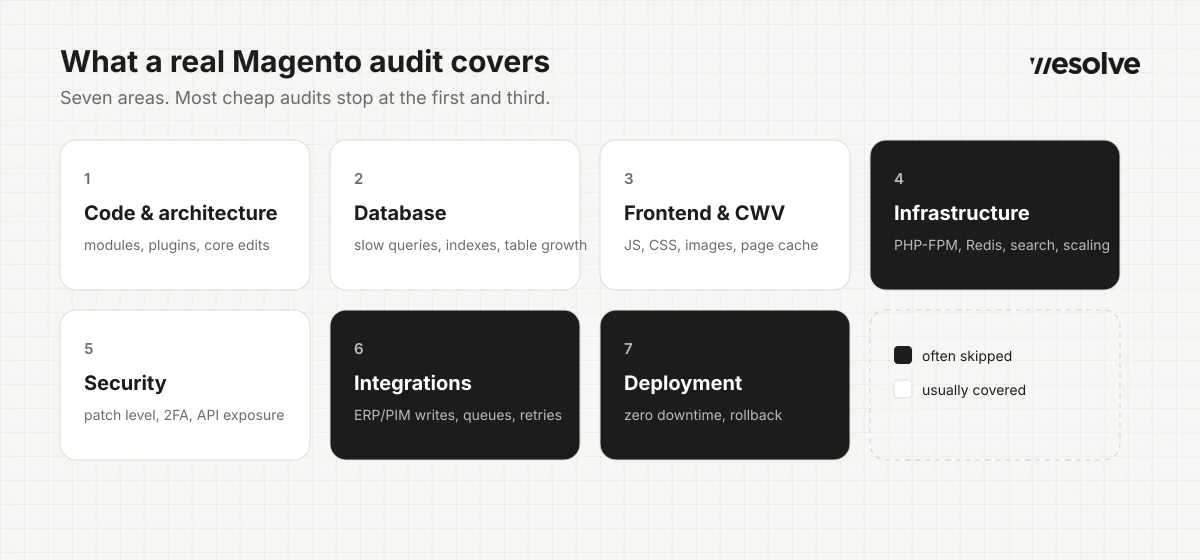
What a real audit covers
1. Code quality and architecture
Engineers review custom modules and third-party extensions against Magento 2 standards, looking for code that will cause trouble at scale or during an upgrade:
- Direct SQL that bypasses the ORM
- Observers and plugins that fire on every request without need
- Hard-coded values that belong in configuration
- Extension conflicts around dependency injection and plugin order
- Deprecated APIs that will break on the next version
- Core files edited directly instead of overridden
If several agencies have added code over the years, this part alone can take several days.
2. Database performance
Magento’s EAV model creates query patterns that degrade predictably as the catalog grows. The audit looks at:
- Slow query logs and the queries with the highest total load
- Missing or redundant indexes on custom tables
- Flat catalog and category configuration
- Log and grid tables that grow without cleanup
- Database engine settings relative to available memory
A store with 50,000 SKUs behaves very differently from one with 5,000. The audit should reflect your actual catalog, not a generic checklist.
3. Frontend and Core Web Vitals
This goes deeper than a PageSpeed score:
- JavaScript bundles, and whether third-party scripts block rendering
- How CSS is delivered, and whether critical CSS is inlined
- Image pipeline, including WebP conversion
- Full Page Cache hit rate and what causes misses
- Varnish or built-in FPC setup, including hole-punching for dynamic blocks
On Hyvä, the audit checks the Alpine.js and Tailwind setup. On Luma, it notes that Luma’s JavaScript architecture is a structural limit, not a configuration problem.
4. Hosting and infrastructure
Most audits skip this, because the agency doing the audit doesn’t run the servers. That’s a real gap: infrastructure problems look like application problems until someone looks at the server. A proper review covers:
- PHP-FPM pools, and whether worker counts match your traffic
- OPcache sizing for your codebase
- Redis for sessions and cache, including eviction policies
- Elasticsearch or OpenSearch health and index settings
- Nginx or Apache: compression, keep-alive, rate limiting
- Autoscaling: does it trigger before or after the store starts dropping requests?
See Magento managed hosting in 2026 for why the same team should own both layers.
5. Security
Application and server, together:
- Magento version and patch level against current releases
- Admin URL exposure and enforced 2FA
- Permissions on writable directories
- REST and GraphQL endpoints that don’t require authentication
- Extension versions with known CVEs
- Content Security Policy headers
- PCI-relevant settings if the store handles card data directly
This is a configuration and code review, not a penetration test. That’s a separate engagement.
6. Third-party integrations
ERP and PIM integrations are among the most common causes of slowness and outages. The audit checks:
- How integrations write to Magento: direct database writes, API or import queues
- Whether an integration failure degrades the storefront
- Whether queue consumers run reliably
- Rate limiting and retry logic on outbound calls
7. Deployment pipeline
Often skipped, and it shouldn’t be:
- Zero-downtime deployment, or maintenance mode?
- Static content deployed correctly for every locale and theme?
- Are the right caches cleared, and the others kept?
- Is rollback documented and tested?
A pipeline that works in staging and fails in production is not rare. The audit should document the gap.
What you should get back
A prioritised findings report, not a raw list of everything found. Good reports rank findings by impact and effort:
- Critical: active revenue loss or security exposure. Fix now.
- High: will cause problems under load or at the next upgrade.
- Medium/low: technical debt for the next development cycle.
Each finding names the file, query or setting, explains the impact in plain words and recommends a fix. “Improve database performance” is useless. “The catalog_product_entity_varchar table has no index on attribute_id and causes 34% of queries over 2 seconds” is useful.
What an audit costs
For a mid-market Magento 2 store with a moderate number of custom extensions and a standard ERP integration, a thorough audit typically costs EUR 3,000 to 8,000. Multi-store setups, large catalogs or custom composable architectures sit at the top of that range or above.
What pushes the price up: many custom or third-party modules, multi-store, multi-language or multi-currency setups, legacy code from several agencies, infrastructure in scope, and deeper security review.
What brings it down: clean, documented code, little customisation, and infrastructure the current host has already documented well.
Be careful with audits under EUR 1,500. At that price you usually get an automated tool report with a consulting cover page.
Who should do it
The most useful audits come from engineers who have built and run Magento in production, not consultants who review code but have never kept a store up through Black Friday.
The difference is practical. An engineer who has seen a Redis eviction policy break checkout at 3,000 concurrent sessions will flag it at once. Someone who has only read the documentation may not see the risk at all. When you compare Magento agencies in Greece, ask whether the people reviewing your infrastructure have operated Magento in production.
After the audit
An audit without a remediation plan is just a document. The usual next steps:
- A sprint of critical fixes before a peak period
- A replatform decision, when the documented debt costs more than rebuilding
- A hosting move, when the current host can’t or won’t fix infrastructure findings
- A retainer to work through high and medium findings
If the audit finds problems your current vendor can’t fix because they don’t own that layer, that’s useful too. It’s the clearest argument for one team owning code, platform and infrastructure. Want to scope an audit for your store? Talk to an engineer at wesolve.
FAQs
How long does an audit take? One to two weeks from access to final report for a typical mid-market store. Complex multi-store setups or heavily customised stores can take three to four weeks.
What access does the auditing team need? Read access to the codebase, query logs and server configuration. Read-only database access is enough for query analysis. Infrastructure review needs infrastructure access.
Can it be done without production access? Staging covers code and configuration. It can’t show real query patterns, cache hit rates or traffic behaviour. Read-only production access gives far more accurate findings.
Is it the same as a security audit? No. Security is one part of a technical audit. A dedicated security audit or penetration test goes deeper into exploitability.
How often should a store be audited? Before a major migration, before a peak season if the last audit is over a year old, after a major version upgrade, and after a change of agency or team.
Can the agency that built the store audit it? Yes, and they know the code. But they may have blind spots about their own decisions. If they do the audit, ask for a second engineer who wasn’t on the build to review the findings.