

An order management system is one of those things you don’t think about until it breaks. Then it’s all you think about.
If you run a mid-market Magento or Adobe Commerce store and have ever had a Black Friday order stuck in “processing” with no clear owner, or a warehouse team working from a spreadsheet while the storefront shows stock that doesn’t exist, you know the problem. This guide explains what an OMS does, what to look for, and how it fits a Magento stack.
What an OMS does, and what it doesn’t
An OMS is the operational layer between your storefront and fulfilment. It receives orders, routes them, tracks stock across locations, coordinates warehouses and carriers, handles returns and keeps the customer’s order status accurate.
It is not a storefront, a warehouse management system (WMS) or an ERP. It sits between them and makes them work together without manual steps.
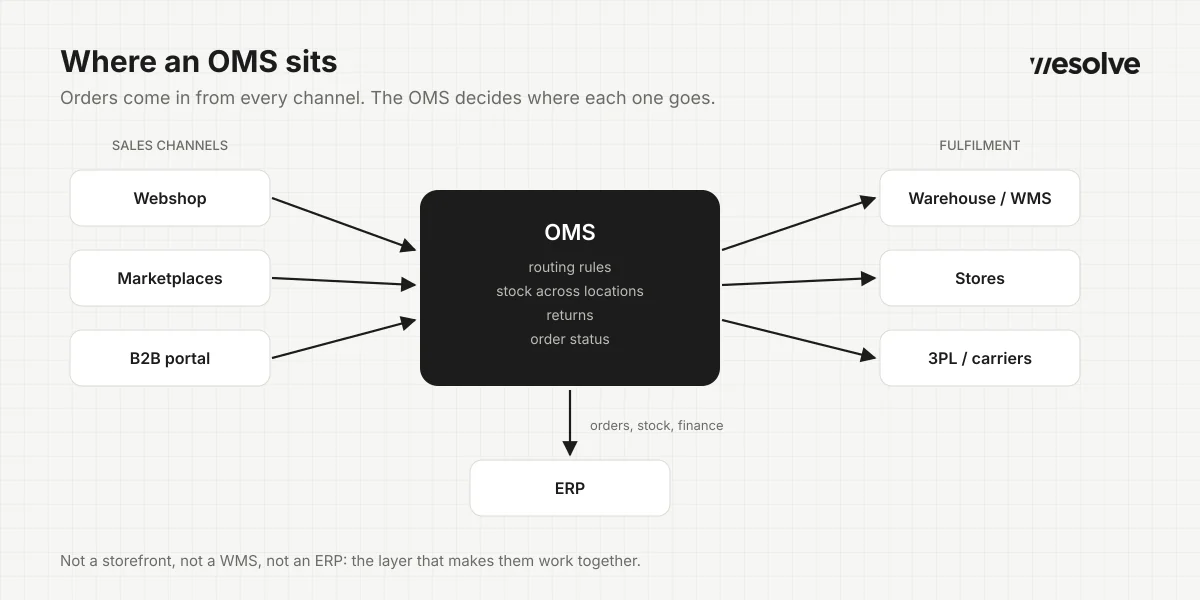
The core functions any credible OMS covers:
- Order capture across channels: web, marketplaces, B2B portal
- Inventory visibility across warehouses, stores and 3PLs
- Order routing by rules you define: proximity, stock, cost
- Fulfilment coordination with pick, pack and ship
- Returns and reverse logistics
- Real-time status updates for customers
If you handle any of these with spreadsheets, Slack messages or a patchwork of plugins, you have an OMS gap.
When native Magento stops being enough
Magento 2 and Adobe Commerce handle orders well for a single warehouse and a single channel. For many mid-market stores that’s enough at launch. The cracks appear with:
- A second warehouse or a 3PL partner
- A B2B channel alongside B2C
- Fulfilment in several countries with different tax and carrier rules
- Peaks where manual intervention can’t keep up
Then orders queue, staff step in, errors compound, and the storefront shows stock that isn’t there.
Magento’s Multi-Source Inventory (MSI) handles stock across multiple sources and warehouses, and for many mid-market retailers it closes the gap without a separate OMS. But MSI is not a full OMS: it allocates inventory and selects sources. It doesn’t run fulfilment workflows, carrier coordination or returns end to end.
Standalone or integrated OMS?
| Standalone OMS | Integrated OMS | |
|---|---|---|
| What it is | A dedicated platform connected to Magento by API | OMS capability inside your commerce stack |
| Strengths | Deep fulfilment features, ready-made carrier and 3PL connectors | One system of record, no sync issues, one vendor owns it |
| Weaknesses | Another vendor and contract, sync latency, finger-pointing in incidents | You depend on your platform partner’s roadmap |
| Best for | Very specific fulfilment needs, or scale where best-of-breed pays off | Most mid-market retailers who want fewer moving parts |
For mid-market retailers in Greece and Southeast Europe, the integrated approach usually wins on operational simplicity.
Six questions to ask before you buy
1. Does it match your fulfilment model? Single warehouse, several warehouses, drop-ship, click-and-collect, 3PL, or a mix? If you ship across Southeast Europe from Greece, routing rules and carrier connections must reflect that.
2. How does it connect to your ERP? Orders flow into the ERP for finance, stock accounting and purchasing. If that connection is fragile or needs manual reconciliation, you’ve moved the problem, not solved it. Ask whether the connector is native, custom or middleware.
3. What happens at peak load? An OMS that handles 200 orders a day can collapse at 2,000. Ask whether it queues and processes asynchronously, and how it fails under load.
4. Who owns the integration when something breaks? If the OMS vendor and your Magento agency are separate, you need a clear escalation path for orders stuck between them. In practice it’s rarely clear.
5. What does the returns workflow look like? Returns are where most OMS implementations are weakest. A credible system handles authorisation, restocking, refunds and return labels without manual steps.
6. How does it model inventory? As a single number, or as reservations across locations? You need the second for accurate available-to-promise. If the storefront shows stock already reserved for another channel, the data model is wrong.
The real failure mode: gaps between vendors
The most common OMS failure isn’t a bug. It’s a gap between vendors. The agency built the storefront, the host runs the servers, the OMS vendor owns fulfilment logic, and the ERP vendor owns finance. When an order fails, each checks its own logs, finds nothing wrong and points elsewhere.
The fix is fewer boundaries. When one team writes the code, runs the infrastructure and owns the OMS layer, there’s nothing to argue over. That’s part of why we hold 99.98% uptime across 27 live storefronts. If a Magento partner can’t tell you who owns the OMS integration during a production incident, that’s your answer.
Magento-specific advice
Use MSI properly first. It handles multi-warehouse allocation, source priority and distance-based routing. Many stores use maybe 20% of it. Audit MSI before adding a standalone OMS.
Custom order workflows are a Magento strength. Its event and observer architecture makes custom order states fairly straightforward, so unusual workflows can often stay native.
Integrate by API, never at database level. If you add a standalone OMS, use the REST or GraphQL API. Database-level integrations break on upgrades and create security exposure.
Hosting affects OMS performance. Order processing is write-heavy. If hosting isn’t built for write throughput under load, the OMS integration will lag at peaks. It helps when one team can tune code and infrastructure together; see Magento managed hosting in 2026.
Do you need a dedicated OMS?
Probably yes, if you:
- Fulfil from three or more locations with separate stock
- Sell in several countries with different carrier and tax rules
- Run B2B and B2C with different fulfilment SLAs
- Regularly process thousands of orders a day
- Need automated purchase orders for drop-ship suppliers
Probably not yet, if you:
- Run one warehouse with straightforward pick, pack and ship
- Already coordinate fulfilment in a stable ERP integration
- Can cover routing with MSI
- Would create more problems with another vendor than the OMS solves
For most mid-market Greek retailers, a well-configured Magento store with MSI and a clean ERP integration covers about 80% of what a standalone OMS promises. The other 20% is real, but know which 20% you need before you sign another contract.
How CommerceSuite handles it
Where native Magento isn’t enough, CommerceSuite provides OMS alongside PIM, CIAM and DAM, already connected to Magento and to each other: no sync to build from scratch, no API version mismatches between separate vendors, no third vendor in the room during an incident.
We run it for retailers in beauty, grocery, petcare, home, fashion and toys, in Greece and five other countries. Their needs differ: a beauty brand with subscriptions routes differently from a grocer with same-day delivery windows, so the OMS is configured for that at implementation. Want a second opinion on your setup? Talk to us.
FAQs
What is an order management system in ecommerce? The software that handles everything after an order is placed: routing, inventory across locations, warehouse and carrier coordination, returns, and accurate customer status.
Does Magento have a built-in OMS? It has native order management, plus Multi-Source Inventory for multi-warehouse allocation and routing. That’s enough for many mid-market stores. Multi-country, drop-ship or high-volume B2B often needs more.
What’s the risk of a separate OMS vendor next to a separate Magento agency? Accountability gaps. When an order fails between systems, each vendor finds nothing wrong on its side, and resolving it means coordinating two parties with no obligation to each other.
Is an OMS the same as a WMS? No. A WMS runs the physical warehouse: bins, pick paths, packing, labels. An OMS decides routing and allocation and tells the WMS what to do. Some products blur the line, so check which functions a system actually covers.