

It’s 2am on Black Friday and your store is down. The host’s support bot wants a ticket; your agency isn’t answering. Every minute is revenue you won’t get back.
Uptime isn’t an abstract SLA number. It’s a direct line to revenue, customer trust and your team’s sleep. Here’s what the numbers mean, how to work out what’s at risk, and what separates infrastructure that holds from infrastructure that doesn’t.
The maths behind the percentages
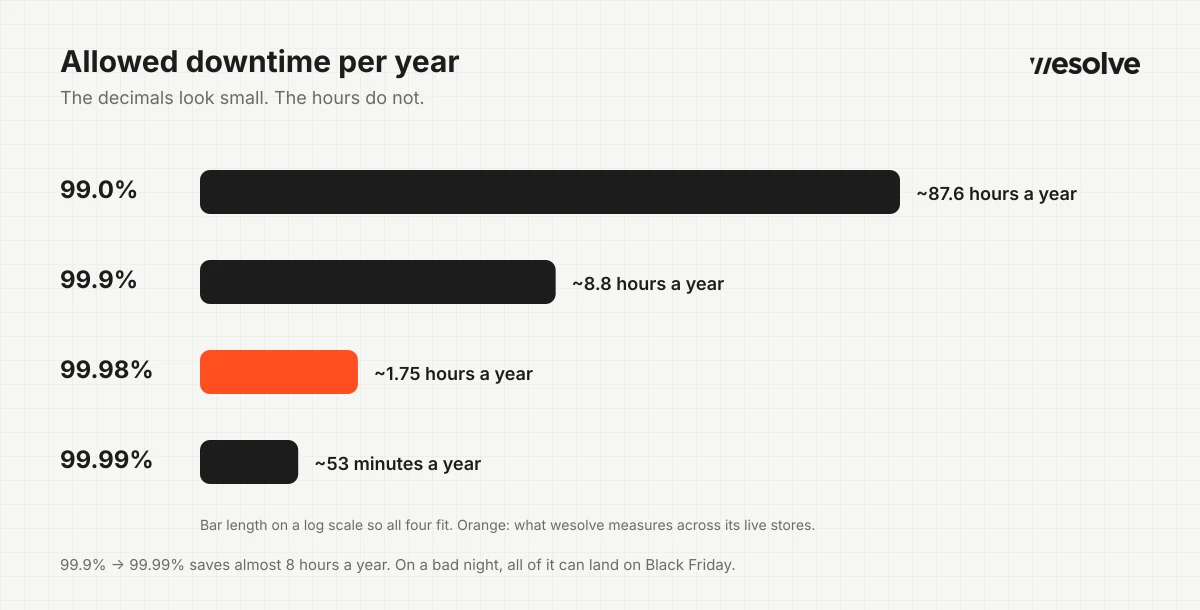
| Uptime | Downtime per year | Downtime per month |
|---|---|---|
| 99.0% | ~87.6 hours | ~7.3 hours |
| 99.9% | ~8.8 hours | ~44 minutes |
| 99.98% | ~1.75 hours | ~9 minutes |
| 99.99% | ~53 minutes | ~4.4 minutes |
The gap between 99.9% and 99.99% is almost 8 hours a year. For a store taking €5,000 a day, 8 unplanned hours is about €1,700 in direct lost sales, before abandoned carts that never come back, crawl errors and customers who don’t return.
Peaks are the real test
Average uptime is misleading, because downtime doesn’t spread evenly. It clusters when load is highest: Black Friday, Cyber Monday, launches, campaigns.
A store at 99.9% a year could spend its entire 8.8-hour allowance in one Black Friday weekend. That’s a common failure pattern where autoscaling isn’t configured, or where infrastructure and engineering are separate teams and nobody owns the gap.
So don’t ask a host “what’s your SLA?” Ask “what happens when traffic jumps 10x in 30 minutes?” If the answer involves a ticket queue, you have your answer.
What causes Magento downtime
- Infrastructure not sized for Magento. A misconfigured PHP-FPM pool, undersized Redis or untuned database degrades under load before it fails, and customers hit timeouts before the alert fires.
- Deploys without real staging. Code that works in development breaks production when staging doesn’t mirror it. Almost always a process failure, not a technical one.
- Late security patches. A compromised store doesn’t just slow down; it gets taken down. Patching within release windows is the baseline, not optional maintenance.
- Nobody watching at 2am. Monitoring detects; it doesn’t decide. A store throwing 503s during a flash sale needs an engineer who knows the code, not a bot opening a ticket.
The vendor handoff problem
Behind most downtime is a failure that rarely appears in post-mortems. The agency says it’s the server; the host says the application is throwing errors. Neither is lying, and neither is accountable. That gap is where incidents live.
It’s structural, not personal. The only fix is one team owning both sides. At wesolve, the engineers who write the store code run its infrastructure, so at 2am there’s no handoff. See managed Magento hosting.
Reading an SLA
- What counts as downtime? Some providers count only full outages. A store loading in 15 seconds is losing customers while the SLA clock stands still.
- What’s the window? Monthly and yearly SLAs carry different risk: steady 99.9% every month isn’t the same as a good year with one catastrophic month.
- What’s the remedy? Usually service credits: a fraction of one major incident’s cost, with no lost revenue or trust recovered.
- Who responds? Monitoring is a start. What matters is what happens after the alert.
What 99.98% looks like in practice
wesolve measures 99.98% uptime across 27 live production storefronts in 6 countries: about 1.75 hours of downtime a year. It comes from autoscaling, 24/7 engineer monitoring, patching within release windows, daily backups, one-click rollback, and engineers who know where the failure points are because they built the stores.
Fast Hyvä frontends help too: a lighter frontend puts less load on the application, so there are fewer cascading failures under spikes. See speed optimisation.
Working out your revenue at risk
You need two numbers: revenue per hour (annual revenue ÷ 8,760) and the downtime your tier allows.
A €1.5 million store earns about €171 an hour. At 99.9%, the allowed 8.8 hours put about €1,500 a year at risk in direct sales; at 99.98%, about €300.
The caveat cuts both ways. Downtime on well-run infrastructure tends to fall in quiet hours. Badly run infrastructure fails exactly when load is highest, because that’s when its weaknesses show, so real losses can be far higher than the average suggests.
Questions before you sign
- What’s your measured uptime across current production stores, not the SLA target?
- Who’s watching at 2am on Black Friday?
- Are they the same engineers who built the application?
- How fast are Magento security patches applied?
- How do you roll back a deploy that breaks production?
- Does the SLA cover slow performance, or only full outages?
More on comparing providers in Magento hosting pricing.
FAQs
What does 99.9% uptime mean for a store? Up to about 8.8 hours of downtime a year, roughly 44 minutes a month.
What’s the difference between 99.9% and 99.99%? Almost 8 hours a year. At 99.99%, annual downtime is capped near 53 minutes.
Why does uptime matter more at peaks? Magento is resource-heavy. Infrastructure that holds at normal traffic often fails when traffic spikes, exactly when campaigns drive visitors.
What’s a realistic target for production Magento? 99.98% or better on properly sized, autoscaling infrastructure with engineer-staffed monitoring. Below 99.9% is a meaningful revenue risk.