

Slow Magento stores don’t fail dramatically. They bleed. A 200ms delay on a category page, a heavy JavaScript bundle on mobile, a cache miss on a busy afternoon: none of these trigger alerts. They just quietly cost you conversions.
If your Magento 2 or Adobe Commerce store has red PageSpeed scores, or LCP measured in seconds, these are the six areas where real gains come from, the kind that show up in Core Web Vitals reports and revenue dashboards.
Why speed problems are structural
Most Magento slowness isn’t one bad decision. It’s accumulated technical debt: an extension making synchronous API calls on every page, a theme that ignores render-blocking resources, hosting never sized for real traffic. No single tweak fixes that. What works is a sequence of targeted changes in the right order.
1. Move to a Hyvä frontend
If you still run Luma or a Luma-based theme, the frontend is almost certainly your biggest performance liability. Luma ships RequireJS, KnockoutJS and a large JavaScript bundle that grows with every extension.
Hyvä replaces that stack with Alpine.js and Tailwind CSS: a much smaller JavaScript footprint, faster interactivity, and green Core Web Vitals on stores that couldn’t get out of the red. It’s a rebuild, not a tweak, and every extension needs a compatibility check first. But for mobile-critical stores on Luma, nothing else comes close.
2. Fix the full-page cache
Most stores have the full-page cache enabled but not tuned. Common problems:
- Cache invalidating too aggressively on catalog price rule changes
- Varnish in the stack, but ESI blocks not set up for dynamic content
- Low hit rates because URL parameters (UTM tags, sort options) create unique cache keys
Check your hit ratio first. If it’s under 80% on category and product pages, you’re serving uncached pages at scale, and no amount of hardware will fully make up for that. Varnish with ESI for cart and session data is the standard for busy stores; at minimum, use Redis for sessions and object cache.
3. Cut third-party JavaScript
Every extension added JavaScript. Some loads on every page, some calls external services synchronously, and some belongs to extensions you stopped using years ago. Audit it with Chrome DevTools’ Coverage tab or a WebPageTest waterfall, and look for:
- Chat widgets loading on page load instead of on interaction
- Analytics and tag-manager scripts that aren’t deferred
- Extension scripts loaded globally but needed on one page type
- Leftover assets from removed extensions
Removing or deferring two or three of these usually improves LCP measurably, with no infrastructure changes.
4. Optimise images at the infrastructure level
Image weight is one of the most common causes of slow LCP on product and category pages. The fix has two parts:
- Format: serve WebP. Magento 2.4.x supports it natively, but it has to be enabled and the resize pipeline configured.
- Delivery: serve images from a CDN with edge caching, not from your origin server.
Also check dimensions. Stores that let merchants upload anything often serve 4000×4000px files scaled down with CSS, and the browser still downloads the full file.
5. Fix database query performance
Magento is query-heavy by design: a category page with layered navigation, price filters and sorting can run dozens of queries. On a neglected database, that becomes the bottleneck. Check:
- Indexes: run
bin/magento indexer:status. Stale indexes are a common cause of slow category pages. - EAV load: fewer attributes in layered navigation, all properly indexed, make a big difference.
- Slow query log: anything over one second is usually fixable with an index or a rewrite.
- Connections: under high concurrency Magento can exhaust database connections; ProxySQL or similar helps.
It’s unglamorous work, but on catalog-heavy stores the gains are often bigger than frontend work.
6. Size infrastructure for your real traffic
Speed isn’t only code. Infrastructure must match how your traffic actually behaves, not a quiet Tuesday. A server that’s fine at baseline can fall over when traffic jumps 5x in an hour on Black Friday. The answer is autoscaling that adds capacity ahead of demand, not after the first timeout.
The stack matters too: PHP-FPM with OPcache, PHP 8.2 or 8.3, and Redis for sessions and object cache. If you can’t autoscale, run old PHP or sit on shared hosting, you’ve hit the ceiling of what code optimisation can do. See Magento managed hosting in 2026 for the architecture decisions that matter.
The gains compound
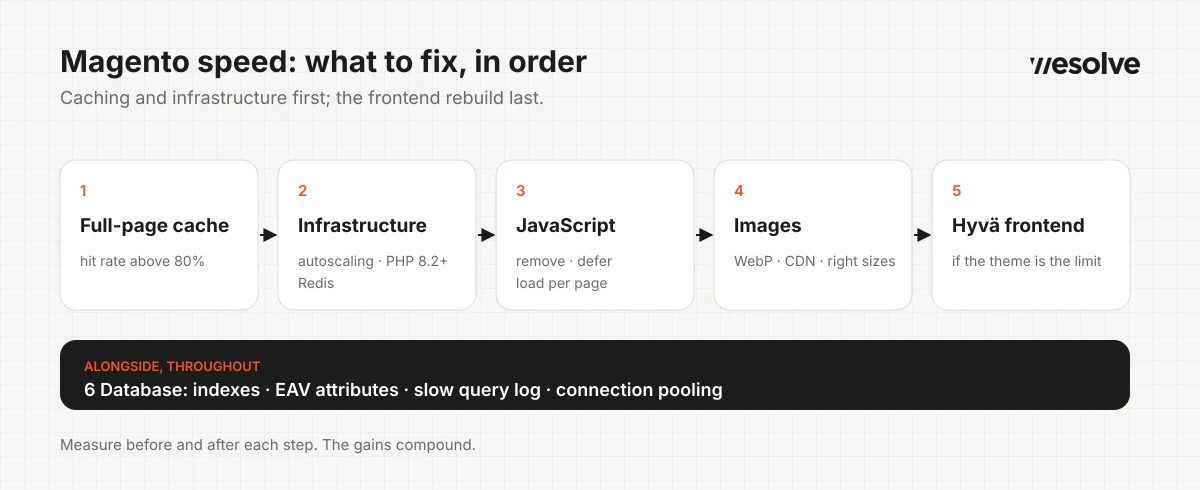
These changes don’t work in isolation. A Hyvä frontend on a slow database still underperforms; a fast database on misconfigured hosting still drops requests under load.
Order matters: caching and infrastructure first, then JavaScript and images, then the Hyvä rebuild if the theme is the limit. Database work can run alongside throughout. Measure before and after every change.
Want to know where your store’s bottlenecks are? A technical audit is the place to start, or talk to us. The same team writes the code and runs the infrastructure, so problems between the two layers don’t fall through the cracks.
FAQs
What’s the single biggest factor? For most Magento 2 stores on a Luma theme and standard hosting: frontend JavaScript and cache configuration. Moving to Hyvä and getting high Varnish hit rates usually produce the largest gains.
Does Hyvä work with every extension? Not out of the box. Every extension needs a compatibility check, and some need custom Hyvä components. That’s normal scoping work for any Hyvä project.
How do I know if Varnish is caching my pages?
Check the X-Cache response header: HIT means Varnish served it, MISS means it reached your server. Mostly MISS on category and product pages means the configuration needs work.
Which PHP version should I run in 2026? PHP 8.2 or 8.3, depending on your Magento version’s compatibility. Older versions miss performance gains and fall outside security support.
Can image optimisation alone fix a bad LCP? It can help a lot when images are the LCP element, but server response, blocking resources and caching matter too. It’s one part of the fix.
Redis for sessions vs Redis for object cache? Sessions store customer session data; object cache stores results of expensive computations. Configure both, ideally on separate Redis instances so evictions don’t interfere.