

The store is slow. Order emails aren’t sending, prices are stale, the indexer hasn’t run in six hours. Server load, PHP errors and database connections all look fine. Then someone checks cron: it stopped three days ago.
Cron is the nervous system of a Magento store: indexing, email queues, price rules, sitemaps, cleanup and dozens of other background tasks. When it breaks, everything degrades at once, and the symptoms look like ten different problems.
How Magento cron works
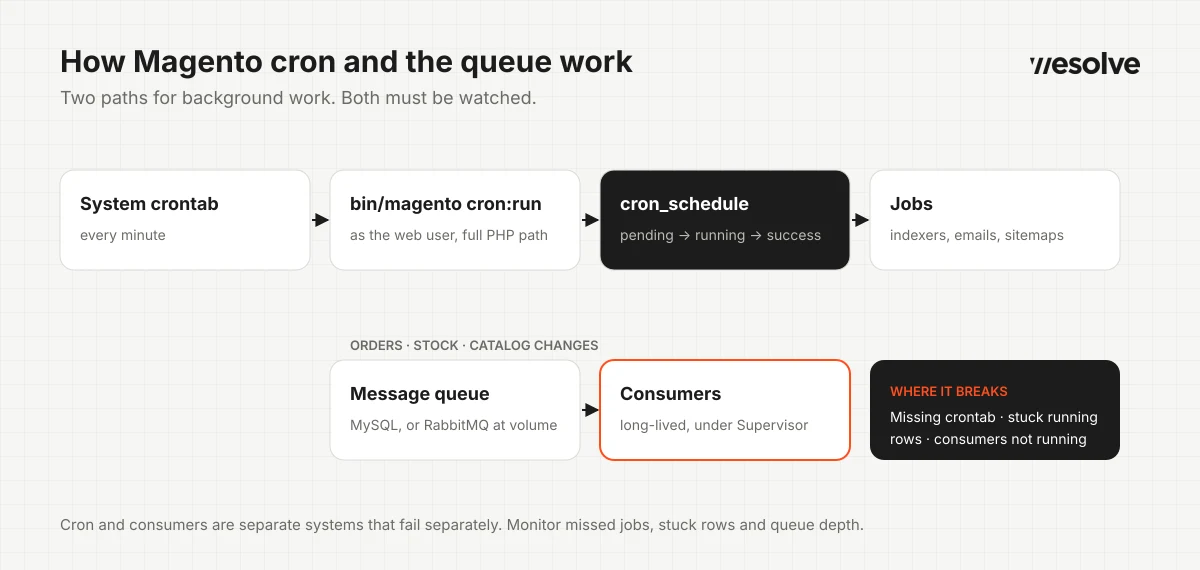
The system crontab runs bin/magento cron:run every minute:
* * * * * /usr/bin/php8.2 /var/www/html/bin/magento cron:run >> /var/log/magento.cron.log 2>&1
Each run does two things: it writes upcoming jobs into the cron_schedule table, and executes the ones that are due. Jobs are organised in groups; the main ones are default and index, each with its own settings. Running every five minutes works for small stores but delays time-sensitive jobs like order processing and transactional email.
Start with cron_schedule
Every job gets a row with a status: pending, running, success, missed or error.
SELECT job_code, status, scheduled_at, executed_at, finished_at
FROM cron_schedule
ORDER BY scheduled_at DESC
LIMIT 50;
Healthy: a mix of success and pending with recent timestamps. Unhealthy: hundreds of missed rows, running rows from hours ago, or no recent rows at all.
Why cron stops
The crontab is missing or wrong. The most common cause: a redeploy, a server move or a provisioning script that didn’t restore it. Magento can’t tell you this happened; it just stops scheduling. Check crontab -l as the web server user (www-data, nginx or your app user).
The PHP path doesn’t match. If cron uses a different PHP binary from the web app, you get silent failures or version conflicts. Always use the full path, and confirm with which php and php -v as the right user.
Permissions. Cron needs write access to var/, pub/media/ and the log folders. A deploy that resets permissions makes jobs fail silently.
Stuck running jobs. A job marked running blocks new runs of the same job. If the process died (timeout, out-of-memory kill, restart), the row was never updated. Reset old ones:
UPDATE cron_schedule
SET status = 'error', messages = 'Manually reset stuck job'
WHERE status = 'running'
AND executed_at < NOW() - INTERVAL 1 HOUR;
Set the interval to longer than your longest legitimate job.
Queue backlogs
Magento’s message queue (MySQL or RabbitMQ) handles async work: order placement, stock updates, catalog changes. Consumers process it. When they fall behind, the queue grows, and tens of thousands of messages after a cron outage isn’t unusual. The effects:
- Orders look placed but don’t process
- Stock goes stale
- Notification emails stop
- Price rules don’t apply on time
MySQL or RabbitMQ? MySQL is the default and fine for low-to-medium volume, but every consumer poll is a database query, which creates contention under load. For thousands of orders a day, use RabbitMQ. Patterns are in Magento ERP integration.
Run consumers as long-lived processes, managed by Supervisor or systemd, with a message limit to contain memory leaks:
bin/magento queue:consumers:start async.operations.all --max-messages=10000
Clearing a backlog: run more consumers in parallel to drain it, or, if the messages are stale (catalog updates from three days ago), truncate the queue tables. Be careful doing that on a live store.
Debugging, step by step
- Is the system cron running?
crontab -las the right user; check/var/log/syslogor/var/log/cron. - Is
cron_schedulegetting new rows? Any stuckrunningrows? - Check the logs:
var/log/cron.logandvar/log/exception.log. - Run it by hand, as the web server user (not root):
bin/magento cron:run --group="default"and--group="index". - Look for stacking processes:
ps aux | grep cron. Many means jobs take longer than the interval. - Measure job duration from
executed_atandfinished_at. A 30-second job taking 8 minutes is usually a slow query or a missing index.
Settings worth knowing
In Stores > Configuration > Advanced > System > Cron, per group. The defaults are in minutes:
| Setting | Default | What it does |
|---|---|---|
| Generate schedules every | 1 | How often new rows are written |
| Schedule ahead for | 4 | How far ahead jobs are scheduled |
| Missed if not run within | 2 | When a pending job becomes missed |
| History cleanup every | 10 | How often old rows are deleted |
The classic mistake: raising “schedule ahead” without raising “missed if not run within”, so jobs get marked missed before they can run.
Give heavy custom jobs their own cron group. A badly written third-party module that blocks the default group degrades the whole store.
Indexers
Set indexers to “Update by Schedule”, not “Update on Save”, in System > Index Management. Scheduled mode updates incrementally as data changes. Save full reindexes for after big imports or configuration changes, and run them off-peak. Full reindexes on a schedule during business hours are a fast way to slow the store down.
Infrastructure matters more than you think
Cron reliability is an infrastructure problem too. A server that runs out of memory kills jobs mid-run; a container that restarts drops them; shared hosting that throttles PHP makes them time out silently.
On every store wesolve runs, cron is monitored: we alert on missed jobs, queue depth and stuck running rows, so failures surface as incidents, not as “the store feels slow” two days later. When hosting is separate from development, nobody owns cron. More in managed Magento hosting and monitoring baselines.
Checklist
cron:runevery minute, as the right user, with the full PHP path- Recent
successrows and no stuckrunningrows - Consumers as long-lived processes under Supervisor or systemd
- Indexers on “Update by Schedule”; full reindexes off-peak only
- Heavy custom jobs in their own group
- Cron log on and watched
- Alerts on missed jobs and queue depth
FAQs
How often should Magento cron run? Every minute. Magento decides which jobs are due.
Why are jobs showing as missed? They didn’t run within the “missed if not run within” window (2 minutes by default): the system cron wasn’t running, a run timed out, or a stuck job blocked it.
What’s the difference between cron and queue consumers? Cron runs scheduled tasks (indexing, emails, sitemaps). Consumers process async operations (orders, stock). They’re linked but fail separately.
Can one third-party module break all of cron? Yes. An uncaught exception can stop a whole group, and a long job can stack processes. Isolate heavy jobs in their own group.