

ERP integration is where most Magento projects get humbled. The storefront looks good, the catalog is clean, and then someone asks why stock is wrong at checkout. The answer is almost always the same: the integration was designed for launch-day volume, not for the business six months later.
This guide covers the approaches that hold up when orders grow, SKUs multiply, and your ERP vendor ships a breaking API change on a Friday afternoon.
Why integrations break at scale
The failure is predictable. A developer writes a direct API call from Magento to the ERP. It works at 50 orders a day. At 500 orders during a promotion, the ERP starts timing out, Magento backs up and stock data goes stale. Customers buy what isn’t there, and fulfilment falls behind.
The root cause is coupling. When Magento talks to the ERP in real time, every traffic spike on the storefront becomes a load spike on the ERP. The two systems share one failure domain. Fixing that afterwards is expensive; designing for it upfront is not.
The three integration patterns
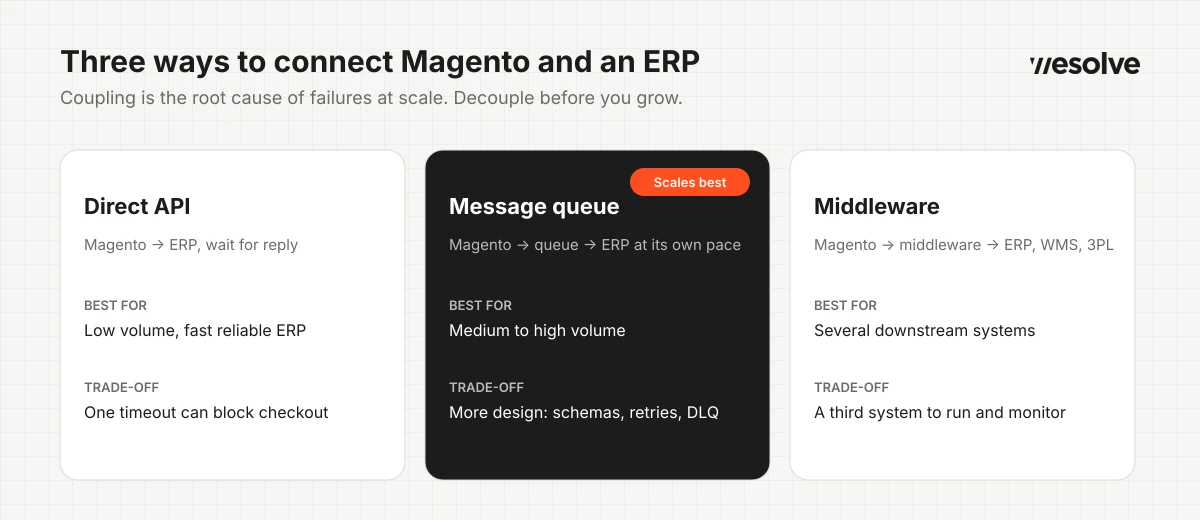
1. Direct API
Magento calls the ERP synchronously: place order, push to ERP, wait, confirm. It’s the simplest and the most fragile at scale: one ERP timeout can block a checkout.
Use it only if peak volume is genuinely low and your ERP guarantees responses under 200ms. Most don’t.
2. Message queue (event-driven)
This is the pattern that scales. Magento publishes events to a queue (RabbitMQ is native to Magento 2; Kafka handles higher throughput), and the ERP consumes them at its own pace.
The systems are now decoupled. A storefront spike doesn’t hit the ERP directly, orders process in sequence, and if the ERP goes down for maintenance, messages wait instead of getting lost. It needs more upfront design (message schemas, retries, dead-letter queues, queue-depth monitoring), but the stability is worth it.
3. Middleware
With several downstream systems (ERP plus WMS plus 3PL plus marketplace feeds), a middleware layer owns the translation for each one. Magento sends a standard event and the middleware routes it. When the ERP changes its API, you update one adapter, not the Magento codebase. The cost is a third system to monitor, version and secure.
Each data domain needs its own strategy
| Data | Direction | Sync approach |
|---|---|---|
| Stock | ERP → Magento | ~60-second cycle for most retail; near real time for flash sales; daily reconciliation |
| Orders | Magento → ERP, status back | Reliable, ordered queue; ERP status reflected to the customer |
| Products and prices | ERP/PIM → Magento | Batch for stable catalog data; faster sync or real-time pricing API for daily or per-customer prices |
| B2B accounts, credit, tiers | ERP → Magento | ERP is the source of truth; writes go to the ERP first |
Stock doesn’t need to be real-time to the millisecond, but customers mustn’t buy what’s gone. Batch reconciliation once or twice a day catches the drift event-driven sync misses when a message fails silently.
Orders must arrive reliably and in order. The key decision is where status lives: Magento should show the ERP’s status (picked, shipped, invoiced), so you need a return flow.
Products and prices usually come from the ERP, which is rarely structured for a storefront. A PIM in between normalises and enriches the data before it reaches Magento. That’s why CommerceSuite bundles one: the translation work stays out of Magento’s codebase, where it would break on upgrades.
What breaks during Magento upgrades
ERP integrations are the most common reason Magento upgrades stall. A module written against 2.3 APIs may not survive 2.4.x, and the deeper the logic is embedded in Magento, the bigger the upgrade.
The fix: treat the integration as a separate, versioned component with its own tests, deployment pipeline and owner. Test it independently before touching the storefront. It also helps when the team that wrote the integration runs the infrastructure and the upgrade: they already know where the fragile points are.
Monitoring in production
Integrations degrade quietly: queues grow, processing slows, stock falls behind, and nobody notices until a customer complains. Monitor at least:
- Queue depth and consumer lag: are messages keeping up?
- Failed messages and dead-letter queue volume
- Sync latency per domain: how old is the stock data on the storefront?
- ERP API errors and response times
- Order acknowledgement delay: time from order placed to ERP confirmation
These metrics are the difference between catching a problem at 2am and hearing about it from a support ticket at 9am. We monitor all 27 storefronts we run around the clock, with engineers responding, not bots. Fixes often need someone who understands both Magento’s event schema and the ERP’s payloads.
How CommerceSuite helps
Where the ERP is central to the business (B2B pricing, multi-warehouse fulfilment, complex product data), CommerceSuite adds a structured layer between Magento and the ERP. Its OMS routes orders, the PIM normalises product data, and CIAM handles customers and accounts.
Magento’s codebase stays clean: integration logic doesn’t pile up as custom modules that become liabilities on upgrades. Not rebuilding that scaffolding on every project is part of why CommerceSuite cuts launch time from quarters to weeks.
Choosing the right pattern
| Your situation | Recommended pattern |
|---|---|
| Low volume, one ERP, reliable API | Direct API |
| Medium to high volume, one ERP | Message queue (RabbitMQ) |
| High volume, several systems | Middleware or CommerceSuite OMS |
| Complex B2B with ERP-owned pricing | Real-time pricing API at quote time |
| Large catalog from the ERP | PIM layer before the Magento import |
If your integration was built for a smaller version of your business, audit it before the next peak season; a technical audit covers integrations as one of its seven areas. For why hosting matters too, see managed hosting in 2026. Or talk to an engineer at wesolve.
FAQs
What’s the most common cause of ERP integration failures at scale? Direct, synchronous API calls. When orders spike, the ERP becomes the bottleneck. A queue-based design decouples the two systems.
Should integration logic live inside Magento? No. Put it in a separate, versioned layer with its own tests. Logic buried in Magento modules becomes a liability on upgrades.
How often should stock sync? About every 60 seconds for most retail; near real time for flash sales; plus a daily reconciliation to catch drift.
What’s a dead-letter queue? Where messages go after failing their retries. Without one, failed orders or stock updates disappear silently; with one, you can investigate and reprocess them.
Does CommerceSuite replace the ERP? No. It sits alongside it. The ERP stays the source of truth for finance, warehouse and accounting; CommerceSuite handles orchestration and translation on the commerce side.
When is middleware better than a direct queue? When Magento talks to more than one downstream system. Middleware keeps routing and translation in one place, so one system’s API change doesn’t touch the others.