

Fast in staging. Then the store goes live, traffic spikes and response times climb past two seconds: the database is sweating and PHP workers are queuing.
That’s not a code problem. It’s a caching problem: the gap between a setup that works in theory and one that holds under real load. Here’s what a production-ready Varnish and Redis stack looks like.
Two caching layers, two jobs
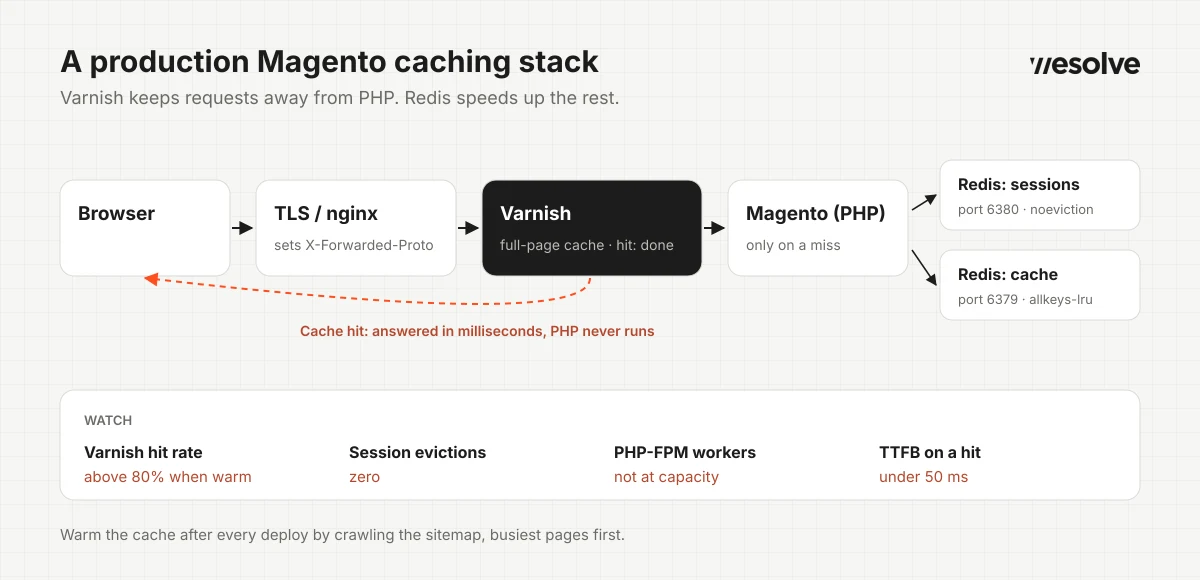
Varnish sits in front of the web server and caches whole HTTP responses. On a hit, PHP and the database never run: a category page can be served thousands of times a second from memory.
Redis sits behind the application and caches Magento’s internal objects (configuration, layout, block HTML) plus session data. It makes PHP faster when PHP does run.
They’re not interchangeable. Varnish removes requests from PHP; Redis speeds up the ones that remain. You need both, configured correctly.
Varnish
How it plugs in
Magento exports a VCL (Varnish configuration) from the admin. The flow: request reaches Varnish → hit: straight back to the browser → miss: forwarded to nginx, Magento builds the page, Varnish caches it.
The exported VCL is a starting point, not production-ready.
The cookie problem
Varnish skips caching for requests with session cookies. Real users also carry cookies from analytics, A/B testing and chat widgets, and each can push a request past the cache. In practice, a store that looks fully cached in testing behaves like an uncached one in production.
VCL changes that matter
- Strip non-essential cookies before the cache check. Audit every cookie; a chat widget’s cookie shouldn’t bypass your full-page cache.
- Set realistic lifetimes. The default is 24 hours. Magento sends purge requests when you save a product or page, but only if the Varnish host is configured correctly in the admin.
- Use grace mode. Serve slightly stale content while fetching a fresh copy, so an expiring page doesn’t send a stampede of requests to PHP at once. Set grace to at least 30 seconds on busy stores.
- Handle HTTPS correctly. TLS ends at the load balancer or nginx. Without the right
X-Forwarded-Protohandling, Magento generates HTTP URLs on HTTPS pages: broken canonicals and redirect loops.
Redis
Magento uses Redis for two things: the object cache (config, layout, blocks, and full-page cache when Varnish isn’t used) and sessions (logins and carts).
Why sessions need their own instance
When Redis memory fills, it evicts keys. If sessions and cache share an instance and the cache fills memory, Redis starts evicting sessions: users get logged out and carts disappear, silently.
Run two instances:
- Sessions with
noeviction: Redis returns errors instead of silently dropping session data. - Cache with
allkeys-lru: evicts the least recently used cache keys when memory is needed.
Most shared hosting doesn’t give you two instances, which is one reason the hosting layer matters as much as the application.
env.php for two instances
'session' => [
    'save' => 'redis',
    'redis' => [
        'host' => '127.0.0.1',
        'port' => '6380',
        'database' => '0',
        'compression_threshold' => '2048',
        'compression_library' => 'gzip',
        'max_concurrency' => '6',
        'disable_locking' => '0'
    ]
],
'cache' => [
    'frontend' => [
        'default' => [
            'backend' => 'Magento\\Framework\\Cache\\Backend\\Redis',
            'backend_options' => ['server' => '127.0.0.1', 'port' => '6379', 'database' => '0']
        ],
        'page_cache' => [
            'backend' => 'Magento\\Framework\\Cache\\Backend\\Redis',
            'backend_options' => ['server' => '127.0.0.1', 'port' => '6379', 'database' => '1']
        ]
    ]
]
Sessions on port 6380; object and page cache on 6379, in separate databases.
Full-page cache: Varnish or Redis?
| Varnish | Redis full-page cache | |
|---|---|---|
| PHP runs on a hit? | No | Yes |
| Typical cached response | Single-digit milliseconds | Adds roughly 50–200 ms of PHP |
| Best for | Production stores with real traffic | Development or very small stores |
Point Magento at Varnish with http_cache_hosts in env.php, and select Varnish under Stores > Configuration > Advanced > System > Full Page Cache.
Warm the cache after every deploy
After a deploy, the cache is empty and every request is a miss. Under normal traffic it fills gradually; under a spike right after deploying, PHP workers saturate before the cache can fill.
Warm it before traffic arrives by crawling your sitemap, starting with:
- Homepage and top-level categories
- Your 50–100 busiest product pages (from analytics)
- CMS pages linked from navigation
For promotions and flash sales, warming isn’t optional. It’s the difference between a smooth launch and a 2am call.
What to monitor
Varnish
- Hit rate: below 80% on a warm cache means something is bypassing it; check cookies and headers
- Backend connections: a spike means more requests reaching PHP than expected
- Purge rate: unusually high means an invalidation trigger is flushing too much
Redis
- Memory against the limit: constantly near it means aggressive eviction
- Evictions on the session instance: the target is zero
- Connected clients: Redis is single-threaded, so a spike adds latency
Application
- PHP-FPM workers at capacity means the hit rate is too low or warming is incomplete
- TTFB: the most direct signal; a Varnish hit should be under 50 ms from nearby
More on what to measure in monitoring baselines and speed optimisation.
The infrastructure gap
None of this survives infrastructure you don’t control. Varnish needs a server where you can edit and reload the VCL without downtime. Redis needs two instances with separate limits. Warming has to be part of the deploy pipeline, not something someone remembers.
When the agency tunes the VCL and a separate host configures the server, the caching setup lives in the gap between two contracts. At wesolve, the team that writes the VCL owns the servers, so when the hit rate drops at 11pm before a sale, one team sees application logs, Varnish stats, Redis memory and PHP workers together. See managed Magento hosting.
FAQs
Do I need both Varnish and Redis? Yes. Varnish takes cached pages out of PHP entirely; Redis speeds up PHP for everything else, including sessions.
Why separate Redis instances for sessions and cache? So a full cache can’t evict sessions and silently log people out or empty carts.
Do I need to change Magento’s exported VCL? Yes: strip third-party cookies, set grace mode and handle HTTPS headers correctly.
How do I know Varnish is working?
Check the hit rate with varnishstat. A warm Magento store should be above 80%.