

A shopper in Athens, your server in Frankfurt. The HTML arrives in 380ms; the CSS, fonts and hero image take another 1.2 seconds. By the time the page is usable, they’ve decided it’s slow.
That’s not a code problem; it’s a delivery problem, and a properly configured CDN fixes most of it. Here’s how CDN setup works in Magento 2, where most stores get it wrong, and what a good production setup looks like.
What a CDN does for Magento
A CDN keeps copies of static files (CSS, JavaScript, images, fonts) on edge servers close to your visitors, so they don’t travel to your origin server every time. The result: faster asset delivery, less load on your server and better LCP.
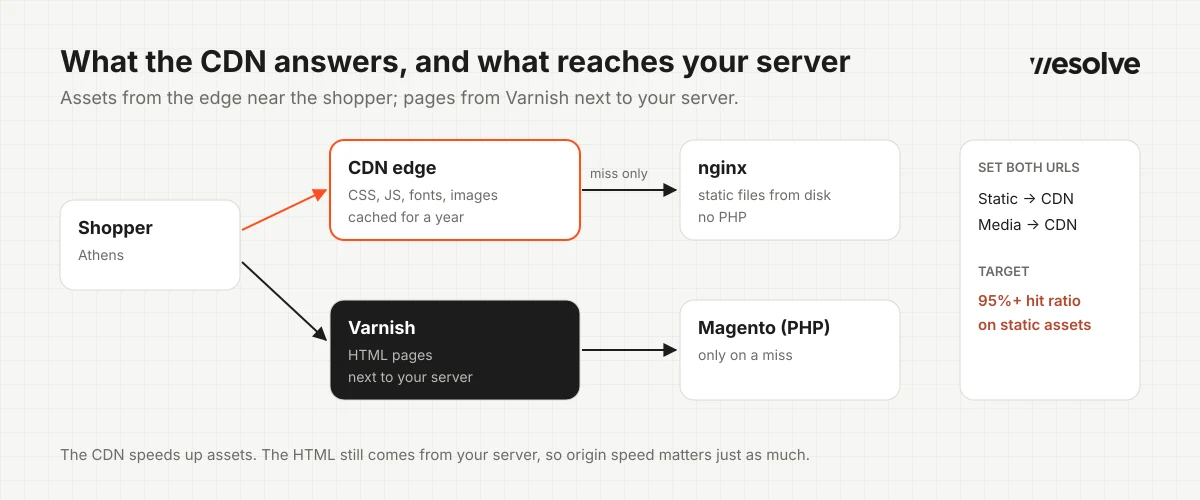
Magento supports this natively: you set separate base URLs for static files and media, and Magento rewrites every asset link in the HTML to the CDN. What it doesn’t do for you: set cache headers, handle invalidation sensibly or tune delivery. That part is deliberate configuration.
Two URLs, set both
Under Stores > Configuration > General > Web (or in env.php per environment):
- Base URL for static view files → your CDN hostname
- Base URL for user media files → your CDN hostname
The common mistake: setting the static URL but leaving media on the origin. Product images then bypass the CDN, and on a catalog page with dozens of images, that’s usually the biggest cause of a slow LCP. Set both, then check the rendered HTML in DevTools.
Cache headers: where most setups go wrong
A CDN only caches what your server tells it to. Send no-store, or no header, and every request goes back to origin: a CDN in name only.
Static files are versioned. Every setup:static-content:deploy puts files under a new version path, so the URL changes on each deploy. That makes aggressive caching safe:
Cache-Control: public, max-age=31536000, immutable
Media files aren’t versioned by default, so be more moderate:
Cache-Control: public, max-age=2592000
Set these in nginx, not in PHP, and serve files straight from disk. Static files should never boot Magento, touch the database or start a session.
The HTML still comes from your server
The CDN speeds up assets. The HTML document almost always comes from origin, and the browser can’t do anything until its first byte arrives. A slow origin means a slow page, however well the CDN is tuned. The usual causes:
- Low full-page cache hit rate. Below 90% on a catalog store, something’s misconfigured.
- Slow database queries on uncached pages: often 800ms to 2s.
- Too few PHP-FPM workers: TTFB spikes track pool exhaustion.
- Misconfigured Redis, causing cache stampedes under load.
Fix both layers. More in Varnish and Redis setup and speed optimisation.
CDN and Varnish do different jobs
A typical production chain:
Browser → CDN edge → Varnish → PHP-FPM
Varnish caches whole HTML pages next to your server; the CDN caches assets at the edge, near the shopper. They’re not redundant. Caching HTML at the CDN edge is possible, but it needs careful cookie, header and invalidation handling. For most stores, keep HTML caching in Varnish and use the CDN for assets.
Invalidation on deploy
Static files invalidate themselves: a new deploy means new URLs, so the old cached copies are simply never requested again. No purge rules needed.
Media is different. Replace a product image under the same filename and the CDN serves the old one until it expires. Options:
- Rename the file on update, so the new URL bypasses the cache. Simplest.
- Call the CDN’s purge API from your deploy pipeline. Cleanest for frequent catalog updates.
- Use an image service that generates content-based URLs.
Hyvä changes the priorities
A Luma store often sends 400KB to 1MB of JavaScript; a Hyvä build sends a fraction of that, with small purged Tailwind CSS. With Hyvä, the bottleneck moves to images and server response time, so media delivery and origin TTFB matter even more.
Production checklist
- Static and media both served from the CDN
immutableheaders on versioned static files; sensible lifetime on media- nginx serves static files directly, never through PHP
- Varnish caching HTML with a tuned VCL; Redis set up correctly
- Full-page cache hit rate monitored, with alerts on drops
- Media purge built into the deploy pipeline
- HTTP/2 or HTTP/3, Brotli for text files, WebP with fallback
It isn’t one-off. A setup that works at 500 concurrent users behaves differently at 5,000. Keep watching hit rates, origin response and edge latency. At wesolve, the engineers who configure the CDN also wrote the store and run the servers, because cache headers, Varnish lifetimes and Redis interact. See managed Magento hosting.
How to check it’s working
- DevTools Network tab: assets load from the CDN hostname with the expected headers.
X-Cache: HITon repeat requests.MISSagain and again means your headers are wrong.- WebPageTest waterfall for per-asset timing.
- The CDN dashboard for hit ratio and latency by region.
Target: 95%+ hit ratio for static assets.
FAQs
Does Magento 2 support a CDN natively? Yes. Set separate base URLs for static and media files, and Magento rewrites asset links to the CDN.
Why is TTFB still high after adding a CDN? The HTML comes from your server. High TTFB there means a low full-page cache hit rate, slow queries or too few PHP workers.
Do I need to purge the CDN after a deploy? Not for static files: their URLs change. Media files with the same name need renaming or a purge.
What headers should static files get?
public, max-age=31536000, immutable for versioned static files; around 30 days for media.