

Search is where revenue leaks quietly. A shopper types a query, waits two seconds, gets irrelevant results and leaves. You never see it in one session; you see it in your conversion rate, month after month.
For many shoppers the search box is the main way into the catalog. Here’s what to configure, what to tune and how to measure it.
Magento needs an external search engine
Magento 2.4.0 removed MySQL search. Every store from 2.4.0 onwards must connect to an external engine, with no fallback. MySQL search was the wrong architecture for large catalogs.
Elasticsearch or OpenSearch? Older 2.4 releases use Elasticsearch; OpenSearch support arrived in 2.4.4, and it’s the direction Adobe has taken since. Check the system requirements for your exact version. New builds should plan on OpenSearch. The settings below apply to both.
Admin settings that matter
The connection
Stores > Configuration > Catalog > Catalog Search: choose the engine, host (an internal address, not a public IP), port, an index prefix if several stores share a cluster (or their indexes collide) and authentication. Test Connection, save, then run a full reindex: a working connection with no index returns nothing.
Search weights
This is where most stores leave conversion on the table. In Stores > Attributes > Product > Storefront Properties, each attribute has Use in Search and a Search Weight from 1 to 10.
- Name and SKU: highest
- Brand, material and other attributes shoppers actually type: middle
- Description: lower
When everything has the same weight, nothing is relevant. Look at your top queries and weight the attributes that match them.
Synonyms
Marketing > SEO & Search > Search Synonyms. If customers type “dog food” and your catalog says “canine nutrition”, a synonym group is a direct conversion fix. Build the list from your zero-results report: every empty query is a synonym opportunity.
Indexing mode
| Update on Save | Update by Schedule | |
|---|---|---|
| Freshness | Immediate | After the next cron run |
| Admin saves | Slow on big catalogs | Fast |
| Best for | Small catalogs | Most production stores |
Use Update by Schedule with cron every minute, and run a full reindex after bulk imports or search configuration changes. See cron jobs.
Tuning the cluster for layered navigation
Faceted category pages generate many count queries before a shopper clicks a filter, and multiplied across hundreds of sessions, that load adds up. The fix is configuration, not just hardware.
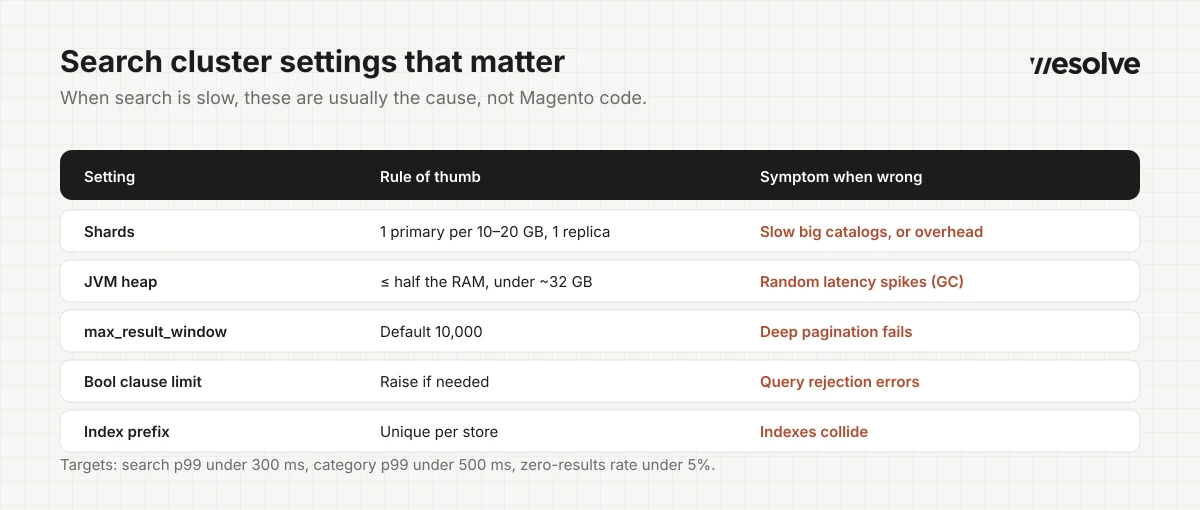
- Shards: too few bottleneck big catalogs; too many add overhead to small ones. A starting point: one primary shard per 10–20 GB of index, with one replica. Revisit as the catalog grows.
- Heap: no more than half the RAM, and under about 32 GB. On a 16 GB node, 8 GB. Intermittent latency spikes often mean garbage collection pauses; check GC logs before blaming queries.
- Result window: the default
max_result_windowis 10,000. Deep pagination past it fails. Raise it if needed, and size the heap for it. - Boolean clause limit: many filterable attributes create large boolean queries. Query rejection errors in the logs mean you’ve hit the clause limit; raise it in the cluster settings.
Measure it
- Search p99 latency: what your slowest-served shoppers feel. Aim for under 300 ms.
- Category p99 latency: same infrastructure. Aim for under 500 ms.
- Zero-results rate: above 5% points to missing synonyms, wrong weights or catalog structure.
Above those targets, the cause is usually shards, heap or clause limits, not Magento’s application code.
Secure the cluster
Search clusters exposed to the internet without authentication have caused major data incidents.
- Bind to internal interfaces only, and firewall access to the application servers
- Turn on authentication, keep credentials out of version control and rotate them
- Use TLS when the cluster sits on separate hosts
- Give Magento index-level access, not cluster admin
These controls belong at the hosting layer, and they’re exactly the kind of detail that falls between an agency and a separate host.
Moving to OpenSearch
Starting fresh: use OpenSearch. Running stable Elasticsearch on an older 2.4 release: migrate as a planned project, not an emergency. The Magento admin settings are almost identical; the differences are in cluster management. If you’re planning a wider 2.4 upgrade soon, bundle the move into it, rather than making two infrastructure changes close together. See the upgrade guide.
One team for the full picture
Shards, heap, clause limits and cron all need access to the cluster, not just the Magento admin. When the agency and the host are different companies, slow search becomes a blame loop: queries look fine, the cluster looks healthy, and nobody owns the whole. At wesolve, the same engineers configure Magento search and run the cluster. See managed Magento hosting.
FAQs
Which Magento versions need an external search engine? All from 2.4.0, when MySQL search was removed.
Elasticsearch or OpenSearch? OpenSearch for new builds and newer versions; it’s where Adobe is heading. Check your version’s requirements.
Update on Save or by Schedule? By Schedule, with cron every minute, for any catalog above a few thousand SKUs.
What latency should search hit? Under 300 ms p99 for search and under 500 ms for category pages.