

A Magento upgrade is one of the riskiest things you’ll do to your store. But most breakage isn’t random: it follows predictable patterns, and knowing them before you start is what separates a clean upgrade from a three-day incident.
Why upgrades break stores
The usual story: someone runs composer update, it completes, and then a custom module, an extension or a theme override stops working. The store goes live broken, or the upgrade gets rolled back under pressure, and the cycle repeats six months later. Three causes drive most of it:
- Custom code calling Magento’s internal classes. The public API is stable across patches; internals aren’t.
- Extensions the vendor hasn’t updated, or has abandoned. The single biggest source of upgrade friction.
- Themes that copy and edit core templates instead of using proper extension points.
None of these are surprises. They’re knowable before you start.
Patch, minor and major
| Type | Example | Risk | What it needs |
|---|---|---|---|
| Patch | 2.4.7 → 2.4.7-p3 | Low | Apply within release windows (security patches) |
| Minor | 2.4.4 → 2.4.7 | Higher: API changes, PHP versions, schema | A full pre-upgrade audit |
| Major | Magento 1 → 2 | A replatform, not an upgrade | A separate project (replatforming) |
Can you skip minor versions?
Yes, with conditions. Magento supports non-sequential upgrades, but skipping compounds the extension problem: an extension that dropped support two versions ago only surfaces mid-upgrade. If you’re more than two minor versions behind, check extension compatibility against each intermediate version before committing to the jump. Clean audit: skip. Not clean: update or replace extensions first.
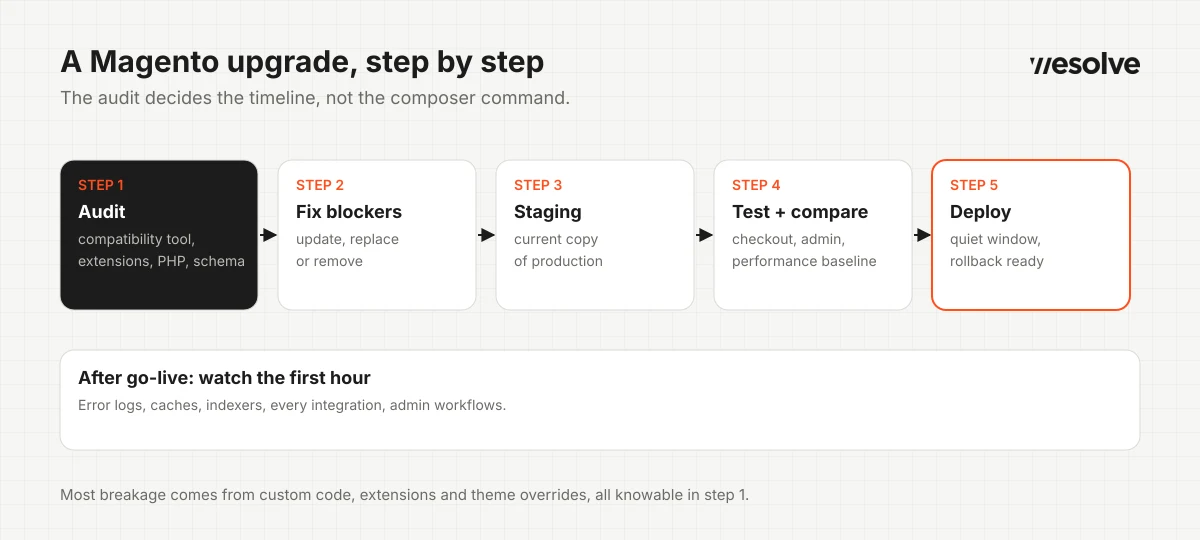
The pre-upgrade audit
The step teams rush. Don’t. A few days here saves weeks afterwards.
- Custom modules. Run Adobe’s Upgrade Compatibility Tool against your code and target version. It reports deprecated calls, removed classes and schema conflicts by severity. Fix critical issues first; note the rest to watch after launch.
- Extensions. List everything from
composer.lock, check each vendor’s declared compatibility with the target version, and decide now for each flagged one: wait for an update, replace it or remove it. - PHP. Each Magento release supports specific PHP versions (2.4.7 needs PHP 8.2 or 8.3). If PHP must change too, test your code and extensions against the new PHP, a separate compatibility surface.
- Database. Declarative schema applies changes automatically, but custom modules that touch core tables deserve a manual review.
Running the upgrade
- Staging first, always, on a current copy of production: same data, code and infrastructure. An upgrade that passes on stale staging tells you very little.
- Composer: set the target version, run
composer updateand resolve dependency conflicts. Thensetup:upgrade,setup:di:compileandsetup:static-content:deploy. - Test: automated tests if you have them; otherwise at least smoke tests of checkout, product and category pages, search and admin, plus anything custom.
- Compare performance with your pre-upgrade baseline. Upgrades sometimes change bundling, scripts or caching. Caught on staging it costs nothing; on production it costs conversions.
- Deploy to production in a quiet window, with a current backup and rollback ready. Maintenance mode on, run the steps, maintenance mode off, then watch the error logs for the first hour, not just uptime.
What goes wrong afterwards
- Caches serving stale content: flush everything and watch hit rates for 24 hours.
- Indexers: run them all and confirm they finish without errors; keep them on “Update by Schedule”. (Cron jobs)
- Integrations: ERP, payment and shipping connectors may behave differently if APIs changed. Test each one explicitly.
- Admin screens: custom admin components break in ways storefront testing never shows. Walk through admin workflows too.
Upgrade or rebuild?
Sometimes upgrading the existing code costs more than starting clean. The signs: hundreds of critical findings in the compatibility report, several abandoned extensions, and a team that can’t explain what half the custom modules do. At that point you’re not upgrading a store; you’re maintaining a liability. A clean build on current architecture with a Hyvä frontend usually costs less over three years. A technical audit helps decide.
The infrastructure side
Composer, compilation and static deploys are CPU- and memory-heavy. Infrastructure sized for normal traffic can time out on them. And when something goes wrong at 11pm with the store in maintenance mode, you don’t want to be opening a ticket with a separate host. At wesolve, the engineers who upgrade the code also run the servers. See managed Magento hosting.
FAQs
Can I skip minor versions? Yes, but check every extension against each intermediate version first.
How long does a minor upgrade take? A day or two on a clean codebase with few extensions; weeks with heavy customisation or deferred debt. The audit sets the timeline.
What is the Upgrade Compatibility Tool? Adobe’s command-line scanner that checks your code against a target version for deprecated calls, removed classes and schema conflicts.
What if an extension isn’t compatible? Wait for an update, replace it or remove it, decided during the audit, not mid-upgrade.