

Your store is taking orders and your team is making decisions, but if GA4 is misconfigured, every decision rests on incomplete data.
GA4 on Magento isn’t complicated in theory. In practice it produces more silent failures than almost any other setting: duplicate events, missing purchases, fragmented configurable SKUs and revenue that never matches your Magento reports. Here’s the setup path and the gaps most stores never catch.
Choose one implementation path
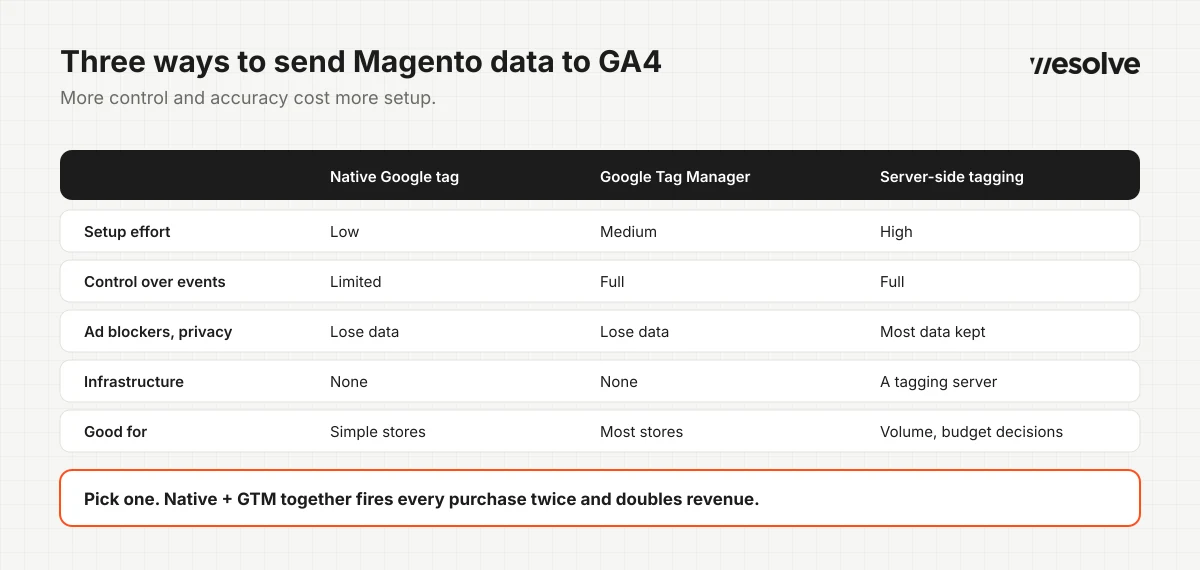
Native Google tag. Recent Magento versions include a GA4 option under Stores > Configuration > Sales > Google API. It sends the standard ecommerce events without a tag manager. Fine for simple setups; custom events, Consent Mode and data layer changes mean overriding it, which can conflict with upgrades.
Google Tag Manager. The data layer pushes events, GTM picks them up and sends them to GA4. Full control over what fires, when and with which parameters.
Server-side tagging. Events go from your store to a tagging server you run, then to GA4. Ad blockers and browser restrictions don’t intercept them, so it’s the most accurate option, but it needs infrastructure and someone who understands both the tags and the server.
The classic mistake: running native and GTM at the same time. Purchases fire twice and revenue doubles, while both setups look correct on their own. Pick one path and switch the other off.
The data layer
GA4 ecommerce relies on Magento pushing specific events at specific moments:
| Event | Where |
|---|---|
view_item_list |
Category pages, with item id, name, brand, price, position |
view_item |
Product pages |
add_to_cart / remove_from_cart |
With the full item array |
begin_checkout, add_shipping_info, add_payment_info |
Checkout steps |
purchase |
Confirmation page: transaction id, value, tax, shipping, items |
Configurable products
A configurable product has a parent SKU and a child SKU per variant. If you send the parent on the product page and the child at purchase, GA4 can’t connect them, and product reports fragment. Send the child SKU as item_id throughout, and the parent as item_variant or a custom dimension. Decide this before launch: changing it later breaks your history.
Check the purchase event
This is the one you can’t get wrong.
- Reloads. Refreshing the confirmation page fires the event again. GA4 deduplicates on
transaction_id, but only if every order sends a consistent, unique value. - Revenue that doesn’t match Magento. Almost always tax or currency. Magento reports include tax by default; GA4’s
valueusually excludes it. Pick one convention, apply it everywhere and write it down. - Guest checkout. If the data layer depends on logged-in fields, guest orders send incomplete events. Test guest checkout separately.
Events worth adding
searchwith the search termview_promotion/select_promotionfor bannersloginandsign_upadd_to_wishlist- B2B: quote requests, bulk add to cart, requisition lists
Register custom dimensions in the GA4 property before deploying the events, or the parameters won’t appear in reports.
Data freshness and benchmarking
Standard GA4 reports can take 24–48 hours to process. Numbers that look low the morning after a campaign are often just lag. Use the Realtime report to confirm events are firing.
Benchmarking against peers only works once you enable data sharing under Admin > Account Settings. Most stores never switch it on.
Consent Mode
In the EU, GA4 must not track before consent, so your consent banner needs to integrate with Consent Mode v2. It lets GA4 model conversions for people who decline cookies, recovering part of the gap, but modelled data isn’t observed data. Server-side tagging narrows the gap further.
Bottom line: unless you combine Consent Mode with server-side tagging and first-party data, your GA4 revenue is an estimate. Know what your numbers represent before optimising against them. More in Magento GDPR.
Analytics only shows what, not why
GA4 shows checkout abandonment rising on mobile; it doesn’t tell you the server is slow. Those questions connect analytics to engineering. At wesolve, the engineers who write the data layer also run the servers the events fire from, so a tracking gap that points to a server issue has no handoff. See speed and revenue and managed Magento hosting.
FAQs
How do I avoid duplicate purchase events? Run one implementation. If you use GTM, switch off the native Google tag in Magento.
How should configurable products be tracked?
The child SKU as item_id everywhere; the parent as item_variant or a custom dimension.
Why doesn’t GA4 revenue match Magento? Usually tax: Magento includes it, GA4’s value usually doesn’t. Also check currency and refunds.
Is server-side tagging worth it? If GA4 conversion data drives real budget decisions and you have meaningful volume, usually yes. It needs infrastructure and maintenance.