

The Magento admin is the highest-value target on your store. Anyone who gets in can export customer data, redirect payments, inject scripts or take the store down, and a stolen password is enough unless a second factor stops it.
Magento has shipped two-factor authentication as a core module since 2.4.0, enabled by default. Teams still misconfigure it, skip it “for one admin account”, or break it during an upgrade. Here’s how to set it up and roll it out without locking anyone out.
How it works
The user enters username and password; Magento then asks for a second factor, and no valid factor means no session. Built-in providers include:
- Google Authenticator: time-based one-time codes from any compatible app
- Duo Security: push notifications and tokens
- U2F / WebAuthn security keys, such as YubiKey
(Older versions also offered Authy; check which providers your version includes.) You can restrict the allowed providers, so if policy requires hardware keys, disable the rest.
Setup
- Confirm the module is on:
bin/magento module:status Magento_TwoFactorAuth. If a past deploy disabled it, enable it, runsetup:upgradeand flush the cache. Never leave it off in production. - Choose providers under Stores > Configuration > Security > 2FA. Enable only what your team uses: fewer options mean fewer support requests and a cleaner audit trail.
- Force a provider if you want everyone on the same standard.
- Keep device clocks in sync. Time-based codes fail when a phone’s clock drifts; automatic time fixes most “invalid code” errors.
Rolling it out to a team
The technical setup takes minutes. Getting fifteen admins enrolled without a production lockout takes planning.
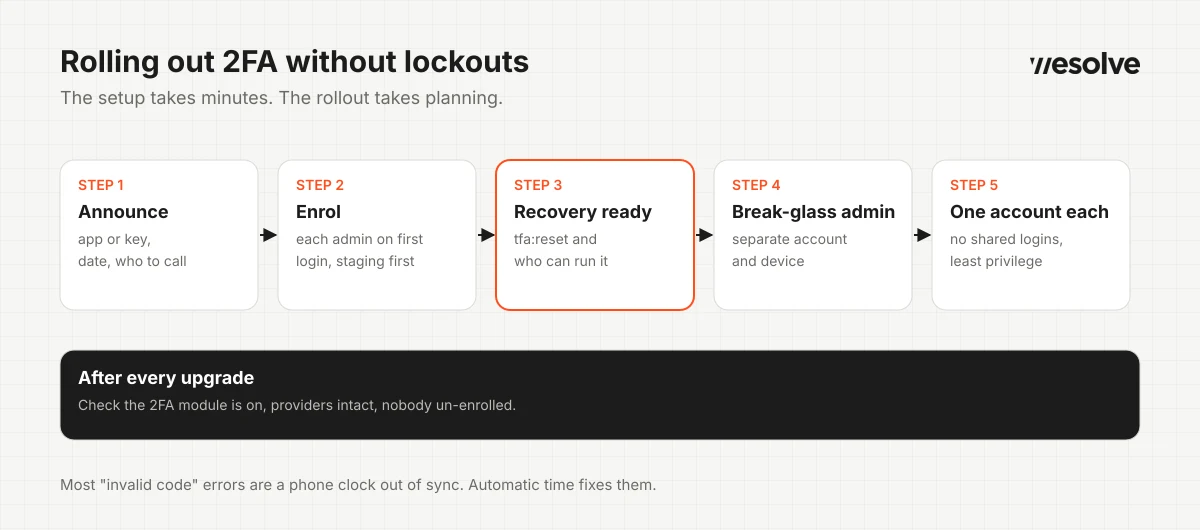
Tell people first. Which app or key to set up, when enforcement starts and who to contact if locked out. Two days’ notice prevents most tickets.
Enrol before the deadline. Each admin enrols on first login after 2FA is active, scanning a QR code and confirming a code. Walk them through it on staging if you can.
Have the recovery path ready before you need it. Magento’s CLI resets a user’s 2FA so they can re-enrol:
bin/magento security:tfa:reset <username> <provider>
It needs server access. If your hosting restricts the command line, confirm who can run it before rollout day. When an admin is locked out at 9pm before a sale, you need someone who can run that command, not a ticket queue.
Keep a break-glass admin: a separate account, separate email and separately enrolled device, with recovery details stored securely offline.
No shared accounts. If three people log in as one admin, there’s no audit trail and no clear answer to whose phone gets the code. One account per person, with only the permissions each role needs.
Staging and development
2FA on staging is useful for testing enrolment, but it slows teams that deploy often. Common approaches: a dedicated test admin on staging with its secret kept in the team password manager, or 2FA disabled only on local development machines. Production never gets an exception.
After every upgrade
Upgrades can change the 2FA module. Add three checks to your post-upgrade runbook: the module is still enabled, provider settings are intact, and no admins were unexpectedly un-enrolled. (Upgrade guide)
Common problems
| Problem | Usual cause | Fix |
|---|---|---|
| “Invalid code” every time | Device clock out of sync | Turn on automatic time |
| Locked out after a new phone | Old enrolment lost with the device | CLI reset, then re-enrol |
| No 2FA prompt after upgrade | Module disabled during deploy | Re-enable, setup:upgrade, flush cache |
| Duo pushes stop | Duo keys rotated | Update the Duo credentials in config |
| Login loop after enrolment | Session or cache issue; sessions not shared across nodes | Flush cache; check Redis sessions |
2FA isn’t hard to configure. The risk is skipping it, misconfiguring it, or not planning the rollout. It pairs with security patching as the baseline for admin security. At wesolve, the team that builds the store also runs its servers, so a 9pm lockout is a command, not a ticket. See managed Magento hosting.
FAQs
Is 2FA mandatory in Magento 2.4? It’s a core module enabled by default since 2.4.0, and should stay on in production.
Which providers are supported? Google Authenticator, Duo and U2F/WebAuthn security keys in current versions; check your version’s list.
How do I reset a locked-out admin?
bin/magento security:tfa:reset <username> <provider> from the server, then the user re-enrols.
Is enrolment shared between environments? No. Each installation keeps its own; production enrolment doesn’t carry to staging.