

Security patches aren’t optional maintenance. They’re the difference between a store that stays up and one that gets compromised at 2am on a Tuesday. The gap between “patch available” and “patch applied” is where incidents happen.
Adobe releases planned security updates on a regular schedule, and emergency hotfixes outside it when a critical vulnerability appears, sometimes the kind that allows remote code execution without logging in. Your process has to be fast enough for emergencies and disciplined enough not to cause its own incidents on routine releases.
Track the bulletins
Adobe publishes security bulletins (APSB) listing affected versions, CVEs, severity scores and fixed versions. A single bulletin often fixes many CVEs at once, which is why skipping a cycle compounds risk rather than just deferring it.
- Subscribe to Adobe’s security notifications
- Watch the security bulletins page for Adobe Commerce
- Alert your team on new CVEs mentioning Magento
- Keep a log: bulletin, release date, affected versions, date applied per environment
That last one matters most. During an incident you need to answer “which patches are running in production right now?” in five minutes.
Are you affected?
Check your version (bin/magento --version, or the product package in composer.json) against the bulletin’s affected range. Inside the range, and the fixed version is higher than yours? You’re exposed.
Unsupported versions
Adobe doesn’t patch versions that have reached end of support. You get a CVE disclosure and no fix. Backporting fixes is possible but risky and unsustainable. The real answer is upgrading (upgrade guide). While you plan it:
- A web application firewall with Magento-specific rules
- Remove unpatched or abandoned extensions
- Restrict admin access to known IPs
- Scan for compromise before and after any emergency measure
None of these replace an upgrade; they shrink the attack surface while you plan it.
Applying patches safely
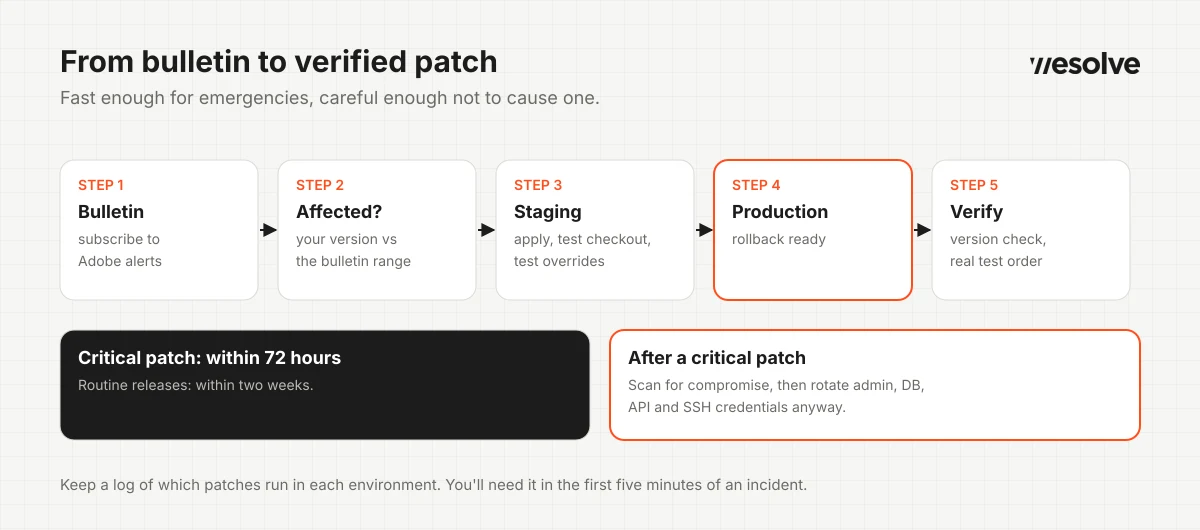
Full patch releases (Composer). Set the patched version in composer.json, run composer update for the Magento packages, then setup:upgrade, setup:di:compile, flush caches and redeploy static content. Never straight on production.
Isolated hotfixes. Adobe sometimes ships individual patches, applied with its Quality Patches Tool or as patch files. Check prerequisites: some assume an earlier patch is already in place. If you’ve skipped releases, you may need to apply them in order.
Test on staging first. The usual way a patch breaks a store isn’t the patch: it’s a custom module or extension that overrides a core file the patch changed.
- Apply on staging that mirrors production data and configuration
- Run regression tests, or at least a full checkout by hand
- Check the admin in the areas the patch touches
- Read the diff, and test any custom code that overrides those files
- Confirm Varnish and Redis respond correctly after flushing
Sensible targets: critical patches in production within 72 hours, routine releases within two weeks. If you can’t make 72 hours for a critical vulnerability, fix the process before the next bulletin. More in Magento security and uptime.
Verify it’s actually applied
Applying and running are different things. Check the installed package version with composer show against the bulletin’s fixed version; for isolated patches, check their status with the patch tool. Read the logs for errors from setup:upgrade. Then run a real test order on staging before calling it done.
After a critical patch: assume you might be compromised
Almost no patching guide mentions this. A vulnerability that allowed unauthenticated code execution may have been exploited before the fix was public. After an emergency patch:
Scan with a Magento-aware malware scanner, looking for:
- Unexpected files in
pub/,app/code/orvendor/ - Modified core files (compare with a clean install of the same version)
- Admin accounts you didn’t create
- Outbound connections to unfamiliar IPs
Rotate credentials anyway, even if the scan is clean: admin passwords, database credentials, API keys for payments, ERP and PIM, and SSH keys. That’s not paranoia; it’s the correct response to a maximum-severity disclosure. See also two-factor authentication.
Don’t fall too far behind
Patches aren’t always cumulative, and some assume earlier ones. Stay within one or two quarterly releases of current. More than two behind, plan a version upgrade instead of stacking patches: the sequencing complexity grows faster than the upgrade effort.
One team makes patching faster
When the agency tests patches and a separate host applies them, patching becomes coordination, and nobody owns the outcome when it breaks. At wesolve, the engineers who built the store apply its patches: they already know which custom modules touch which core files, so the regression risk is known before they start. See managed Magento hosting.
FAQs
Patch or upgrade: what’s the difference? A patch fixes specific vulnerabilities in your current version. An upgrade moves to a new release, with fixes plus other changes and more regression risk.
How often does Adobe release patches? On a regular schedule, with emergency hotfixes when a critical vulnerability needs immediate action.
Can I skip a patch? Sometimes, but some patches depend on earlier ones. Read the prerequisites; if you’re several releases behind, upgrade instead.
Should I rotate credentials after an emergency patch? Yes: scan for compromise, then rotate admin, database, API and SSH credentials regardless of the result.