

Your store was built on WooCommerce. It worked, until it didn’t: the plugin stack slowed things down, the catalog hit a ceiling, or the team spent more time fixing conflicts than shipping features.
Moving to Magento isn’t a platform swap. The data model is different, extensions work differently, and get the SEO wrong and you lose rankings that took years to build. Here’s what to plan in all three areas.
Why merchants move
WooCommerce is a WordPress plugin. That works at small scale but constrains you as catalog, traffic and operations grow:
- Catalog scale: large sets of variable products with many attribute combinations strain WooCommerce; Magento’s product model handles them natively.
- B2B: customer groups, tiered pricing, quotes and company accounts are native in Adobe Commerce and available as extensions on Open Source; on WooCommerce they’re bolted on.
- Load: WordPress wasn’t built for high-concurrency transactions. Magento, properly hosted, handles spikes better.
- Control: checkout logic, pricing rules, stock sources and ERP or PIM connections.
None of this makes WooCommerce bad. Magento simply fits a particular kind of complexity. See Magento vs WooCommerce.
Data: what moves, what doesn’t, what breaks
A naive export-import produces garbage. WooCommerce stores products as WordPress posts; Magento uses an EAV attribute model. The concepts map; the structures don’t.
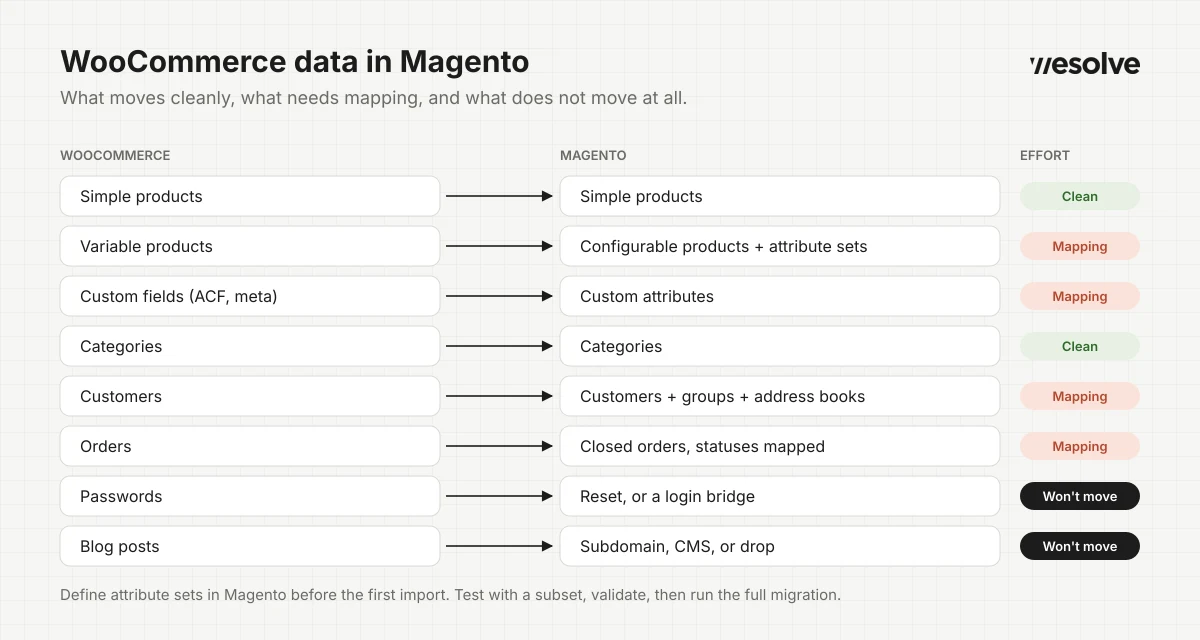
Moves cleanly with proper tooling: simple products (SKU, price, stock, description), images (with URLs remapped), categories and product assignments.
Needs mapping or transformation:
- Variable products become configurable products. Define attribute sets in Magento before importing.
- Custom fields (ACF or post meta) map to Magento custom attributes.
- Downloadable and virtual products need type-specific handling.
Customers and orders. Magento adds address books, customer groups and store views, so decide group assignment during import. Bring order history across as closed orders with mapped statuses; never reprocess them.
Passwords don’t transfer. WordPress and Magento hash passwords differently. Either force a reset on first login, or build a login bridge that checks the old hash once and re-hashes in Magento format. The bridge costs development time but is smoother for returning customers.
Reviews migrate; map them as approved with a default rating. Content has no direct path: if you run a WordPress blog, keep it on a subdomain, move it into Magento’s CMS or drop it. Each choice affects SEO.
Extensions: replace, don’t copy
Magento already does much of what your plugins did: shipping methods and rates, coupons and cart rules, layered navigation, customer-group pricing, multiple store views and currencies, regional tax rules, and multi-source inventory.
Where you’ll still need extensions: B2B features on Open Source (company accounts, quotes, requisition lists), subscriptions, advanced bundling, loyalty, and marketplace or multi-vendor setups. Check each one’s last update, compatibility with 2.4.x and vendor support.
Don’t rebuild your whole plugin stack. Use the migration to audit what you actually use; most stores carry plugin bloat that slows them down for no gain.
SEO: where the lasting damage happens
URLs
WooCommerce typically uses /product/name/ and /product-category/name/; Magento defaults to /name.html. Two options:
- Configure Magento to match the old URLs. Lower risk.
- Accept new URLs and 301-redirect every old one. More work, cleaner structure.
Either way, you need a complete URL map before launch. A missing redirect on a high-traffic product page is a direct ranking loss.
Canonicals and duplicates
Audit canonicals after migration. Layered navigation creates filtered URLs (?color=red) that must canonicalise back to the category, and products reachable through several category paths need one canonical URL.
Sitemap
Generate a fresh Magento sitemap at launch, submit it in Search Console and remove the old one. Include products, categories and CMS pages; exclude noindex pages.
Speed
WooCommerce stores often score badly on Core Web Vitals. Magento on Luma is slow too; build on Hyvä. A slow Magento store after migration is worse than a slow WooCommerce store: you changed platforms and lost rankings. See Magento speed optimisation.
Structured data
Yoast or RankMath handled product schema for you; Magento doesn’t ship complete structured data. Add Product (price, availability, reviews), BreadcrumbList and Organization schema.
Internal links
Magento’s layered navigation creates a different link structure. Keep key category and product pages within two or three clicks of the homepage.
Infrastructure
Magento needs more than WooCommerce: PHP 8.x with specific extensions, OpenSearch, Redis and properly managed queues and cron. A WooCommerce store on shared hosting won’t run Magento.
This is where many migrations stall: the agency builds the store, hands it over, and it runs on infrastructure not designed for Magento. Slow pages, failed cron jobs and search indexing problems follow. The cleaner model is one team building and hosting.
A practical sequence
- Audit every URL, plugin, custom field and integration.
- Design Magento attribute sets and product types before any import.
- Build on production-grade infrastructure from day one.
- Test-import a subset and validate it.
- Build and test the store on staging with real data.
- Map every URL to a 301 destination.
- Run a pre-launch SEO audit: canonicals, sitemap, schema, speed.
- Launch and watch Search Console for 30 days; fix redirect gaps immediately.
The general version is in the replatforming checklist. Planning this move? Talk to us.
FAQs
How long does it take? A clean catalog with few integrations: around 8–12 weeks. A custom build with ERP integration and a large catalog: longer.
Will I lose rankings? Not if every URL with ranking value has a 301 before launch. Short-term movement is normal; a well-executed migration usually recovers within one to three months.
Can I keep my WordPress blog? Yes, on a subdomain, or move the content into Magento’s CMS.
Do WooCommerce plugins work on Magento? No. You need Magento extensions, and much of the functionality is already built in.
What happens to customer passwords? They can’t be migrated directly. Force a reset, or build a login bridge that re-hashes on first login.