

Black Friday is Friday 27 November. Cyber Monday is Monday 30 November. If you are reading this now, you are doing triage, not a rebuild. Triage works if you pick the right things.
Peak traffic is not a bigger slope. It is a series of cliffs. Your own actions cause them: an email lands and thousands click within minutes, an ad campaign switches on, a midnight price drop sends everyone to the same pages at once. A store that is fine on a normal Tuesday tells you little about this one.
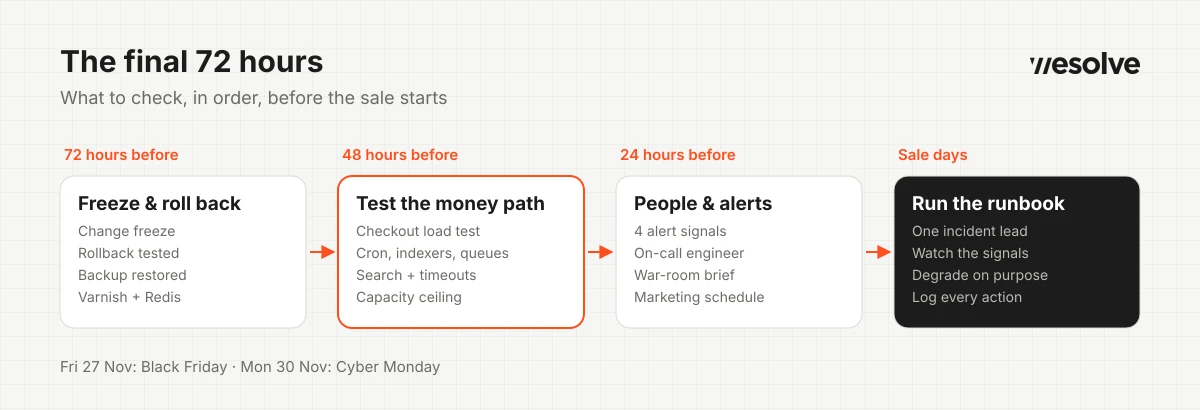
1. Freeze changes
Declare a change freeze now. No deploys, no extension updates, no “quick” config tweaks. Anything you ship now runs untested under peak load.
Allow only fixes for active, revenue-blocking bugs.
Before the freeze, confirm you can roll back:
- a known-good release
- a rollback procedure someone has actually run
- a recent backup you have restored at least once
If rolling back means an hour of improvising, it is not a plan. See Magento zero downtime deployment for how to make releases and rollbacks routine.
2. Check the caching layers
Full-page cache decides whether your origin survives. Check three things:
- Varnish hit rate on category and product pages. A low hit rate means every visitor reaches PHP and the database. Find out why before Friday.
- Redis memory headroom for sessions and the cache backend. A Redis that starts evicting keys under load causes odd, intermittent failures.
- Cache invalidation. Saving products, prices or categories purges the cached pages that show them. One bulk price update at 11pm can wipe the cache that was protecting you. Batch catalog and price changes, schedule them, and warm the cache afterwards.
More detail in Magento Varnish and Redis setup.
3. Load test checkout, not the homepage
Most load tests hit the homepage and a few categories. Those pages are cached, so they prove very little.
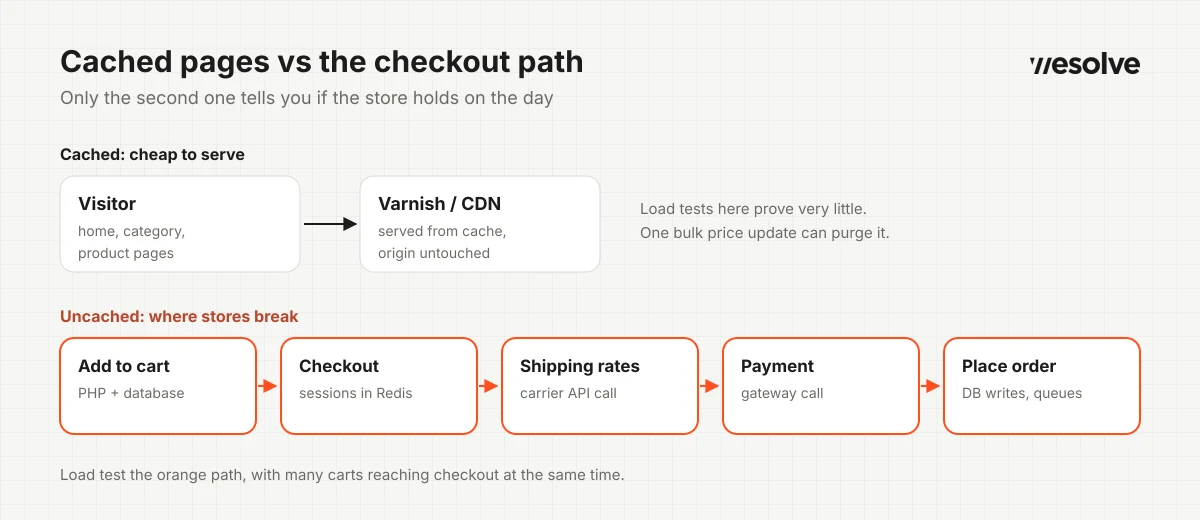
Test the path that makes money and cannot be cached:
- Add to cart, and mini-cart updates
- Guest and logged-in checkout
- Shipping rate calculation
- Payment authorisation and order placement
Include the burst that actually breaks stores: many carts reaching checkout within a few seconds, as after a countdown or an email send. Watch database locks, PHP-FPM worker saturation and order placement time. Fix what you can now and write down the rest.
4. Check cron, indexers and queues
Cron is where Magento failures hide. Under load, jobs overlap, indexers fall behind and queues back up.
- Indexers are on Update by Schedule and none is stuck.
- Queue consumers run and the backlog is near zero.
- Heavy jobs (ERP syncs, feed exports, reports) are moved out of peak hours.
- No scheduled job purges the cache or runs a full reindex on Friday.
A growing backlog means late orders, stock updates and emails. Alert on queue depth. More in Magento cron jobs.
5. Search and third-party calls
Search. OpenSearch or Elasticsearch serves every category listing and search query. Check heap, cluster health and response times under load. When search slows, the catalog slows with it.
Third parties. Payment, ERP and shipping-rate calls sit in the request path. When one hangs, PHP workers wait, and the waiting takes the storefront down.
For each dependency, answer three questions:
| Question | What good looks like |
|---|---|
| What is the timeout? | Short and explicit, set in config or code |
| What happens when it fails? | A fallback: flat shipping rate, queued ERP sync |
| Who do you call on Friday? | A named contact at the provider |
A dependency with no timeout is an outage waiting for a busy day.
6. Know your capacity ceiling
Check the scaling rules, the maximum node count and the database limits. Adding web nodes does nothing if the database or search is the bottleneck.
On Adobe Commerce cloud infrastructure, ask Adobe support about extra capacity for the peak now; it is not instant.
Write your ceiling down, and what you will do if you reach it.
7. Monitoring, and who answers
Dashboards do not fix incidents. People do. Watch four signals:
- TTFB on key pages
- Error rate (5xx)
- Checkout success rate
- Queue depth
Checkout success rate matters most. A store can look healthy on every technical metric while orders quietly fail.
Then decide who answers the alert at 2am: an engineer who can read logs and change things. Monitoring without someone who can act is an alarm, not a response. See Magento New Relic monitoring for baselines.
The war-room runbook
One page. Everyone reads it before the sale.
- Name one incident lead. One person decides.
- Open one channel for engineering, merchandising and support.
- Watch the four signals, closely around email sends and price drops.
- Share the marketing schedule so engineering knows when traffic will spike.
- Agree rollback triggers in advance: the error rate or checkout drop that means act.
- Degrade on purpose. Switch off heavy extras (recommendations, live stock checks) before checkout suffers.
- Log every action with a timestamp. It becomes next year’s list.
Summary checklist
| Task | Owner | When |
|---|---|---|
| Change freeze | Engineering lead | 72 hours before |
| Verify rollback and backup | Engineering / hosting | 72 hours before |
| Varnish hit rate, Redis memory | Hosting / engineering | 72 hours before |
| Schedule price and catalog updates | Merchandising + engineering | 48 hours before |
| Load test checkout and payment | Engineering | 48 hours before |
| Cron, indexers, queues | Engineering | 48 hours before |
| Search health, third-party timeouts | Engineering | 48 hours before |
| Capacity ceiling | Hosting | 48 hours before |
| Alerts and on-call rota | Hosting / engineering | 24 hours before |
| Brief the war room | Incident lead | 24 hours before |
What to fix before next year
Next year’s Black Friday prep starts in the summer. Book it now, while the lessons are fresh:
- Turn every incident-log entry into a ticket.
- Plan capacity and tests months ahead, not in November.
- Load test checkout every quarter, not once a year.
- Replace dependencies that failed, and add fallbacks for the rest.
- Make cron and indexers predictable.
- Rehearse a rollback in a quiet month.
Where wesolve fits
Many peak-day incidents turn into an argument: the agency blames the host, the host blames the code. At wesolve, the team that writes the code also runs the servers, so there is one team to call and no handoff. If you want that behind your next peak, talk to us.
FAQ
How long before Black Friday should I freeze changes? At least 72 hours, earlier if you can. Allow only revenue-blocking fixes, each with a tested rollback.
What should I load test on a Magento store? The uncached path: add to cart, shipping rates, payment and order placement, including many carts reaching checkout at once.
Is autoscaling enough? No. More web nodes do not help when the database, search or a third-party API is the bottleneck.
I am already inside the 72-hour window. What first? Freeze, rollback, checkout test, third-party timeouts, and a named responder. Write the rest down for next year.