

Every maintenance page turns customers away. Most Magento releases don’t need one: build the new release next to the live one, then switch to it in one step. The hard part isn’t the switch; it’s the database.
Two strategies
| Atomic symlink switch | Blue-green | |
|---|---|---|
| How | New release in a new folder on the same servers; switch a symlink | Two full environments; switch traffic at the load balancer |
| Cost | Low | Two production environments |
| Rollback | Point the symlink back | Route traffic back |
| Fits | Most stores | Large setups that want to test the whole environment live |
For most stores, the symlink switch is the right starting point. Both share one rule: during the switch, old and new code run against the same database.
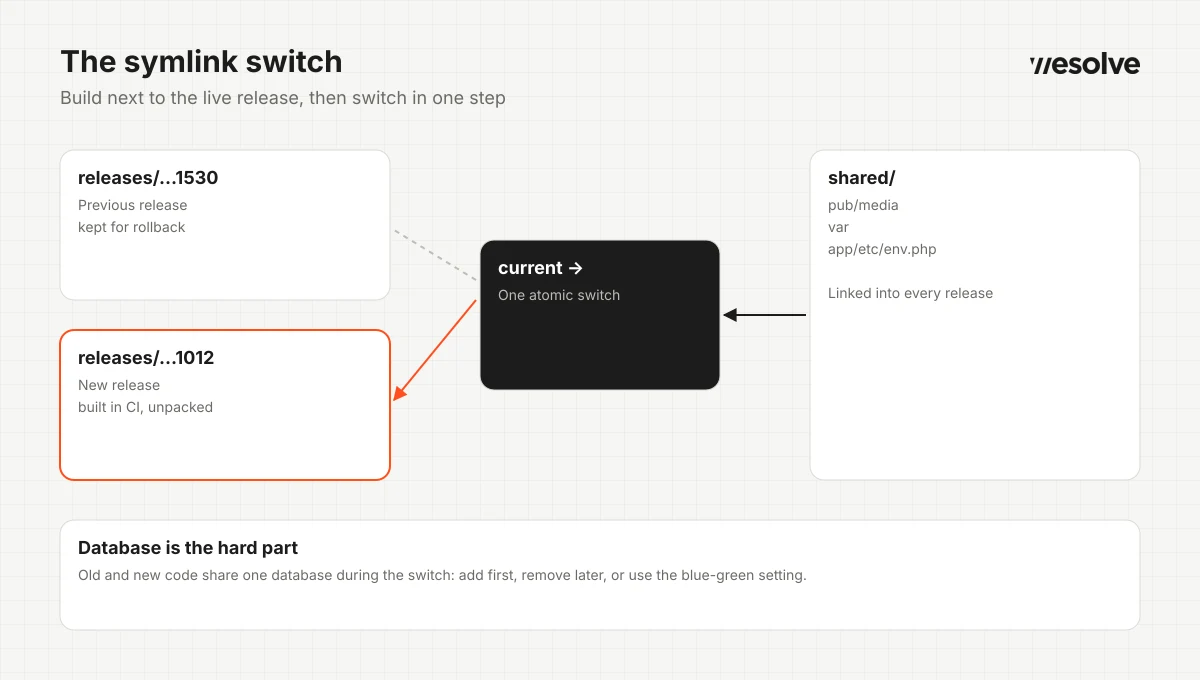
How the symlink switch works
releases/20261104-1012/   ← new
releases/20261028-1530/   ← previous
shared/  (pub/media, var, app/etc/env.php)
current → releases/20261104-1012
The web server’s root is current. Replacing a symlink is a single atomic operation on Linux: requests see either the old or the new release, never a mix. The previous release stays on disk, so rollback is one command.
The release, step by step
- Build elsewhere: Composer,
setup:di:compile,setup:static-content:deploy, in CI (CI/CD pipeline). - Upload and unpack into a new
releases/folder; link the shared folders andenv.php. - Check the database:
bin/magento setup:db:status.- No changes: skip to step 5. No maintenance mode at all.
- Changes: see the next section.
- Upgrade the database with
setup:upgrade --keep-generated(keeps the compiled code you built). - Switch the symlink, reload PHP-FPM (so OPcache drops the old paths), flush Magento’s cache.
- Health checks: home, category, product, cart, checkout. If they fail, switch back.
Tools like Deployer do steps 2–6 for you, including dep rollback.
Database changes without downtime
By default, old code refuses to run once the database is upgraded (“please upgrade your database”), which is why many teams fall back to maintenance mode. Two ways around it:
- Magento’s blue-green setting: with
deployment/blue_green/enabledset inenv.php, the old release keeps serving while the database is upgraded, until you switch. - Backward-compatible changes (expand, then contract):
- Add new columns or tables; remove nothing.
- Release code that writes to both, reads from the new; backfill data.
- Remove the old structure in a later release, once nothing uses it.
A change that drops or renames something the old code reads will break the store during the switch, whatever the tooling. Large table changes can also lock tables: schedule them for quiet hours and test them on a copy of production data (staging).
Third-party modules are the usual surprise: an extension update with a destructive schema change. Check setup:db:status and the module’s changes on staging before every release.
Caches after the switch
- OPcache: reload PHP-FPM, or PHP may keep running the old files.
- Magento cache: flush after the switch.
- Varnish: full-page cache is purged by Magento’s cache flush; static assets are versioned, so old pages still load their own CSS and JS.
- Warm the cache for key pages right after release (Varnish and Redis).
Cron and queues during a release
Stop cron and queue consumers before switching, and start them from the new release after. Otherwise a job started by old code may run against new code or a changed database (cron jobs).
When to bring in help
The mechanism is simple; the edge cases aren’t: multiple stores, third-party schema changes, peak-season release windows. At wesolve, the team that writes the code also runs the pipeline and the servers, so releases are routine and rollbacks are rehearsed. Talk to us.
FAQs
Does Nginx need a reload after the switch?
Not if its root points at the current symlink. Reload PHP-FPM, though, for OPcache.
Is maintenance mode ever needed? Only for database changes the old code can’t run against, unless you use the blue-green setting.
Can I do this on shared hosting? Rarely. It needs shell access and control of the web root (VPS).
How do I roll back? Point the symlink to the previous release. Database changes need their own plan, which is why they’re kept backward-compatible.