

Manual Magento deployments break stores: a forgotten compile, a cache not flushed, a file edited on the server. A pipeline runs the same steps, in the same order, every time.
CI and CD
- CI (continuous integration): every push is built and tested. Bad code doesn’t get merged.
- CD (continuous delivery): a passing build moves to staging and, after approval, to production. Bad releases don’t go live.
Magento builds are slow (compilation and static content take minutes), which is exactly why they should happen once, on a build server, not on the live one.
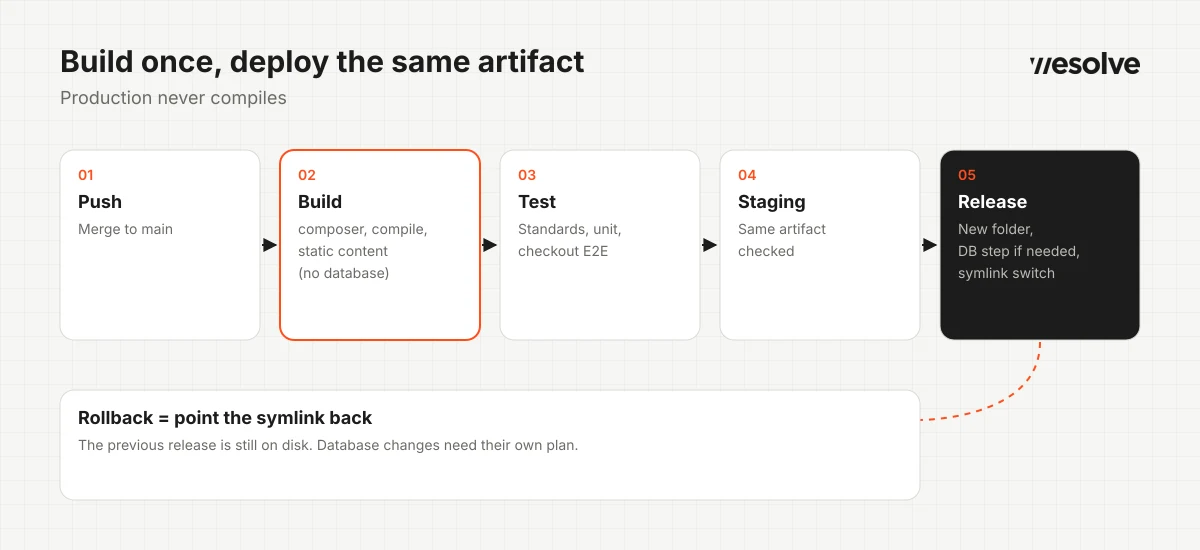
The stages
- Trigger: a merge to
mainor a release branch. - Build, without a database:
This works without a database whencomposer install --no-dev --prefer-dist --optimize-autoloader bin/magento setup:di:compile bin/magento setup:static-content:deploy -f el_GR en_USapp/etc/config.phpcontains your stores and themes (bin/magento app:config:dump scopes themes). List every locale you use. - Test: static analysis and coding standard, unit tests, and end-to-end tests of checkout on staging.
- Package the built code as a versioned artifact. Production never compiles.
- Deploy to staging and check it.
- Release to production:
- unpack into a new
releases/folder, link sharedpub/media,varandenv.php - only if
bin/magento setup:db:statusreports changes: maintenance mode on,setup:upgrade --keep-generated - switch the
currentsymlink atomically, reload PHP-FPM, flush caches - maintenance off
- unpack into a new
- Health check and notify: if checks fail, point the symlink back to the previous release.
Most releases have no database changes, so they go live without maintenance mode at all (zero-downtime deployment).
GitHub Actions example (build stage)
name: build
on:
  push:
    branches: [main]
jobs:
  build:
    runs-on: ubuntu-latest
    steps:
      - uses: actions/checkout@v4
      - uses: shivammathur/setup-php@v2
        with:
          php-version: '8.3'
      - uses: actions/cache@v4
        with:
          path: ~/.composer/cache
          key: composer-${{ hashFiles('composer.lock') }}
      - run: composer install --no-dev --prefer-dist --optimize-autoloader
        env:
          COMPOSER_AUTH: ${{ secrets.COMPOSER_AUTH }}
      - run: bin/magento setup:di:compile
      - run: bin/magento setup:static-content:deploy -f el_GR en_US
      - run: tar -czf release.tar.gz --exclude=.git .
      - uses: actions/upload-artifact@v4
        with:
          name: release
          path: release.tar.gz
Keep credentials (Marketplace keys, SSH keys) in the CI’s secrets, never in the repository. For the deploy stage, Deployer (with its Magento recipe) handles releases, shared folders, symlinks and rollbacks for you.
Tools
| Tool | Fits | Notes |
|---|---|---|
| GitHub Actions | Teams on GitHub | Hosted runners, simple YAML |
| GitLab CI/CD | Teams on GitLab | Self-hosted runners for firewalled servers |
| Jenkins | Complex in-house setups | Flexible; you maintain it |
| Deployer | The release step | Works with any CI |
| Adobe Commerce Cloud | Adobe’s cloud | Has its own build and deploy process |
Multi-store pipelines
- Deploy static content for every locale and theme
- Config in files, secrets in the environment:
config.phpin Git,env.phpper server - Smoke-test every store’s URL after release
- Flush full-page cache once, after the switch
(multistore setup, internationalisation)
When to bring in help
Pipelines are quick to start and slow to get right: shared folders, cron during releases, queue consumers, cache warm-up. At wesolve, the team that writes the code also owns the pipeline and the servers, so releases are routine, not events. Talk to us.
FAQs
Which commands does a Magento build need?
composer install, setup:di:compile and setup:static-content:deploy; setup:upgrade runs at release, only when the database needs it.
How do I avoid downtime? Build elsewhere, then switch a symlink to the new release. Use maintenance mode only for database changes.
How do I roll back? Point the symlink back to the previous release. Database changes need a plan of their own.