

Magento runs many countries, languages and currencies from one codebase, through its scope hierarchy. Get the structure right before launch; fixing it later means untangling settings, URLs and data.
The scope hierarchy
- Global: defaults for everything.
- Website: its own payment and shipping settings, optionally its own customer accounts, and its own base currency (when price scope is set to website).
- Store: a root category, so its own catalog tree.
- Store view: language, locale and translated content.
Rule of thumb: a separate checkout, currency or price list → a website. Same catalog in another language → a store view.
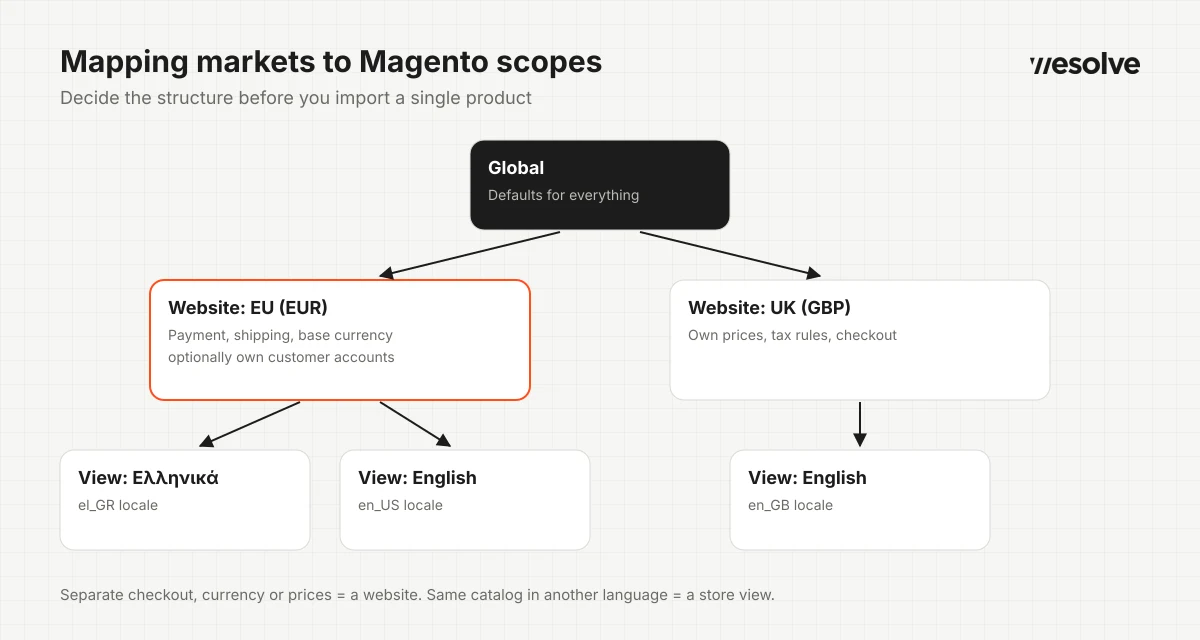
Setting it up
- Map your markets on paper first: which need separate checkout, prices or currency, which only another language.
- Create websites, stores and root categories (Stores > All Stores). Use short, lowercase codes: they end up in server config and CLI commands.
- Add store views for each language and set the locale per store view (General > Locale Options).
- Create all store views before importing products, or you’ll be redoing URL rewrites and translations.
- Check inheritance at each level, so nothing is accidentally overridden.
For the mechanics of multi-store, see multistore setup.
Currencies
Stores > Configuration > General > Currency Setup: base currency (orders and accounting), default display currency and allowed currencies. Automate exchange-rate updates with cron if you display converted prices. For serious markets, set real prices per currency rather than converting, and check your payment gateway settles in the currencies you charge (payment gateways).
Tax
Tax zones and rates (by country and region), tax rules (combining product and customer tax classes) and tax calculation settings (prices incl. or excl. tax, display) work together.
Within the EU, B2C distance sales above the EU-wide threshold are taxed at the customer’s country rate, usually declared through OSS (One-Stop Shop). That means rates for every EU country you ship to, and prices shown incl. VAT. B2B sales with a valid VAT number follow reverse-charge rules. Selling to the UK adds import VAT and customs. Confirm your setup with your accountant; Greek specifics are in online store Greece.
Languages and translation
- Language packs (Composer packages, mostly community-maintained) translate the interface. Quality varies: review the checkout wording.
- Theme and module texts: extract with
bin/magento i18n:collect-phrases, translate the CSV. - Products, categories and CMS content: per store view, in the admin, by import, or from a PIM (PIM integration).
Machine translation suits large volumes of product text, with spot checks. Checkout, legal pages, tax notices and error messages deserve a human translator: mistakes there cost trust, and can create liability.
SEO: URLs and hreflang
| Structure | Example | Notes |
|---|---|---|
| Country domains | shop.gr, shop.de | Strongest local signal; more domains to run |
| Subfolders | shop.com/de/ | One domain; most common |
| Subdomains | de.shop.com | In between |
Magento doesn’t output hreflang tags natively. Use an extension or theme code: every language version links to every other one, plus an x-default. Keep hreflang codes consistent with your store view locales. Changing URL structure after launch means a redirect project, so decide early.
How many store views is too many?
There’s no hard limit, but each store view adds URL rewrites, index data and cache entries. The first signs are slower reindexes and more cache memory. Ten closely related languages on one instance is usually fine; dozens of independent markets with different catalogs and peaks may be better as separate instances. Infrastructure matters here (speed optimisation, Elasticsearch).
When to bring in help
International launches fail at the edges: untested VAT setups, missing hreflang, a store view added after import. At wesolve, the same team builds the store setup, integrations and runs the servers, from Greece across Europe (Magento agency Greece). Talk to us.
FAQs
Is Magento good for international stores? Yes. Websites, stores and store views handle currencies, tax and languages from one installation.
Where do I set the currency? Base currency at global or website level (depending on price scope); display currencies per website or store view.
Does Magento generate hreflang tags? No. Use an extension or theme code.
Can one instance serve EU and UK customers? Yes, typically as separate websites with their own tax rules, currencies and shipping.