

B2B runs on negotiation. A wholesaler doesn’t pay retail; a long-standing account gets terms a new one doesn’t; 500 units shouldn’t cost the same per unit as 10. If every buyer gets the same treatment, you’re running B2C with a company-name field at checkout.
Quote management closes that gap. Here’s how it works in practice and what to get right before launch.
What it does
In standard Magento, the “quote” is just the cart. In B2B, buyers want a price before committing: a sales rep adjusts lines, applies account terms and sends a proposal; the buyer asks for a revision, then approves. Adobe Commerce’s negotiable quotes turn the cart into a negotiation.
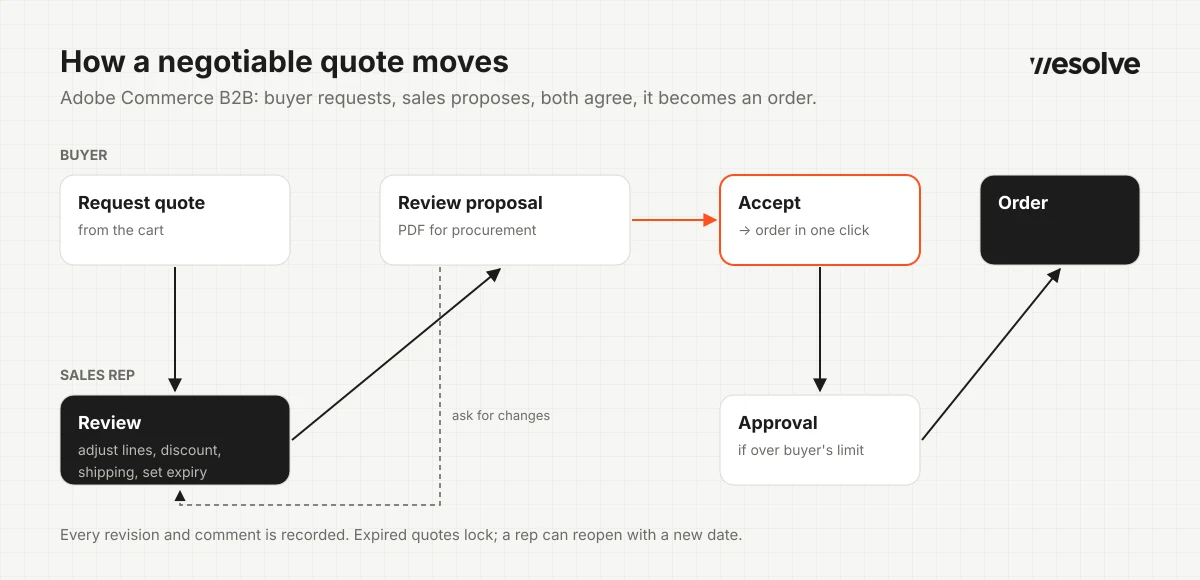
- A company buyer submits a quote request from the cart
- A sales rep reviews it in the admin, adjusts prices, adds notes and sets an expiry date
- The buyer reviews the proposal in their account
- The buyer accepts, declines or asks for changes
- Once both agree, the quote becomes an order in one click
The loop can repeat as often as needed, and every revision, comment and price change is recorded.
Where quotes live
Negotiable quotes are stored separately from normal carts (negotiable_quote), with status, proposed price, expiry and an item snapshot. Each revision adds a history record instead of overwriting. So a buyer can keep a normal cart for everyday orders while negotiating a separate bulk quote.
The statuses: Created → Processing by Admin → Submitted by Admin → Processing by Customer → Ordered, plus Expired, Declined and Closed. Each change sends an email to the other side. The templates are editable; the state machine isn’t.
What a sales rep can change
- Line prices: a fixed price or percentage off for any SKU. The most used.
- A quote-wide discount: percentage or fixed, to move fast on account-level deals.
- Shipping: propose a cost, override the rate or offer free shipping. Often the last lever.
What reps can’t do natively: swap one product for another. Removing and re-adding lines resets some negotiation context; custom work can smooth this.
Company accounts and approvals
Quotes sit inside company accounts: a company admin, users with roles and permissions. One permission controls who can request quotes; another sets order value limits.
A buyer with a €5,000 limit can’t turn a €12,000 quote into an order without approval from higher up — Magento enforces it. For distributors with many buyers across departments, configure this before go-live, not after the first rejected order.
Shared catalogs come first
Quotes don’t replace your pricing architecture; they sit on top of it. Shared catalogs give each company its own products and base prices before negotiation starts, and quotes start from that price.
Account-specific shared catalog prices mean quotes need only small adjustments. One catalog for all B2B accounts means quotes do the heavy lifting. Get shared catalogs right first. More in Adobe Commerce B2B vs Open Source.
Expiry creates urgency
Every proposal carries an expiry date; after it, the quote locks and the buyer must request a new one. That stops buyers sitting on favourable prices indefinitely and protects you from prices that no longer work.
Match expiry to your sales cycle: around 7 days for fast-moving goods, 30 for equipment or large contracts. Expired quotes stay in history, and a rep can reopen and resend with a new date.
The PDF matters
Procurement teams route approvals by email, outside your store. Buyers can download a PDF of the quote with number, lines, prices, expiry and comments. The default template is plain. For B2B, where the quote is a formal proposal your buyer shows their finance team, a branded template is worth it.
ERP integration
For most mid-market B2B, quotes also need to reach the ERP or CRM. A typical pattern:
- A quote request triggers an API call that creates a draft in the ERP
- Price changes made in the ERP sync back to the quote
- Approval creates the order in both systems
None of this is native. The key decision: does Magento pull ERP prices when the quote is created, or does the rep type in the ERP-approved price? The first is cleaner but needs a tighter integration; the second is simpler but invites manual error.
The pattern that holds up best in our B2B builds: a read-only price feed from the ERP into shared catalogs, with quotes handling only the negotiated difference. The ERP stays the source of truth. See Magento ERP integration.
Common mistakes
- Skipping company account setup. The quote button only appears for buyers in a configured company account.
- No training for sales reps. The admin quote panel isn’t intuitive; reps miss comments, forget expiry dates or send quotes back unchanged.
- Default emails. “Your quote has been updated” with no context. Add the quote number, the rep’s name and a direct link: a small change that cuts support tickets.
- No expiry policy. Without one, quotes sit open for 90 days. Set a maximum.
- Treating quotes as a toggle. They touch shared catalogs, company accounts, approvals, ERP and frontend UX. Scope them as a system.
Open Source or Adobe Commerce?
Magento Open Source doesn’t include negotiable quotes, shared catalogs or company accounts; they’re part of Adobe Commerce B2B. On Open Source, the alternative is a third-party extension, and quality and long-term support vary a lot. For a production B2B store with real volume, the native module is the more defensible choice. Licence costs are in Adobe Commerce pricing.
At wesolve, the engineers who build the quote workflow also run the infrastructure, so when it breaks at 11pm before a trade deadline, there’s no separate host to wait for. Talk to us about scoping yours.
FAQs
Is quote management in Magento Open Source? No. Negotiable quotes are part of Adobe Commerce B2B. Open Source needs a third-party extension.
How many negotiation rounds are allowed? No hard limit. It continues until someone accepts, declines or the quote expires, with every revision recorded.
Can a sales rep start a quote for a buyer? Not natively; the flow starts from the buyer. Custom work can add rep-initiated quotes.
Can quotes sync with an ERP or CRM? Not natively, but the REST API exposes quote data and status changes for a custom integration.