

Adobe publishes a compatibility list, the host ticks the boxes, and everyone assumes the store will cope. Then Black Friday arrives, or a catalog update runs at 11pm, and the store falls over.
The official requirements tell you what Magento needs to install. They don’t tell you what a production store needs to stay up. Here are both.
The official stack
Always check Adobe’s system requirements for your exact version; they change with each release. As an example, Magento 2.4.7 needs:
| Component | Requirement |
|---|---|
| OS | Linux (Ubuntu LTS, RHEL-family) |
| PHP | 8.2 or 8.3, with extensions such as bcmath, curl, gd, intl, mbstring, pdo_mysql, soap, xsl, zip |
| Database | MySQL 8.0 or MariaDB 10.6 |
| Search | OpenSearch 2 (or Elasticsearch 8); MySQL search was removed in 2.4.0 |
| Cache | Redis for sessions and cache; Varnish for full-page cache |
| Web server | nginx (Apache works) |
| Composer | 2.x |
| Queue | RabbitMQ, recommended for async work at volume |
Running a PHP version past upstream end of life means no PHP security fixes, a risk separate from Magento’s own patches.
What the minimums don’t tell you
CPU and memory. Adobe’s development minimum is a couple of cores and a few GB of RAM. No production store should run on that. A sensible starting point for a small store is 4 cores and 8 GB for the application; a mid-market store with a big catalog, several store views and active promotions needs 8+ cores and 16 GB+ for the application alone, with database and search elsewhere. Reindexing, price rules and imports are CPU-heavy, and they run while customers browse.
PHP-FPM pool size. This is where most under-powered Magento servers actually fail. Each Magento PHP worker typically uses 150–300 MB. Set pm.max_children too high and the server swaps; too low and requests queue. Calculate it from your measured per-process memory, not a generic guide.
Database. Usually the first bottleneck, and usually configuration, not hardware. On a dedicated database server, give the InnoDB buffer pool 70–80% of RAM, turn on the slow query log, and archive or clean growing tables (sales, logs, quotes) on a schedule, or performance erodes slowly with no obvious cause.
Search memory. OpenSearch’s JVM heap: no more than half the RAM, under about 32 GB; 4–8 GB suits most mid-market catalogs. On the same server as PHP, the two fight for memory under peak load, and the failure is hard to reproduce. (Search tuning)
Separate the services
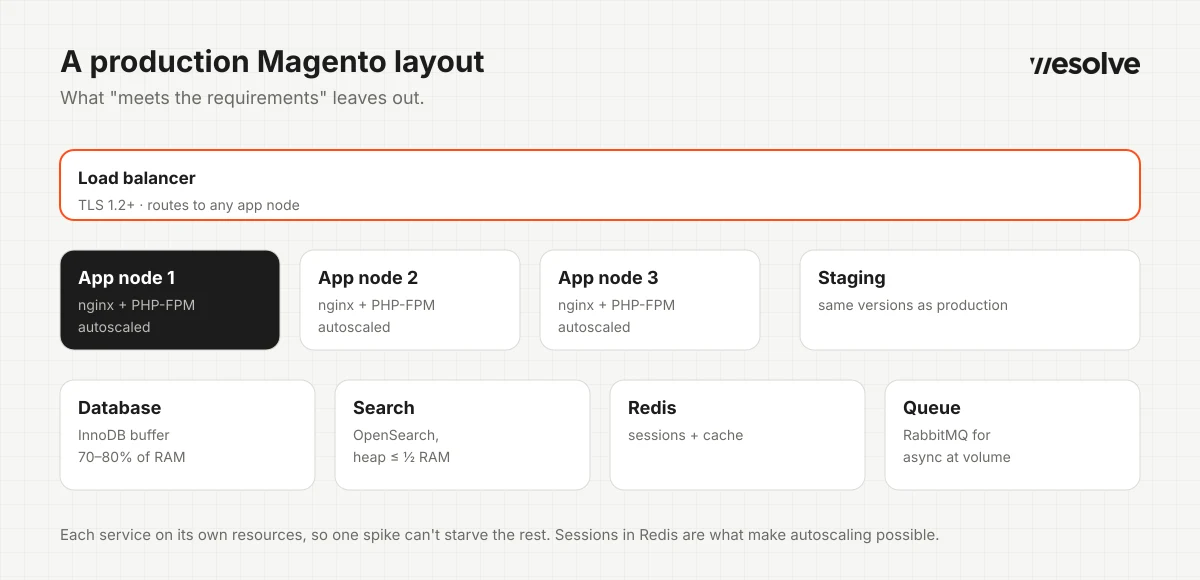
The biggest gap between “meets requirements” and “survives production” is whether these run on separate resources:
- Application (nginx, PHP-FPM)
- Database
- Search
- Redis
- Queue, when used
All on one server is fine for development and very small stores. For a mid-market retailer, when one service spikes it starves the others: the store is fine on a normal day and collapses on the day that matters.
Autoscaling
Campaigns, press mentions and seasonal peaks multiply traffic in hours. Autoscaling adds application nodes when load rises and removes them after. It needs a load balancer, sessions in Redis (not local files), and a deploy process that can bring up new nodes automatically. It’s an architecture decision made at design time, not something you bolt on while the store is under load. (Cloud vs self-managed)
Operational requirements
- Security patching within release windows, through staging, with rollback (security patches)
- TLS 1.2 minimum, 1.3 preferred; PCI DSS requires 1.2+ for card data
- A staging environment that matches production in PHP, database, Redis and search versions. Staging is far cheaper than an incident caused by an untested change.
- Backups with a tested restore
What to ask a managed host
Don’t ask whether they support PHP 8.3 or OpenSearch 2. Ask whether they size for your real load, separate services, autoscale, and patch within release windows, without you managing any of it. And ask who answers when it breaks: when the agency built the store and a separate host runs it, each points at the other. At wesolve the same engineers build the store and run its infrastructure. See managed Magento hosting.
FAQs
Which PHP version does Magento need? It depends on the release: 2.4.7 needs PHP 8.2 or 8.3. Check Adobe’s requirements for yours.
Can production run on one server? Technically yes; it’s not recommended for meaningful traffic, because services compete for resources under load.
How much RAM does production need? At least 8 GB for the application on a small store; 16 GB+ for mid-market, with database and search on separate resources.
Why does Redis matter? It holds sessions and cache centrally, which is what lets you run several application nodes and autoscale.