

Unexpected or inflated shipping costs are one of the most common reasons shoppers abandon carts. Magento gives you three layers to get shipping right; the right one depends on order volume, catalog variety and your development capacity.
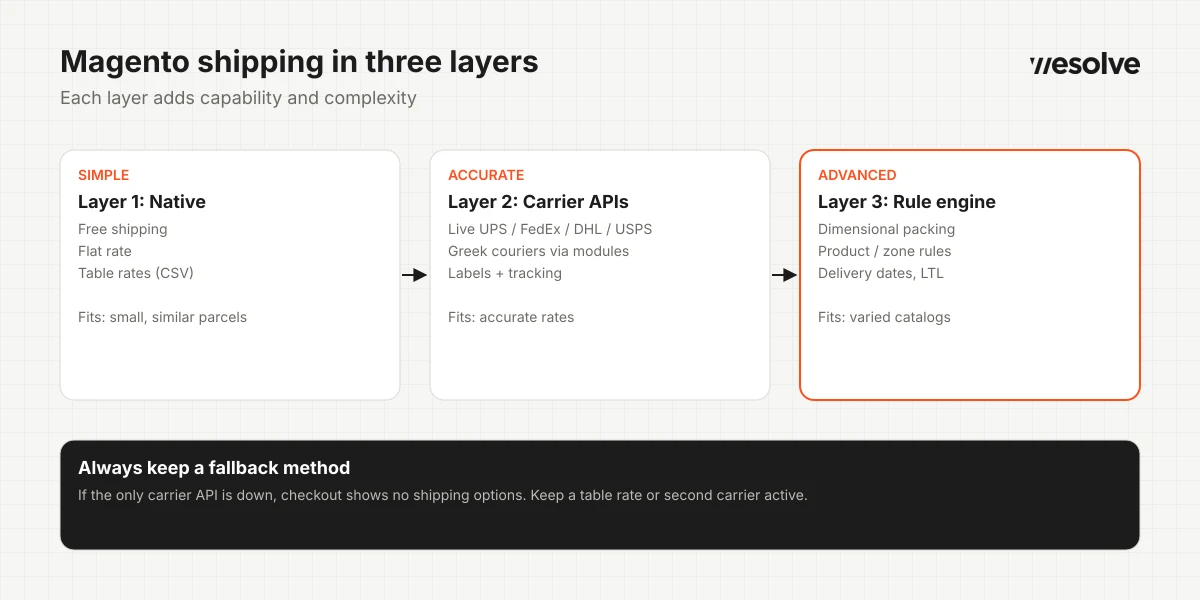
Layer 1: native methods
- Free Shipping above a cart threshold. Good for promotions; no partial rules by category or zone.
- Flat Rate per order or per item. Set up in minutes, but one rate overcharges light orders or loses money on heavy ones. Fine for small catalogs with similar parcel weights.
- Table Rates: a CSV mapping weight, price, destination or item count to a cost. Zone pricing without a carrier API.
Static rates don’t follow carrier surcharge changes and ignore dimensional weight, which is why bigger catalogs move to the next layers.
Layer 2: live carrier rates
Magento includes UPS, FedEx, DHL and USPS integrations under Stores > Configuration > Sales > Delivery Methods. When enabled, checkout calls the carrier’s API and shows the real price for that parcel and destination.
Greek couriers (ACS, ELTA Courier, Speedex and others) come through third-party or custom modules, and quality varies: check label printing, tracking updates and returns before you commit. See Eshop Magento.
Multi-source inventory (MSI) is built into both Open Source and Adobe Commerce: stock by warehouse, with source selection deciding where an order ships from. Complex routing across warehouses, stores and 3PLs often belongs in an OMS (order management).
Layer 3: rule engines
Native Magento doesn’t pack items into boxes or calculate dimensional weight. For catalogs with varied product sizes, that means wrong rates. Rule-engine services such as ShipperHQ add:
- Dimensional packing: items assigned to boxes, then the carrier’s dimensional weight calculated
- Shipping rules by product, attribute or destination, including restrictions (hazmat, oversized)
- Delivery-date estimates at checkout
- LTL freight rates for heavy goods
They’re a subscription service on top of the module. Test against your real catalog before committing, and when you switch, disable the native methods so checkout doesn’t show duplicate or conflicting rates.
Labels and tracking
From an order’s shipment screen in the admin, supported carriers can generate labels through their API, and tracking numbers are stored on the shipment and emailed to the customer. Beyond a few dozen orders a day or multi-parcel shipments, the native label flow becomes a bottleneck; that’s when a courier integration or OMS pays off.
Don’t let one API break checkout
If a carrier API goes down and it’s your only method, customers see no shipping options and can’t check out. Always keep a fallback active (a table rate or a second carrier), and monitor carrier API errors like any other integration (monitoring baselines).
Test before going live
Use each carrier’s sandbox credentials, place test orders for known routes, and compare the rates with the carrier’s own calculator. Then test on staging with real data (staging environments).
When to bring in help
Signs shipping has outgrown configuration: routing across several warehouses or countries, carrier errors that only appear under load, and rate logic table rates can’t express. Multi-country adds customs documents and per-country carrier accounts. At wesolve, the team that builds the shipping integration also runs the servers it’s on, and where order routing needs an OMS, CommerceSuite provides one already connected to Magento. Talk to us.
FAQs
Does Magento Open Source support multiple warehouses? Yes. Multi-source inventory is built into both editions.
Which carriers are built in? UPS, FedEx, DHL and USPS. Greek couriers need third-party or custom modules.
Can I restrict shipping by product? Table rates and country rules cover basics; product- or attribute-based rules need a rule engine or custom work.
What if a carrier API is down? Magento returns no rates from it. Keep a fallback method active.