

Many incidents start right after a deployment: a change that worked locally meets production data, extensions or infrastructure for the first time. Staging is the gate that catches that, as long as it really mirrors production.
Dev, staging, production
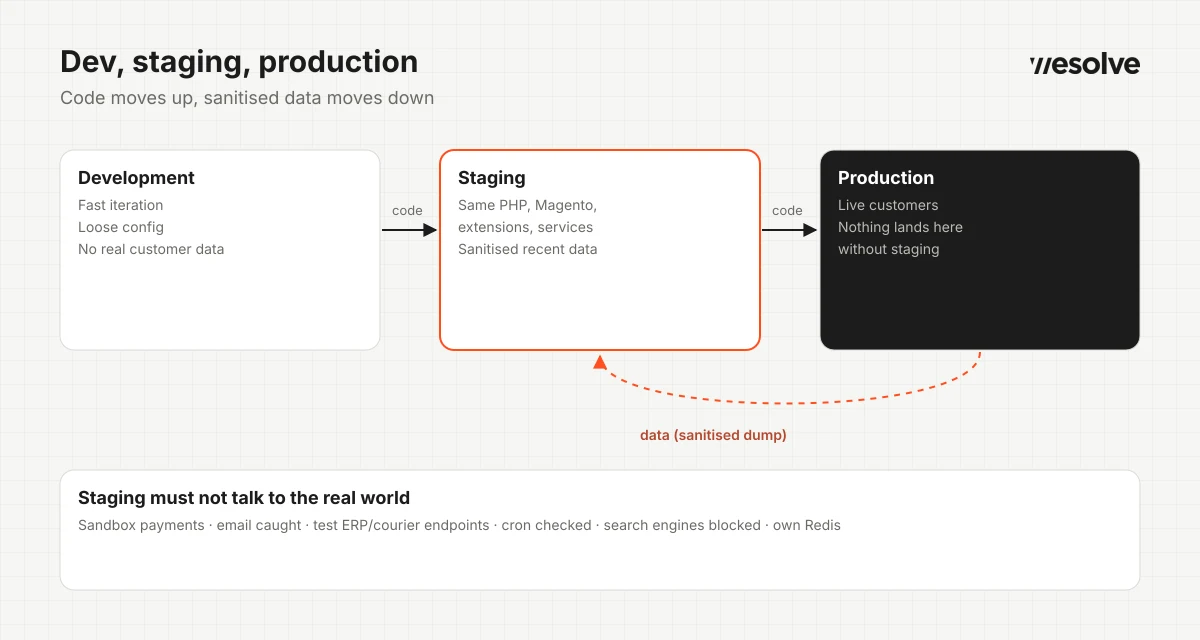
- Development: fast iteration, loose config, no real customer data. It doesn’t need to match production.
- Staging: same PHP, Magento version, extensions and services as production, with a recent, sanitised copy of the data. Its job is to catch what dev can’t.
- Production: live customers. Nothing goes here without passing staging.
Setting it up
- Separate server or container. Never share infrastructure (database, Redis, cron) with production.
- Deploy the same code from Git, the same way you deploy production. Don’t copy
app/etc/env.phpfrom production. - Import a sanitised database dump. Strip or anonymise customer data first; tools such as n98-magerun2 help. Real customer data on staging is a GDPR risk (GDPR for Magento).
- Write a staging-only
env.php: its own database, Redis and credentials. - Run
setup:upgrade,setup:di:compileand static content deploy (or your build pipeline). - Reindex and flush caches after every import.
Two settings that cause silent failures
Base URLs. A production dump still points at your live domain. Update web/unsecure/base_url, web/secure/base_url and the link URLs in core_config_data, plus web/cookie/cookie_domain, or sessions won’t work.
Redis isolation. Cache and sessions are configured in env.php. If staging points at the same Redis instance and database numbers as production, a cache flush on staging empties production’s cache. Best: a separate Redis instance. At minimum: different database numbers.
Don’t let staging talk to the real world
This is where staging does real damage. Before staging runs anything:
- Payment gateways in sandbox mode with sandbox keys (payment gateways)
- Outgoing email disabled or caught (a mail catcher), so customers don’t get staging emails
- ERP, courier and marketing integrations on test endpoints, or off
- Cron jobs checked: exports, feeds and syncs that push to external systems (cron jobs)
- Search engines blocked (password protection or noindex)
The sync checklist
| Layer | Every sync |
|---|---|
| Database | Fresh dump, sanitised, imported into a clean staging database |
| Config | Base URLs, cookie domain, API keys swapped for test keys |
| Cache and sessions | Confirm isolated Redis, flush |
| Indexes | Full reindex |
| Media | Rsync changed files only, or serve from a shared read-only source |
| Code | Deploy the branch under test through the normal pipeline |
| Check | Place a test order end to end |
Sync before every significant test cycle, at least weekly on active stores. Stale data gives false confidence. For teams shipping several times a week, scripted nightly syncs pay for themselves; they fit naturally into a CI/CD pipeline.
Adobe Commerce Content Staging
Content Staging is an Adobe Commerce feature, not in Open Source. It’s different from a staging environment: it schedules future changes (prices, CMS pages, categories, products) with start and end dates, and lets you preview the storefront at a future date.
It adds query complexity on large catalogs, so watch category page performance when many campaigns are active, and test scheduled campaigns on your staging environment before they go live.
When to bring in help
One store with few extensions is manageable. Several stores, custom integrations and frequent releases turn environment management into a part-time job: config drift, failing media syncs, env.php mismatches that only show under load. At wesolve, the team that writes the code also runs the servers, so staging and production are built the same way and stay in step. See zero-downtime deployment or talk to us.
FAQs
What’s the difference between UAT and staging? Staging is a technical gate (does it work like production?); UAT is a business gate (does it do what was asked?). Small teams often use one environment for both.
Is Content Staging available in Open Source? No. It’s Adobe Commerce only.
How often should staging sync with production? Before every significant test cycle, and at least weekly on active stores.
Can staging share a server with production? It shouldn’t. Shared Redis, databases or cron can affect live customers.