

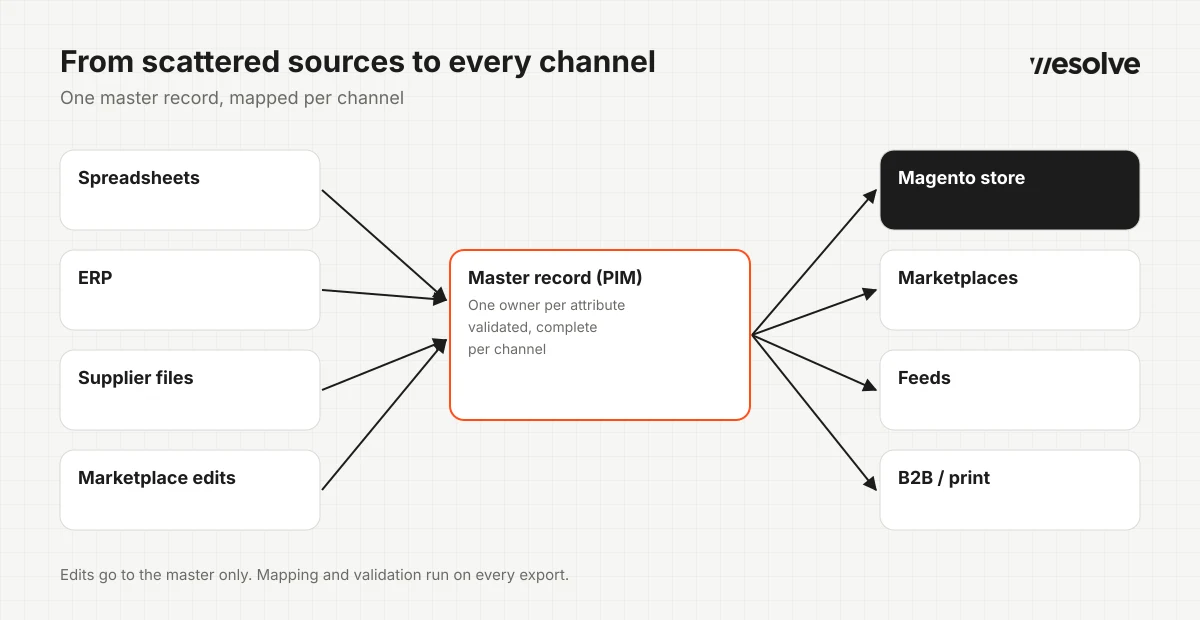
Your product data probably lives in four places: an old spreadsheet, the ERP, supplier files, and whatever each marketplace holds. They all disagree on something, and shoppers notice. Five steps to fix it.
Why it matters
- Shoppers compare channels. Different specs or prices on your store and a marketplace cost trust on both.
- Marketplaces reject or hide listings with missing or badly formatted fields.
- Your team pays in rework: the same fix made in several places, and still missed in one.
This guide is about commercial product data (titles, descriptions, attributes, images, prices), not engineering data such as CAD files and bills of materials.
Step 1: Document every channel’s requirements
- List every channel: your Magento store, marketplaces (Skroutz, Amazon and others), comparison feeds, B2B portal, printed catalogs, and channels planned for next year.
- Collect each channel’s rules from its own documentation: required fields, character limits, image sizes, value lists, category taxonomy, identifiers (GTIN/EAN).
- Compare with what you have: missing fields, wrong formats, failing products.
- Record it in one sheet: one row per channel, one column per requirement, pass or fail.
This gap sheet is your work list.
Step 2: Define the master attribute set
Build it rich enough for your strictest channel: you can trim data for looser ones, but you can’t invent what a channel requires.
- Universal: SKU, name, brand, short and long description, price, category, weight and dimensions, main image.
- Channel-specific: GTIN for marketplaces, short title for feeds, tier prices for B2B, compliance flags.
For each attribute, define name, type, required or not, and allowed values. A colour field with twelve allowed values stays clean; free text turns into “navy”, “Navy Blue” and “dark blue” within a month. Give each attribute group an owner, and don’t add fields nobody needs: every field must be filled and maintained.
Step 3: One source of truth
Bring every copy into one place, then clean it there: remove duplicate SKUs, decide which source wins per field, standardise units and values, mark incomplete records rather than guessing.
| System | Good at | Not for |
|---|---|---|
| Spreadsheet | Small catalogs, one editor | Many people, many channels |
| ERP | SKU, stock, cost, orders | Rich selling content |
| PIM | Attributes, descriptions, translations, channel readiness | Stock and orders |
| DAM | Images, video, documents | Product attributes |
| Magento | Selling on your store | Master for every channel’s content |
A PIM is built to be the master record for selling content (PIM for ecommerce). For Magento projects that need one, CommerceSuite provides a PIM and DAM already connected (CommerceSuite).
Step 4: Map master fields to each channel
| Master field | Channel rule | Transformation |
|---|---|---|
| title_long | Max 80 characters | Use title_short; else cut at a word boundary |
| colour | Fixed value list | Translate to the channel’s value |
| price | Needs currency | Add currency, round to 2 decimals |
| hero_image | White background, min size | Send the approved packshot |
| gtin | Required | Block publishing if empty |
| description | Plain text | Strip HTML |
Put the logic in the mapping, not in someone’s habit, and validate before publishing: records that fail go back to their owner with the reason. Channel specs change, so re-check them regularly (PIM integration).
Step 5: A formal update and launch process
- Roles: an owner per attribute group, approvers per change type, one publisher.
- Workflow: draft → review → publish; nothing publishes until it’s complete for its channels.
- All edits go through the master record. No editing listings in marketplace portals.
- Launch checklist: fields complete, images approved, mapping validated, prices confirmed.
- Audit quarterly, and whenever a channel changes its rules.
At wesolve, the same team builds the data layer, the Magento store and the servers. Talk to us.
FAQs
Do I need a PIM, or is a spreadsheet enough? A spreadsheet works for a small catalog, one or two channels and one editor. If fixing one product means opening three files, you’ve outgrown it.
How do we manage many channels with a small team? One master record, automated mapping and validation. Clear ownership matters more than headcount.
Can Magento be the master for all channels? It stores your catalog well, but wasn’t designed to manage every channel’s content. Stores selling widely usually add a PIM.
How often should we audit product data? Quarterly, plus whenever a channel changes its requirements.