

Every growing ecommerce team reaches the same moment. The catalog is past a few hundred SKUs, you sell on more than one channel, and someone has final_v3_REAL.xlsx open right now. Nobody is entirely sure it matches what’s live.
That’s when a Product Information Management system stops being a nice-to-have.
What a PIM is (and isn’t)
A PIM is a single system of record for product data: every attribute, description, image reference and translation. Your Magento store, marketplaces, print catalog and app all pull from it.
It isn’t a DAM (though many include basic asset handling), an ERP (though it often sits between the ERP and the store) or a CMS. It’s for product data only, and that focus is what makes it useful.
The core value: update a product once, and every channel shows the change. No copy-paste, no version drift, no customer reading a spec your warehouse corrected three weeks ago.
The spreadsheet phase is normal, until it isn’t
For 50 to 200 products, a well-kept spreadsheet with a disciplined import is perfectly workable. The problems build quietly:
- An import fails silently and the live store still shows the old spec
- You add a second language or store view, and two spreadsheets diverge within a week
- A new supplier sends data in their own format, and someone spends two days reformatting it
- A recall means finding every affected SKU and updating every channel by hand
None of these is a disaster alone. Together they drain team time and put errors in front of customers.
A practical signal: if your team spends more than a few hours a week reconciling product data across systems, a PIM pays for itself in time alone.
What breaks when Magento is your PIM
Magento handles product data well for a storefront. It isn’t built to be the master record for the whole business.
- Multi-store gets messy fast. Store views handle localised content, but not as the source of truth for many languages and regional catalogs. Attribute sets multiply and imports get fragile. See multistore architecture.
- Supplier onboarding is manual. Without a PIM to normalise data first, your team does it every time.
- New channels become projects. A marketplace or B2B portal means export, reformat and hope the export is current. With a PIM, a new channel is configuration, not a data migration.
- No audit trail. Who changed that description, and why does the Greek store show a different weight from the German one?
What a proper integration looks like
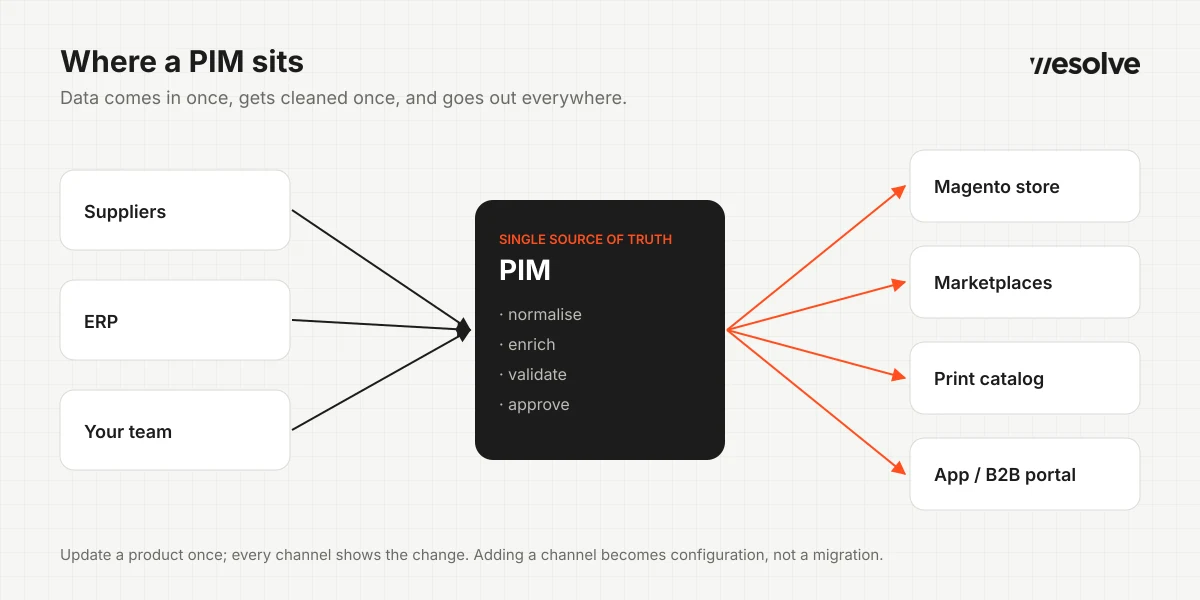
- Product data enters the PIM from suppliers, your team or the ERP.
- The PIM normalises, enriches and validates it.
- The PIM pushes to Magento by API or scheduled sync.
- Magento serves the storefront.
The integration layer is where the real work lives. A CSV import on a cron job isn’t an integration. A real one uses Magento’s API, maps attributes cleanly, handles configurable product relationships, and surfaces errors before they reach the live store. On a catalog with years of attribute history and store-view overrides, that’s where complexity piles up. The same rules apply as for ERP integrations: decouple, validate, and make failures visible.
PIM in the wider stack
In a mature setup the PIM connects to the ERP (prices, stock, supplier data), the DAM (images and files), the OMS (fulfilment attributes) and the storefront.
CommerceSuite, wesolve’s commerce stack, is built around this: PIM, OMS, CIAM and DAM are pre-connected on top of Magento, so these integrations don’t have to be built from scratch on every project. If you already have a standalone PIM, connecting it cleanly to Magento is a standard integration job. More in why we bundle them.
How to choose a PIM
- Magento connector quality: maintained and documented, or will you write the sync yourself?
- Attribute flexibility: a rigid schema creates as many problems as it solves.
- Workflow: can new products go through approval before they publish?
- Localisation: locale-specific attributes, not just one translated field.
- Total cost: licence plus implementation, maintenance and the Magento integration.
When you don’t need one yet
Under a few hundred SKUs, one channel and rare changes? A well-structured spreadsheet is defensible. The honest question is whether your current setup creates problems you’re actively working around. If it does, have the PIM conversation now, not after the catalog doubles again.
Done poorly, a PIM integration can corrupt catalog data at scale. Done well, it becomes infrastructure nobody thinks about. If product data is becoming a real constraint, talk to us.
FAQs
What is a PIM in ecommerce? A central system for storing, managing and distributing product data to every sales channel: the single source of truth for attributes, descriptions, images and translations.
When should a Magento store move from spreadsheets to a PIM? When reconciling product data takes real time each week, when you run several store views or languages, or when supplier data needs manual reformatting. Data-flow complexity matters more than catalog size.
What’s the difference between a PIM and a DAM? A PIM manages structured product data. A DAM manages files: images, videos, documents. They’re usually connected so assets attach to product records.
Does CommerceSuite include a PIM? Yes. CommerceSuite provides PIM, OMS, CIAM and DAM around Magento, already connected, for projects that need them.
Can I keep my existing PIM? Yes. The work is building a reliable integration: attribute mapping, sync schedule, error handling and testing against your catalog.