

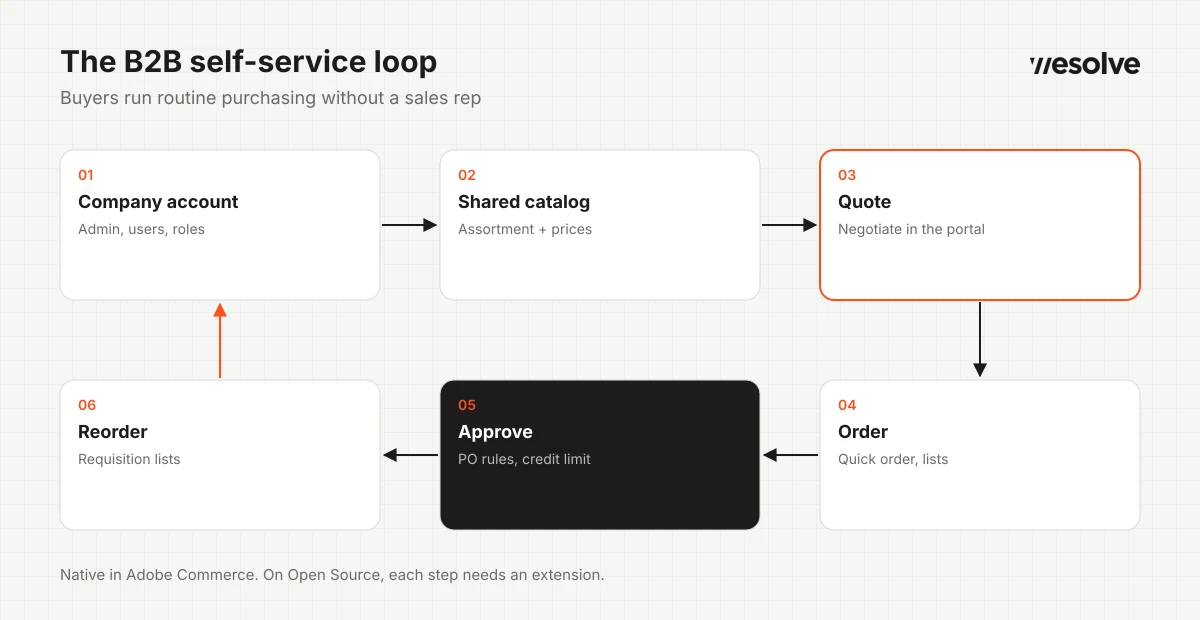
A B2B portal lets business buyers run routine purchasing themselves: their own prices, quotes, reorders and approvals, without a sales rep handling every order. In Magento, the full feature set is native to Adobe Commerce; on Open Source you assemble it from extensions.
Who it’s for
Wholesalers, distributors and manufacturers with account-specific pricing, procurement teams with several users, and high-volume repeat orders. Adobe Commerce runs B2B and B2C from one instance, so you don’t need separate storefronts.
Company accounts and roles
Each customer is a company account with a company admin who adds users and sets roles and permissions: who can order, see prices, use quotes or view order history. The buyer manages its own users within the rules you set, which takes routine admin off your team. Accounts can be organised into teams to mirror the buyer’s structure.
Shared catalogs
Shared catalogs decide what each company sees and pays. You pick the product assortment and the pricing (fixed price or discount per product), then assign the catalog to companies. Each company has one shared catalog at a time; you can create as many as you need. Guests see the public catalog.
Negotiable quotes
Quotes replace email threads. The buyer submits a cart as a quote request with a note; your rep adjusts prices, adds comments and sets an expiry; every round is logged. When the buyer accepts, the quote converts to an order in the portal. For pricing logic and workflow details, see quote management.
Quick order and requisition lists
Repeat buyers don’t browse. Quick Order takes SKUs and quantities directly, typed or uploaded as a CSV. Requisition lists are saved lists (weekly order, seasonal kit) added to the cart in one click. Requisition lists belong to the user who created them.
Payment on account and approvals
- Payment on account: you set a credit limit per company; orders draw on it and you invoice on agreed terms.
- Purchase order approvals: the company sets rules (for example, orders above an amount) that route an order to an approver before it reaches you.
- Purchase order as a payment method, with the buyer’s PO number on the order.
These mirror real procurement policies, and the portal enforces them automatically.
Adobe Commerce vs Open Source
| Feature | Adobe Commerce | Open Source |
|---|---|---|
| Company accounts and roles | Native | Extension |
| Shared catalogs | Native | Extension |
| Negotiable quotes | Native | Extension |
| Quick order | Native | Extension |
| Requisition lists | Native | Extension |
| Payment on account, PO approvals | Native | Extension |
On Open Source, each extension is a licence, a separate vendor and upgrade testing at every patch. That can be the right call for a handful of accounts with simple pricing. With many companies, tiered pricing, multi-user buying and credit terms, the native module removes a lot of integration work, and the licence cost has to be weighed against it (Adobe Commerce B2B, planning a B2B website).
What still needs implementation
- ERP integration: real-time stock, customer-specific prices, credit status and order sync. The most common gap (ERP integration).
- Punchout (SAP Ariba, Coupa and similar): not in the native module; custom or extension work.
- Performance with many shared catalogs and price rules: needs proper indexing, caching and infrastructure.
At wesolve, the same team builds the portal, the integrations and runs the servers, so there’s one owner from first quote to reorder. Talk to us.
FAQs
Can a sales rep order on a buyer’s behalf? Yes. Admins can log in as the customer (when the customer allows it) and place or edit orders for them.
Can I set different credit limits per company? Yes. Credit limits are set per company account.
How many shared catalogs can one company have? One at a time. You can create as many catalogs as you need and reassign them.
Can requisition lists be shared between users? Not natively: each list belongs to the user who created it.