

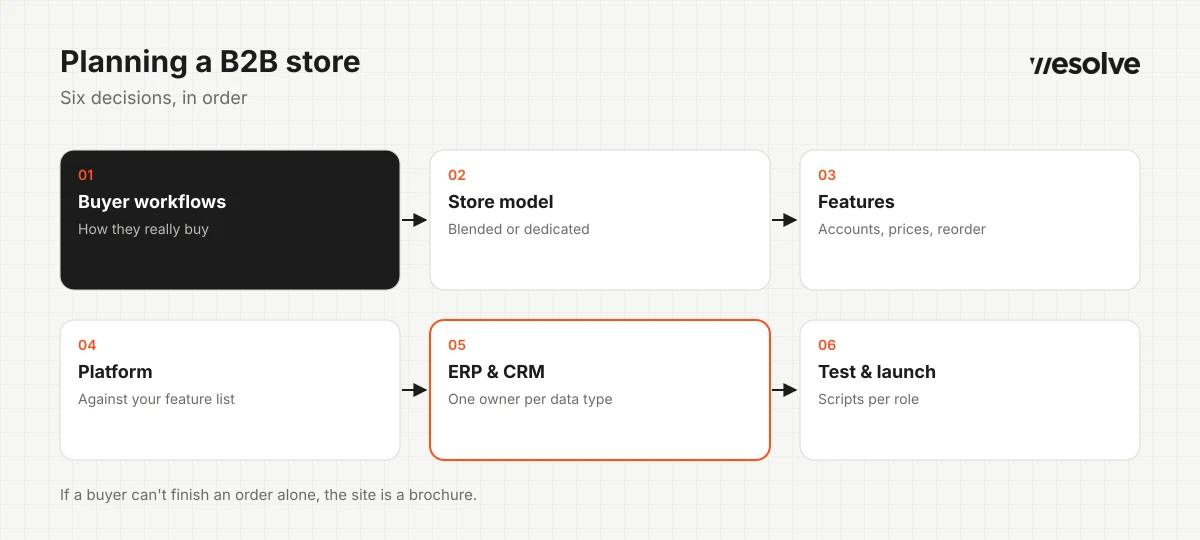
Business buyers now expect consumer-grade self-service: their own prices, quick reorders, approvals, all online. The decisions you make before any code decide whether the site wins orders or sends buyers back to the phone. Six steps, in order.
1. Map how your buyers actually buy
Example: a restaurant group reorders cleaning supplies and packaging every two weeks. Today, the purchasing manager phones it in. Online, she logs in, sees her contract prices, rebuilds the last order and sends it to finance for approval.
B2B buying differs from B2C:
- Negotiated prices per customer
- Repeat orders, not discovery
- Several people: one orders, one approves, one pays
- Large orders with dozens of lines
- Quotes and terms for bigger purchases
Write down your top buyer workflows. They become the test cases at the end.
2. Blended or dedicated store?
| Blended (B2B + B2C) | Dedicated B2B | |
|---|---|---|
| Catalog | One, with visibility rules | Built for business buyers |
| Prices | Public prices + customer-specific | Contract prices by default |
| Brand | One store | Can have its own look |
| Cost | One platform to run | A second storefront |
| Fits | Same products, different prices | Different catalog, terms or buyers |
Decide now. Switching later means rebuilding pricing, accounts and integrations.
3. The features you need
- Company accounts with roles: buyers, approvers, finance, spending limits
- Customer-specific prices and catalogs
- Quick order: by SKU, CSV upload, pasted lists
- Reorder from past orders and saved lists
- Quotes that convert into orders
- Approval rules above set amounts
- Payment on account, purchase orders, credit limits, invoices
- Self-service: order status, tracking, statements, documents
If a buyer can’t finish an order alone, the site is a brochure. Mark each feature required now or later. For how Magento covers these, see B2B portal and Adobe Commerce B2B.
4. Choose the platform
| SaaS with B2B features | Magento Open Source / Adobe Commerce | |
|---|---|---|
| Launch speed | Fast | Slower; more to build |
| Infrastructure | Vendor runs it | You or your partner runs it |
| Unusual pricing, approvals, catalogs | Limited by the platform | Full control of code and data |
| Cost shape | Subscription, revenue-based fees | Development and hosting; licence for Adobe Commerce |
Hold every candidate against your feature list. What it can’t do without custom work is real cost. Cost drivers: licence model, depth of customisation, integrations (often more than the storefront), and hosting and support (platform comparison, Magento cost).
On Magento, projects that need a PIM, OMS, customer identity or asset management can use CommerceSuite, where those systems come already connected (CommerceSuite).
5. Connect ERP and CRM
- Pick one owner per data type: products (ERP or PIM), stock (ERP/WMS), customer prices and credit (ERP), accounts (CRM or ERP), orders (store → ERP), invoices (ERP → store). Never two owners for one field.
- Map the fields: SKU, units of measure, price lists, tax classes, customer IDs, terms. Units and customer IDs cause the most mismatches.
- Choose timing by business impact: prices and stock that affect an order near real time; catalog content in batches.
- Plan for failure: ERP down, order rejected, price changed mid-cart. Queue, block or alert?
The mapping document is a deliverable, not a side note (ERP integration).
6. Design, test and launch
- Design for speed to the order: SKU search in the header, quick order one click away, reorder on the account home.
- Show the buyer’s price everywhere once logged in.
- Script tests per role: buyer, approver, finance. Prices, tax, approvals, credit limits, every payment method.
- Watch a real purchasing manager place a 40-line order. Fix where they hesitate.
- Check cross-border tax and invoicing with your advisers (internationalisation).
At wesolve, one team builds the store and integrations and runs the servers, so when a sync breaks at 2am nobody argues about whose problem it is. Talk to us.
FAQs
What does a B2B ecommerce website cost? It depends on licence model, custom logic, integrations and hosting. Integrations often cost more than the storefront. Get a scoped quote.
What are the biggest barriers? Wrong prices and missing self-service. Fix both first.
SaaS or open source? SaaS for speed and standard B2B needs; Magento when pricing, approvals or integrations are unusual and you want control.