

Modules are the right way to extend Magento 2: no edits to core files, clean upgrades. Two files make a module exist; the extension point you pick decides how well it ages.
Where code lives
Custom code goes in app/code/Vendor/Module (or a Composer package). Vendor is your namespace, Module the feature; both appear in every class name, so choose them carefully.
app/code/Vendor/Module/
├── registration.php
├── etc/
│   ├── module.xml
│   ├── di.xml
│   └── db_schema.xml
├── Setup/Patch/Data/
├── Model/  Plugin/  Observer/
└── view/frontend/  view/adminhtml/
The two required files
registration.php registers the module:
<?php
use Magento\Framework\Component\ComponentRegistrar;

ComponentRegistrar::register(ComponentRegistrar::MODULE, 'Vendor_Module', __DIR__);
etc/module.xml declares it, and its load order:
<?xml version="1.0"?>
<config xmlns:xsi="http://www.w3.org/2001/XMLSchema-instance"
        xsi:noNamespaceSchemaLocation="urn:magento:framework:Module/etc/module.xsd">
    <module name="Vendor_Module">
        <sequence>
            <module name="Magento_Catalog"/>
        </sequence>
    </module>
</config>
No setup_version is needed when you use declarative schema and patches. <sequence> sets load order; real dependencies go in composer.json.
Then:
bin/magento module:enable Vendor_Module
bin/magento setup:upgrade
bin/magento module:status Vendor_Module
Commit the updated app/etc/config.php, so every environment enables the same modules.
Dependency injection
Never new a service class: ask for it in the constructor, and Magento injects it. etc/di.xml configures that:
<preference for="Vendor\Module\Api\MyServiceInterface"
            type="Vendor\Module\Model\MyService"/>
di.xml also sets constructor arguments and virtual types, keeping configuration out of your PHP.
Database: declarative schema and patches
Tables are declared in etc/db_schema.xml; setup:upgrade compares and applies the difference. The old InstallSchema/UpgradeSchema scripts are deprecated.
<table name="vendor_module_record" resource="default" engine="innodb" comment="Records">
    <column xsi:type="int" name="record_id" unsigned="true" nullable="false" identity="true"/>
    <column xsi:type="varchar" name="title" nullable="false" length="255"/>
    <constraint xsi:type="primary" referenceId="PRIMARY">
        <column name="record_id"/>
    </constraint>
</table>
Generate the whitelist (bin/magento setup:db-declaration:generate-whitelist --module-name=Vendor_Module), so Magento knows which columns your module may drop. Data (attributes, default records) goes in data patches under Setup/Patch/Data/, which run once.
Plugin, observer or preference?
| Extension point | What it does | Upgrade safety | Use for |
|---|---|---|---|
| Observer | Reacts to an event | High | Side effects: order placed, customer saved |
| Plugin | Before/after/around a public method | High | Changing a method’s input or output |
| Preference | Replaces a whole class | Low | Last resort |
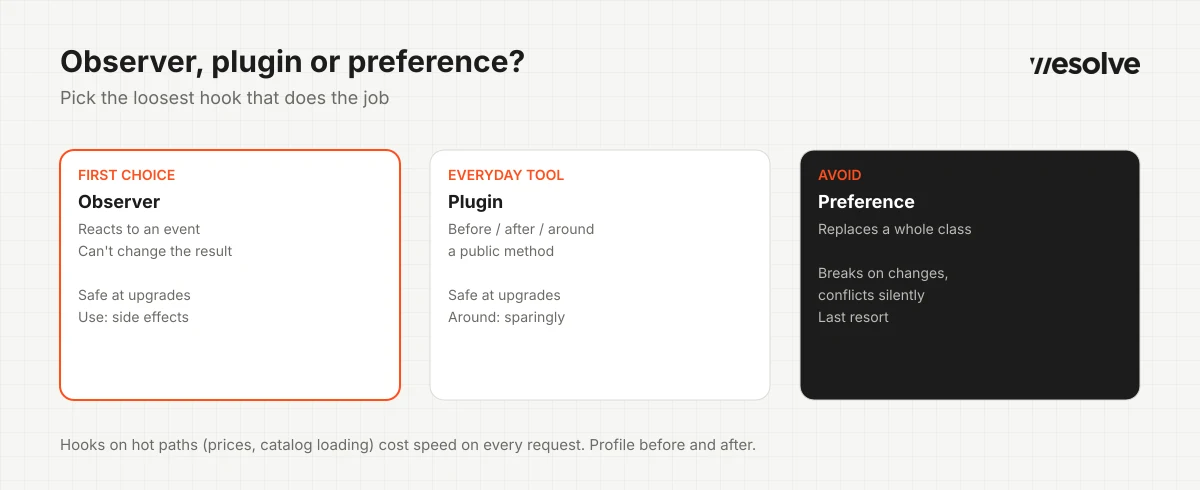
- Observers are loosely coupled and safe, but can’t change what a method returns.
- Plugins are the everyday tool. Use
aroundsparingly: it adds overhead and must call$proceed. - Preferences break when the original class changes, and two modules preferring the same class silently conflict.
Plugins and observers on hot paths (prices, catalog loading) cost speed on every request. Profile before and after (monitoring).
Vetting third-party extensions
Extensions are one of the most common ways stores get compromised or slowed down. Before installing:
- When was it last updated, and does it support your Magento version?
- Check security advisories for the package.
- Read its
composer.jsonfor unexpected dependencies. - Look at controllers and database code: input validation, escaping, ACL checks on admin actions.
- Install on staging first (staging).
Typical problems: unsafe deserialisation or eval, SQL built by string concatenation, unescaped output (XSS), admin actions without permission checks, and abandoned code nobody patches (security patches).
Build or buy?
Buy generic features (reviews, layered navigation, gift cards) when a maintained extension fits. Build when the logic is specific to your business, deeply tied to your ERP, OMS or PIM, or when extensions bring far more than you need. Every extension adds plugins, observers and upgrade work, so audit before adding another (custom development, technical audit).
At wesolve, the team that builds your modules also runs the servers they run on, so code, performance and upgrades are tested together. Talk to us.
FAQs
How do I add a product attribute?
With a data patch using EavSetup::addAttribute() for catalog_product.
Do modules differ between Open Source and Adobe Commerce? The structure is the same. A module that depends on Adobe Commerce-only modules won’t run on Open Source.
How do I check a module supports my version?
Read its composer.json constraints, then run setup:di:compile and test on staging.
What is Mage-OS? A community distribution of Magento Open Source. Standard modules generally work on it.