

Almost every big Magento decision comes back to one question: build something specific to your business, or buy an extension and adapt around it? The answer shapes your costs, your timeline and your ability to compete.
It’s a differentiation question, not a cost question
If a capability is table stakes, something every store in your category has, buy it. If it’s the reason customers choose you, an off-the-shelf extension means a competitor can copy it in an afternoon. Custom development is how you make it yours.
Buy what’s generic. Build what’s yours.
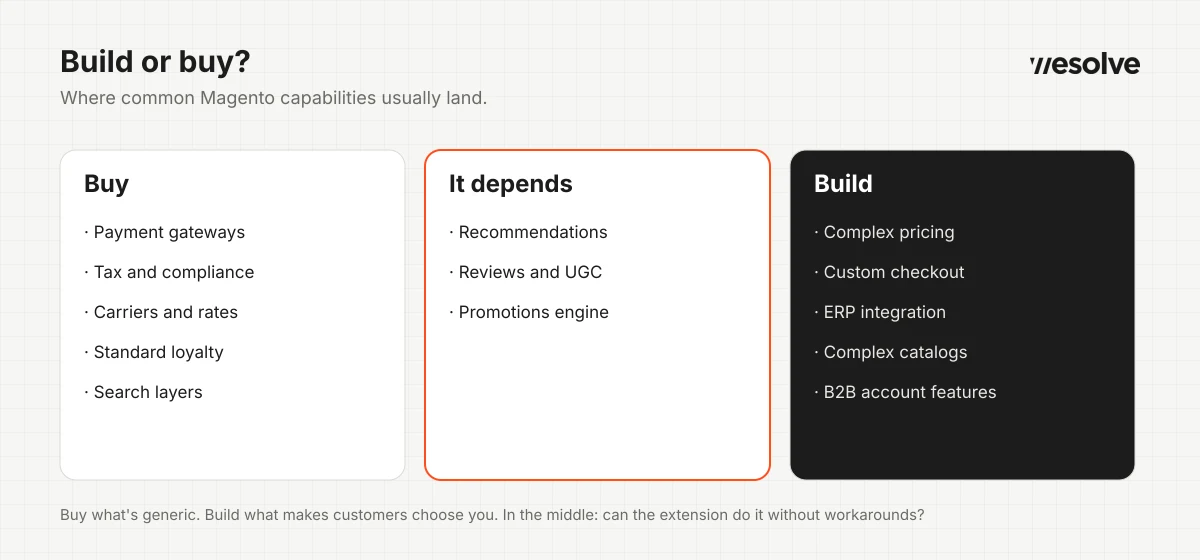
Almost always buy
- Payment gateways. Stripe, PayPal, Klarna, Viva Wallet and others maintain their own Magento modules. A custom payment integration is expensive and widens your PCI scope for little gain.
- Tax and compliance. Let a vendor track regulatory changes.
- Carriers and shipping rates, unless you run your own logistics with proprietary pricing.
- Standard loyalty. Earn-and-burn points are a solved problem (loyalty programs).
- Search layers, unless your catalog has unusual attributes or faceting no extension supports (Magento search).
The pattern: if a vendor’s whole business is maintaining it, they’ll do it better and cheaper than a one-off build.
Almost always build
- Complex pricing. B2B, wholesale and multi-tier pricing based on customer group, history, contract or region quickly go beyond what extensions handle cleanly. A custom module encodes your actual rules, not an approximation.
- Custom checkout. Kits, bundles with dependencies or subscriptions with variable terms don’t fit the standard checkout. Checkout is where revenue is made or lost, so friction there is expensive.
- ERP and back-office integration. Off-the-shelf connectors assume a data structure and process. When the assumptions are wrong, you get a connector that needs constant manual fixing. (ERP integration)
- Complex catalogs. Configuration rules that depend on other products, or tens of thousands of interdependent SKUs, need code that understands your catalog.
- B2B account features: reorder from history, credit limits, approval workflows, multi-user accounts with roles. (Adobe Commerce B2B)
The grey areas
| Capability | Buy if… | Build if… |
|---|---|---|
| Recommendations | “Customers also bought” is enough | Personalised from your own behavioural data |
| Reviews | Standard stars and display | Moderation, media and CRM integration |
| Promotions | Native catalog and cart rules cover it | Rules combining segments, timing and conditions native rules can’t express |
The test: can you describe the requirement in the extension’s own terms? If you keep saying “but we also need it to…”, build.
The hidden cost of the wrong extension
- Upgrade friction. Modules that hook into core in undocumented ways break at every upgrade, so you end up maintaining a fork or paying for compatibility work.
- Performance. Every extension adds code to requests. 40 poorly written modules make a slower store than 10 well-chosen ones, and Core Web Vitals affect rankings and conversion. (Speed optimisation)
- Abandonment. When a vendor stops maintaining a module, you’re left with orphaned code in production.
That’s why a sensible custom development engagement starts with an audit of what’s already in the stack before writing anything new. (Technical audit)
A third option for PIM, OMS, CIAM and DAM
If your project needs product information, order management, customer identity or asset management around Magento, there’s another answer besides building or buying each one: a pre-integrated layer. CommerceSuite, used on wesolve projects that need those systems, provides all four already connected to Magento, so the months of integration work are already done and custom development goes into what’s genuinely yours. See CommerceSuite.
Checklist for each decision
- Generic across your industry? Buy.
- Does your competitive edge depend on it being different? Build.
- Does an extension cover it without workarounds? Buy. With workarounds, build.
- Will it change often as the business evolves? Custom code is easier to change.
- Does it touch checkout, pricing or the ERP? Be sceptical of extensions here unless widely proven in production.
- What happens at the next upgrade? A poor upgrade record means a higher long-term cost.
Who should decide
Neither developers alone nor business stakeholders alone. Developers know what an extension really does under the hood and what it costs to maintain; the business knows whether the capability is a differentiator. Apart, you get one of two failures: building everything because extensions aren’t trusted, or buying everything and working around the limits for years. The right answer is almost always a mix. At wesolve this conversation happens before scoping, for new builds and inherited stores alike. See how we work.
FAQs
What is Magento custom development? Code written for your store (modules, integrations, checkout, pricing) where neither Magento’s core nor available extensions fit.
When should I buy an extension? When the functionality is generic, the vendor maintains it well and it fits without workarounds.
Do extensions slow Magento down? Every extension adds code; poorly written ones, or too many, hurt performance and Core Web Vitals.
How do I know if my store is over-customised? Slow upgrades because custom modules break, performance problems traced to custom code, and business logic spread across overlapping modules. An audit shows what to refactor, replace or keep.