

Customer segments are dynamic audiences built from what shoppers buy, browse and put in their carts. You attach them to promotions and content. Native segments are an Adobe Commerce feature; on Open Source you need an extension. Every active segment has a performance cost, so plan before you build.
Groups vs segments
| Customer groups | Customer segments | |
|---|---|---|
| How customers join | Assigned (manually, at registration or by integration) | Automatically, by conditions |
| Changes | Static until you change it | Customers move in and out as behaviour changes |
| Controls | Tax class, prices, catalog permissions | Content, promotions, recommendations |
| Edition | Both | Adobe Commerce only |
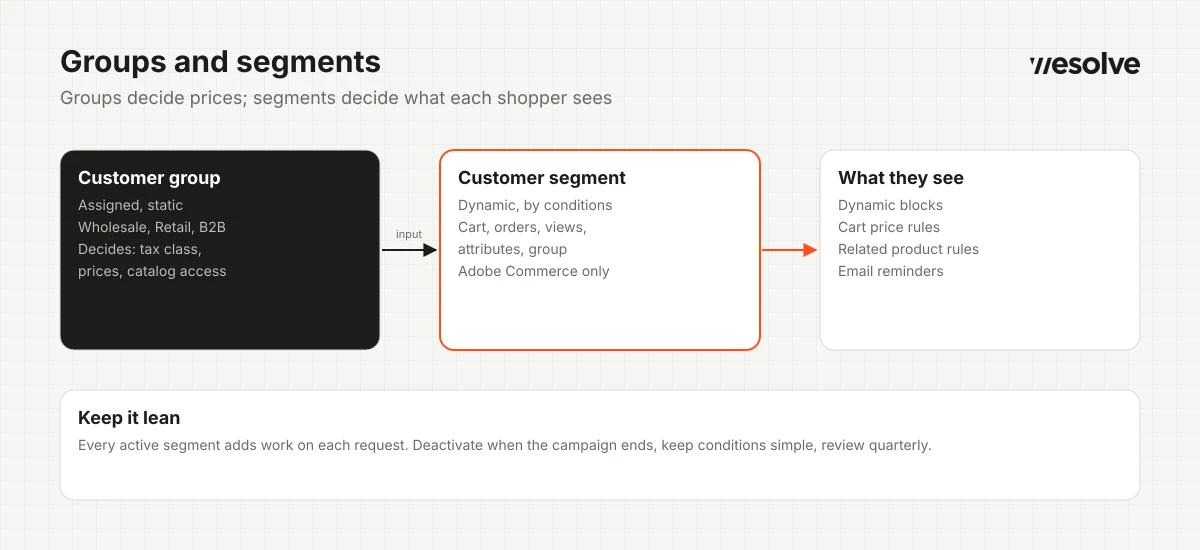
They work together: a group can be one condition inside a segment. Think of groups as who a customer is commercially (retail, wholesale) and segments as what they’re doing right now.
What a segment can use
- Customer: attributes, address, group, newsletter status
- Cart: products in the cart, subtotal, quantities
- Products: viewed, ordered or in the wishlist
- Sales history: number of orders, totals, order dates
Segments can target registered customers, visitors, or both. Visitors have no history, so their segments rely on cart and browsing conditions.
Building one (Adobe Commerce)
- Customers > Segments > Add Segment.
- Name it, set it Active, choose who it applies to (visitors, registered or both).
- Add conditions, combined with ALL or ANY.
- Save and refresh the segment data, then check the matched customers look right.
Start with three to five segments tied to real campaigns, for example:
- Repeat buyers (several orders in the last year): loyalty offers (loyalty programs)
- High-value carts above a threshold: free shipping
- Lapsed customers (no order in 90+ days): win-back
- B2B accounts in a group with low recent orders: re-engagement
Putting segments to work
A segment does nothing on its own. Connect it to:
- Dynamic blocks (Content > Dynamic Blocks): banners and content shown only to the segment
- Cart price rules (Marketing > Cart Price Rules): discounts or free shipping for the segment
- Related product rules: recommendations by segment (cross-sell and upsell)
- Email reminders and exports to your email platform
Measure each one against a control group: conversion, average order value, and margin after the discount.
Open Source options
Open Source has no native segments. Extensions add them; they differ in which conditions they support (many skip browsing or real-time cart conditions), how often they re-evaluate, and price. Check the conditions you need before you buy, and remember each one is another module to test at every upgrade (upgrade guide). For many stores, sending order data to the email platform and segmenting there is enough.
Keeping it fast
Segment matching runs as shoppers browse and shop, so many active segments add database work on every request.
- Deactivate segments when their campaign ends
- Keep conditions simple; deep AND/OR nesting is expensive
- Review active segments every quarter
- Watch response times after adding segments (monitoring)
At scale, infrastructure matters as much as rule design. At wesolve, the team that sets up segments also runs the servers, so database and cache tuning keep up as campaigns grow (speed optimisation). Talk to us.
FAQs
Can segments target guests? Yes. Set the segment to apply to visitors (or both) and use cart or browsing conditions.
Do segments exist in Open Source? Not natively. You need an extension, or segment in your email platform.
How many segments is too many? There’s no fixed number. Keep only segments tied to live campaigns, and watch response times as you add them.