

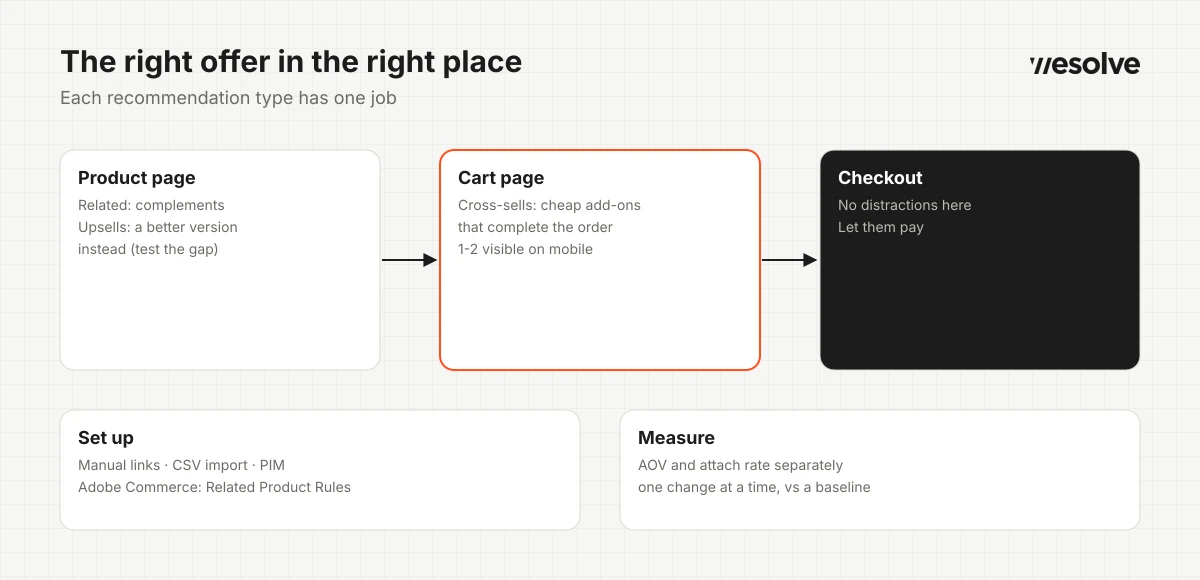
Magento has three recommendation types, each with its own place and job. Most stores set them up once and forget them. The ones that gain revisit placement, pricing and product choice as the catalog changes.
Three types, three jobs
| Type | Where it shows | Job | Rule of thumb |
|---|---|---|---|
| Related products | Product page | Complements and alternatives | Same category or use |
| Upsells | Product page | A better version instead | Moderately pricier; test the gap |
| Cross-sells | Cart page | Add-ons to what’s in the cart | Cheap relative to the cart |
Show the wrong offer in the wrong place and it gets ignored. An expensive upsell in the cart, or a random accessory on the product page, wastes the space.
Setting them up (both editions)
In the product editor, the Related Products, Up-Sells and Cross-Sells sections let you link products by hand.
- Start with your top products by traffic that rarely sell with anything else.
- Related: complementary items in a sensible price range.
- Upsells: the higher spec or newer model. Test how big a price gap your customers accept.
- Cross-sells: low-cost add-ons that make the main purchase work (cables, cases, refills, care products).
For larger catalogs, link products by import (the related, upsell and cross-sell columns in the product CSV), or keep relations in your PIM if you have one (product import, PIM integration).
Automating it
Adobe Commerce has Related Product Rules (Marketing > Related Products Rules): conditions on product attributes, optionally by customer segment (customer segmentation). Write the rule once; it applies across the catalog. Product Recommendations, Adobe’s behaviour-based service, is a further option for Adobe Commerce.
On Open Source, extensions (for example from Amasty or Mageworx) add rule-based or behaviour-based recommendations. Each is another module to maintain, so pick one that does what you need without stacking several.
| Approach | Fits | Limit |
|---|---|---|
| Manual links | Small catalogs, clear relations | Doesn’t scale |
| Adobe Commerce rules | Larger catalogs, segments | Needs tuning |
| Open Source extension | Automation without Adobe Commerce | Third-party upgrades |
Placement and speed
- Mobile: one or two products visible, big images, clear prices. Horizontal carousels are often scrolled past.
- Mini-cart: one or two cross-sells at most, needs theme work, never crowding the checkout button.
- Limit upsells on a product page to a few strong options.
- Load recommendation blocks so they don’t delay the page, and cache them. Check cart page speed after changes (speed optimisation).
Measuring
Track average order value and attach rate separately: are you adding items, or just raising prices? Change one thing at a time, run it for a few weeks, and compare with a baseline. Analytics with e-commerce events shows which blocks get clicked and bought (Google Analytics for Magento).
At wesolve, the team that sets up recommendations also handles catalog data and the servers, so logic, data and speed are tested together. Talk to us.
FAQs
Can cross-sells show in the mini-cart? Yes, with theme work or an extension. Keep it to one or two products.
How many upsells should a product page show? A few strong options. More creates choice overload.
Do Related Product Rules need Adobe’s AI? No. They are condition-based; Product Recommendations is the separate behaviour-based service.
Will recommendations slow the store? They can. Cache the blocks and check cart and product page speed after changes.