

An OMS takes over what happens after checkout: routing orders to warehouses or stores, reserving stock across channels, splitting shipments, returns. Magento handles a lot of this itself; an OMS earns its place when channels, locations and rules multiply.
What Magento already does
- Orders, invoices, shipments, credit memos in the admin
- Multi-source inventory (MSI), in both Open Source and Adobe Commerce: stock per warehouse or store
- Reservations: stock is reserved when the order is placed, not when it ships, which prevents most overselling on the store itself
- Source selection to choose where an order ships from
For one store and one or two warehouses, that’s often enough. An OMS makes sense when you add marketplaces, physical stores, several warehouses or 3PLs, ship-from-store or click-and-collect, and routing rules Magento can’t express (what an OMS does).
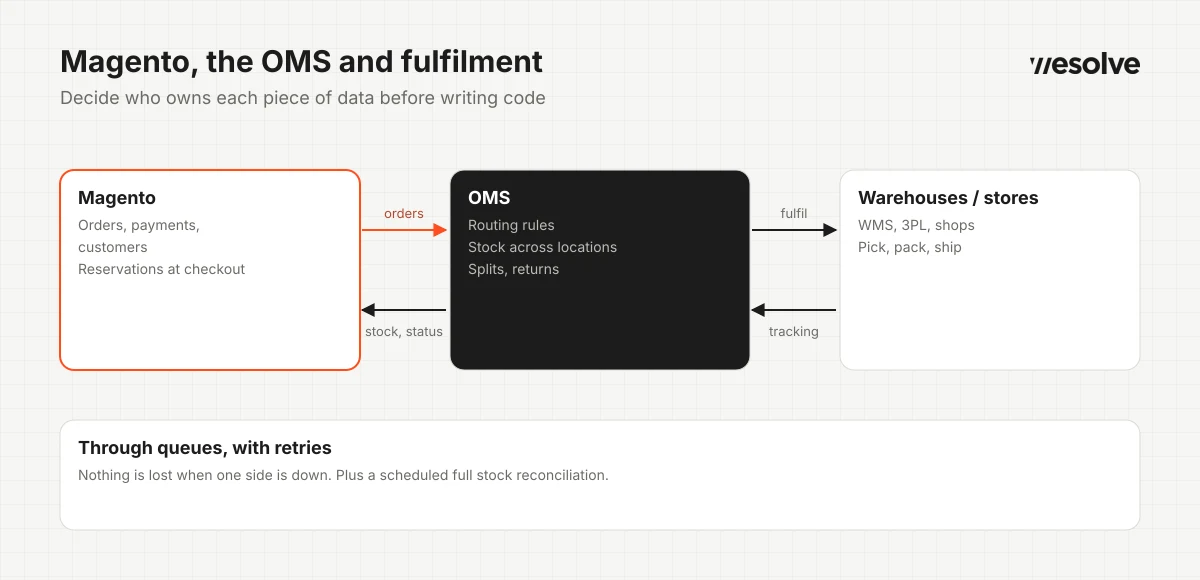
Decide the source of truth first
| Data | Usually owned by | Flows to |
|---|---|---|
| Orders, payment, customer | Magento | OMS, at order creation |
| Available stock | OMS (or ERP/WMS) | Magento |
| Order status, tracking | OMS | Magento → customer emails |
| Prices, products | ERP or PIM | Magento and OMS |
Integrations break when two systems both think they own the same data. Write this table down before any code.
Connecting an OMS
- Create API access for the OMS (System > Integrations), limited to what it needs: orders, shipments, credit memos, inventory.
- Configure the connector with your store’s API endpoint and credentials, on staging first (staging).
- Map the fields: order statuses, SKUs, sources, carrier codes, payment methods. This is where most integrations go wrong.
- Define conflict rules: what happens when both sides change the same order or stock record.
- Use queues and retries, not fire-and-forget calls: Magento’s message queues (RabbitMQ) and async/bulk APIs keep checkout fast and nothing gets lost when the OMS is down.
- Test full cycles: order → OMS → shipment and tracking back → customer email; plus cancellations, partial shipments and returns.
Real-time or batch?
| Real-time (events) | Batch (scheduled) | |
|---|---|---|
| Orders to the OMS | Recommended | Delays fulfilment |
| Stock to Magento | Best for scarce stock and peaks | Fine for deep stock |
| Load | Steady API traffic | Spikes per run |
| Errors | Seen immediately | Surface at the next run |
Most setups mix them: orders and stock changes in near real time, with a scheduled full stock reconciliation to catch anything missed.
After go-live
- Routing rules so orders go to the right location without manual review
- Tracking pushed back automatically to Magento, so customers get shipment emails
- Monitoring and alerts on failed syncs and queue backlogs (monitoring)
- Processing time by channel: the slowest one usually has a mapping or routing problem
- Regular stock reconciliation reports
When to bring in help
Multiple stores, warehouses and channels mean many connectors to build and keep alive. At wesolve, the same team builds the integrations and runs the servers, so a failed sync has one owner. For projects that need it, CommerceSuite provides an OMS already connected to Magento (CommerceSuite, ERP integration). Talk to us.
FAQs
Does Magento have inventory reservations? Yes. MSI reserves stock at order placement, in both editions.
Is MSI Adobe Commerce only? No. Multi-source inventory is in Magento Open Source too.
Can Magento manage orders without an OMS? For a single store with simple fulfilment, usually yes.
How long does an OMS integration take? It depends on channels, locations and data quality. Field mapping and edge cases (returns, partial shipments) take most of the time.