

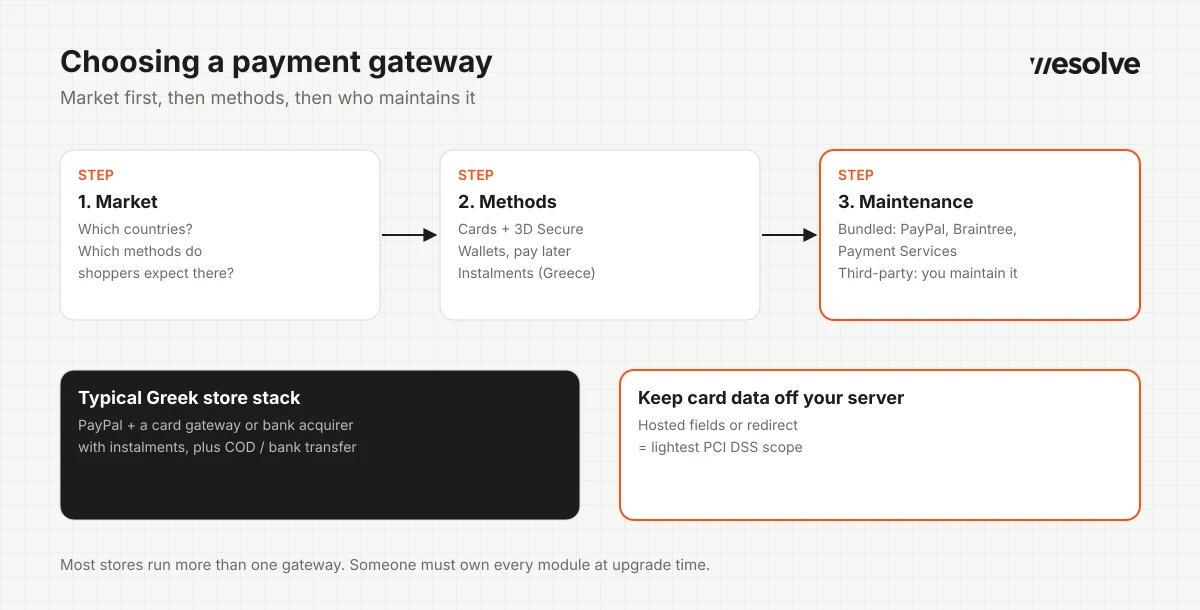
The right gateway depends on three things: where you sell, which methods those customers expect, and how much extension maintenance your team can carry. Missing a shopper’s preferred method is one of the classic reasons carts get abandoned at checkout.
Bundled or third-party?
Bundled integrations ship with Magento: PayPal (including Express Checkout) and Braintree, plus Payment Services, Adobe’s own PayPal-powered option, available for both Adobe Commerce and Open Source in the countries Adobe supports. They update with Magento.
Third-party integrations (Stripe, Viva Wallet, local bank acquirers, Klarna and others) arrive as Composer modules you install and maintain. They often add currencies, local methods or better APIs, but each one is a dependency you test and update at every Magento upgrade. Authorize.net is in this group too: its old built-in module was removed in 2.4.
The main options
| Gateway | Strengths | Watch for |
|---|---|---|
| PayPal / Payment Services | Low friction, wallets, pay later; bundled | Country availability for Payment Services |
| Braintree | Cards, wallets, mobile; bundled | Fewer European bank methods |
| Stripe | Many currencies and local methods; Radar fraud tools | Third-party module to maintain |
| Viva Wallet | Strong in Greece; cards, instalments, local methods | Module quality and support |
| Greek bank acquirers | Local cards, interest-free instalments | Module per bank, slower onboarding |
| Adyen | Enterprise, many local methods | Pricing and integration effort |
Local methods matter
Cards alone rarely cover a market. In Greece, instalments, cash on delivery and bank transfer carry real weight (online store Greece); elsewhere it’s iDEAL (Netherlands), Bancontact (Belgium) or BLIK (Poland). Decide which markets you serve before you pick the gateway stack, then confirm each method with the provider for your account’s country. Every extra method through a separate module is more upgrade work.
Setting one up
- Open the merchant account and collect the API credentials. In Greece, bank onboarding takes time: start early.
- Install the module with Composer (skip for bundled options) and confirm it’s registered.
- Configure it under Stores > Configuration > Sales > Payment Methods (Payment Services connects through the Commerce Services Connector).
- Test in sandbox: a successful payment, a decline, a 3D Secure challenge, a refund and a partial refund. Check the order status updates each time.
- Flush caches and go live, then place a real order in a clean browser and confirm the gateway’s webhooks reach Magento.
Test on staging first (staging environments), and keep sandbox credentials there.
PCI scope, 3D Secure and trust
How card data is handled decides your PCI DSS scope. Most stores aim for the lightest questionnaires by making sure card numbers never touch their server: hosted fields (the gateway’s own iframe) or a redirect to the gateway. Stripe, Braintree, Payment Services and most acquirers support this.
3D Secure (SCA) is required for most card payments in the EU, and it generally shifts fraud liability to the card issuer. Confirm your gateway handles it cleanly on mobile, where clunky challenges lose sales.
Your hosting affects PCI scope too: logs that capture card data or poor network separation can pull you into a heavier compliance tier, whatever the gateway. Visible trust signals matter at checkout: HTTPS everywhere, familiar payment branding and no redirects to unfamiliar domains.
Selection checklist
- Which countries, and which methods do those shoppers expect?
- Bundled or third-party, and who maintains the module across upgrades?
- Instalments if you sell in Greece
- Fraud tools (Radar, PayPal’s tools, acquirer screening)
- 3D Secure handled cleanly on mobile
- Card data kept off your server
- Refunds, partial captures and reconciliation with your ERP or accounting (ERP integration)
Most stores run more than one gateway, typically PayPal plus a card gateway or local acquirer. That’s normal, as long as someone owns every module at upgrade time.
When to bring in help
Payment stacks grow one module at a time, and break at upgrades: a Composer conflict, a regional method that stops working, a hosted-fields setup a PCI review flags. At wesolve, the team that writes the checkout also runs the servers it’s on, so payment changes, upgrades and incidents have one owner. See checkout customisation or talk to us.
FAQs
Can I use several gateways at once? Yes. Running PayPal alongside a card gateway or local acquirer is common.
What’s the easiest to set up? PayPal: bundled with Magento, no extra module.
Is Payment Services only for Adobe Commerce? No. It’s available for both editions, but only in the countries Adobe supports.
Do I need 3D Secure? For most card payments in the EU, yes, under Strong Customer Authentication rules.