

Magento SEO problems are rarely “SEO in general”. They come from how the platform builds URLs, filters and pages. Fix them in dependency order: crawling and indexing first, because everything else depends on them.
The usual problems
- Layered navigation: every filter combination can become a crawlable URL, so crawlers spend time on colour-and-size permutations instead of your categories
- Duplicate URLs: products reachable through several category paths, sorting and paging parameters
- Slow templates: heavy themes, images and stacked extensions
- Migrations that break URLs and lose years of rankings
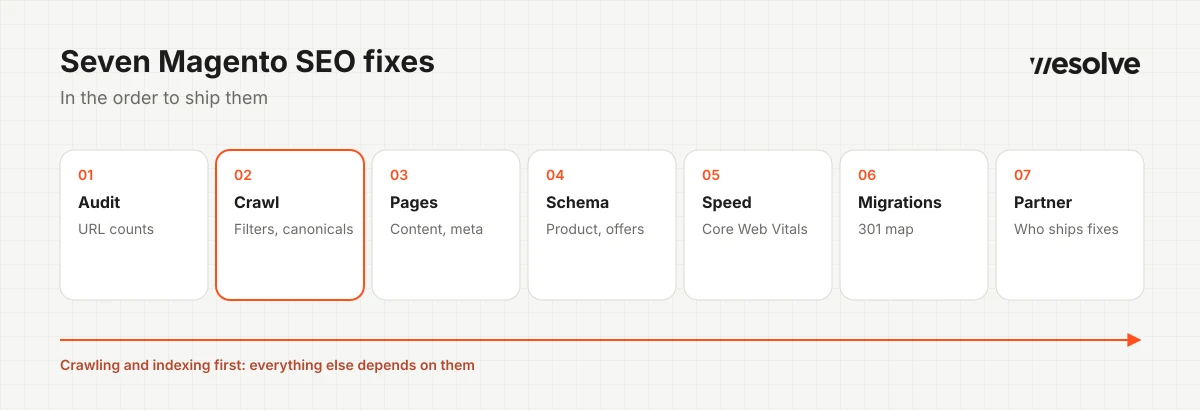
Fix 1: A technical audit with numbers
- Crawl the store like a search engine, following filters, paging and sorting.
- Compare your sitemap with what Google indexes (Search Console).
- Count parameter URLs from filters, sorting and tracking. Often more than your real catalog.
- Map duplicates: multiple paths per product, conflicting canonicals.
- Check responses: redirect chains, soft 404s, 5xx errors.
- Review robots.txt and sitemaps: only canonical, indexable URLs in the sitemap.
- Rank findings by URLs affected and closeness to revenue.
An audit without URL counts didn’t look at your store.
Fix 2: Layered navigation and crawl budget
- Decide which filter pages deserve indexing: those matching real searches (brand in category, popular size). Most don’t.
- Give those clean URLs, their own title, heading and text.
- Canonical the rest to the parent category.
noindex, followfor multi-filter combinations and sort orders.- robots.txt to stop crawling of sort and tracking parameters. Don’t block pages that are already indexed: a blocked page can’t show its noindex.
- Fix internal links that push crawlers into filter URLs.
- Check crawl activity in logs and Search Console over the following weeks.
Fix 3: Product and category pages
Content first: unique descriptions answering what buyers compare (materials, fit, compatibility, delivery, returns), not supplier text. Category pages get a short, useful intro and links to key subcategories.
Magento’s own settings cover the basics: canonical tags for products and categories, product URLs without category paths, URL keys, meta fields, sitemap (Stores > Configuration > Catalog > Catalog > Search Engine Optimization).
| Task | Extension | Custom code |
|---|---|---|
| Meta templates | Quick for uniform catalogs | Rules by attribute or stock |
| Filter URL rules | Limited control | Full control |
| Structured data | Basic product data | Variants, bundles, custom attributes |
| Upgrade risk | Extension conflicts | Contained if well built |
Test every SEO change on staging: a wrong canonical rule sitewide costs more than it fixes (staging).
Fix 4: Structured data
- Product with a complete Offer: price, currency, availability
- Ratings only from real, visible reviews
- Configurable products: data that matches the selected variant
- BreadcrumbList and Organization
- Validate with the Rich Results Test; watch Search Console after each release
Clean structured data also feeds AI search answers with reliable prices and availability. Rich results are earned, not guaranteed.
Fix 5: Core Web Vitals
LCP (main content load), CLS (layout stability), INP (responsiveness). Common Magento causes: oversized images, late banners and fonts, heavy JavaScript, slow server response (speed optimisation).
Fix templates first (they affect every page). Measure your own results: record your top landing pages before, ship fixes in one release, compare sessions and conversion over the following weeks against the same period last year.
Fix 6: Protect rankings in a migration
- Crawl the old site and export every indexable URL with traffic
- One-to-one 301 redirects, never everything to the homepage
- Keep URL patterns where you can
- Test redirects on staging (blocked from indexing)
- Crawl again after launch; watch Search Console daily
- Keep redirects for at least a year
(replatforming, upgrade guide)
Fix 7: Choosing a partner
- Magento depth: ask how they handle layered navigation and canonicals on Magento 2
- Who ships the fix: advice stuck in a ticket queue earns nothing
- How they measure and report
- Scope in writing: is development included?
At wesolve, the team that recommends the fix also writes the code and runs the servers, which matters because filters, structured data and speed all live in code and hosting. Talk to us.
FAQs
How long until results show? Crawl and indexing changes show in weeks; rankings and revenue usually take a few months.
Will an SEO extension break my store? Check what it overrides and test it on staging, then crawl for changed canonicals and slower pages.
Will a migration hurt rankings? It can. A complete redirect map, staging tests and close monitoring limit the damage.