

Architecture is the set of decisions about which system does which job: storefront, commerce engine, content, search, payments, PIM, ERP, CRM, and how they talk. Teams that pick a platform first often discover later it can’t handle their pricing, their ERP or their traffic. Decide in this order.
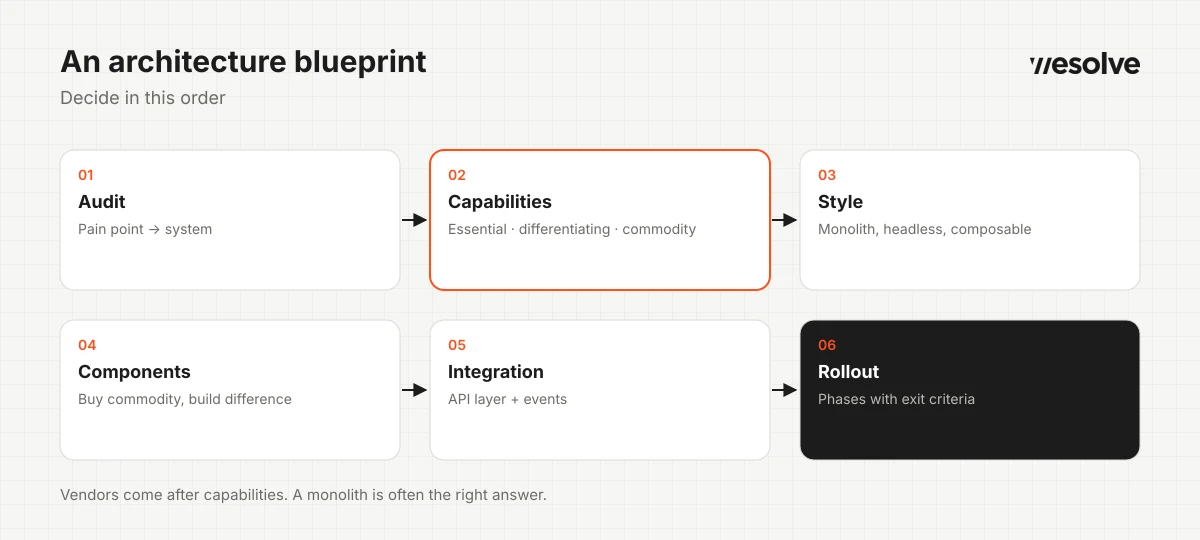
1. Audit what you run
Write each pain point next to the system that causes it:
- Which releases slip, and why?
- Which integrations break at peak?
- Which manual workarounds repeat every week?
- Where do buyers drop out?
That list is your real requirements document (technical audit).
2. Map capabilities before vendors
List what the business must do, without naming tools: catalog and content, pricing and promotions, accounts, search, checkout and payments, order management, integrations, operations (peak load, uptime, release pace, compliance).
Mark each one:
- Essential: the business stops without it
- Differentiating: it sets you apart
- Commodity: everyone has it → buy, don’t build
3. Choose the style
| Style | Fits | Flexibility | Running it |
|---|---|---|---|
| Monolith (one platform) | Few differentiating needs, smaller teams, speed | Lower | Simplest |
| Headless (own front end on a commerce back end) | Custom storefronts, several touchpoints | Higher | More pieces |
| Composable / MACH (best-of-breed services) | Strong engineering teams, high change rate | Highest | You own all the integration |
| Microservices (your own services) | Very large teams | High | Highest |
A monolith is not a failure. If your capability map shows few differentiating needs, it’s often the right answer. Magento sits comfortably in the first two rows: one platform, or a headless front end on Magento (headless, composable commerce).
4. Components: buy or build
Core parts: commerce engine, CMS, search, payments, PIM, ERP, CRM, an API layer. For each, ask:
- Does it differentiate us? Build only if yes.
- Who maintains it and answers alerts at 2am in peak season?
- How many systems does it connect to, and how often do they change?
Payments, tax and search almost never differentiate: buy them. Complex contract pricing often does: build or configure it deeply. Every built service is a permanent operations cost; every bought one is an integration to maintain.
5. Integration layers
- One API layer in front of services, so the storefront doesn’t call ten systems directly.
- A backend-for-frontend per touchpoint (web, app, sales tool) shaping data for each.
- Events and queues for work the buyer doesn’t wait for: order export, stock sync, emails. A slow ERP must never block checkout.
Synchronous where the buyer waits (price, stock, add to cart); asynchronous where they don’t. Two classic mistakes: storefronts calling services directly, and pushing everything through queues, including calls that need an instant answer.
B2B is different
| B2C | B2B | |
|---|---|---|
| Buyer | A person | A company: users, roles, approvals |
| Prices | Public | Per customer, contract, tiers |
| Order flow | Cart → pay | Quotes, approvals, POs, reorders |
| Source of prices and credit | Commerce platform | Usually the ERP |
| Procurement | — | Punchout to buyers’ systems |
Design for company accounts and ERP-driven prices from day one (B2B ecommerce website). For Magento projects that need them, CommerceSuite provides PIM, OMS, customer identity and asset management already connected (CommerceSuite).
6. Security and scale from day one
- Authenticate every service-to-service call; least-privilege API access; rotated credentials
- Card data never touches your servers (hosted fields, tokenisation)
- One identity provider for customers and staff
- CDN for catalog and media, queues for slow work, scale out rather than up
7. Roll out in phases, with exit criteria
- Foundation: audit and capability map signed off.
- Core commerce: a test order completes end to end.
- Integrations: orders and stock sync with no manual fixes.
- Pilot: one brand, region or segment meets agreed uptime and conversion targets.
- Migrate the rest in batches, retiring legacy piece by piece.
Don’t start a phase until the previous one meets its exit criterion. At wesolve, one team designs, builds and runs Magento-based stacks, so architecture decisions are made by the people who will operate them. Talk to us.
FAQs
Is MACH always better than a monolith? No. It’s the most flexible and the most integration work. Decide from your capability map and team capacity.
What does headless give you? Separate front ends on one commerce back end, and redesigns without replatforming. The cost is more pieces to run.
How long does an enterprise replatform take? It depends on integrations, data and storefronts. Phased rollouts show results sooner than one big cutover.