

Most carts are abandoned. That’s true on every platform. Recovery emails win some back, but the bigger lever is usually removing the reason people left.
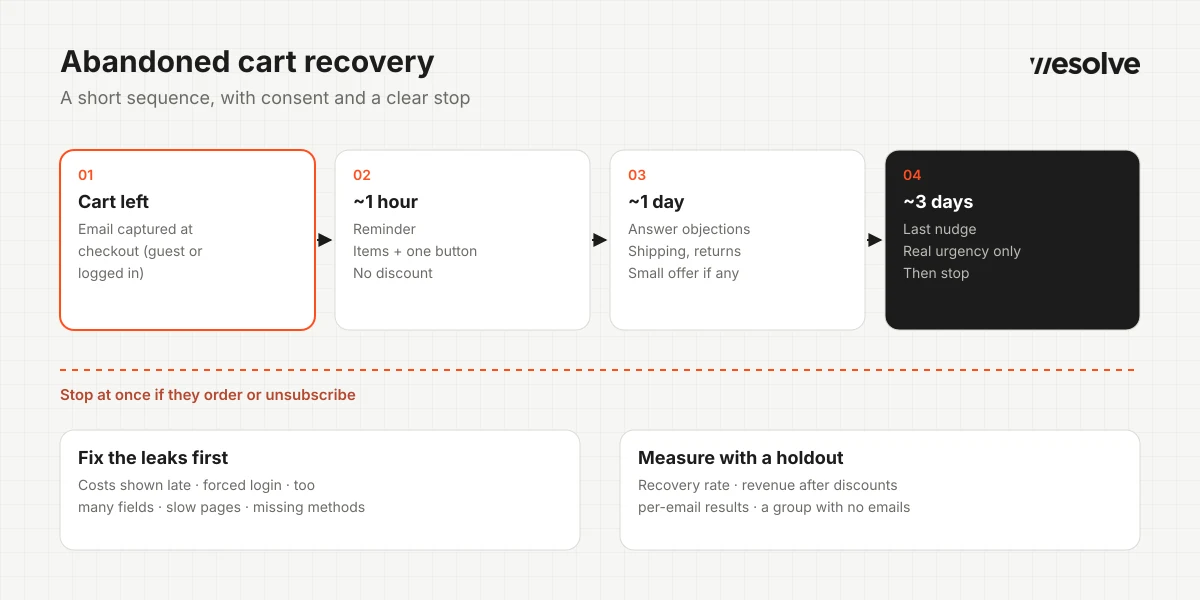
Fix the leaks first
Common reasons shoppers leave:
- Unexpected costs: shipping or fees shown too late (shipping integration)
- Forced account creation: Magento allows guest checkout by default; check no extension or setting has switched it off
- Too many steps or fields (checkout customisation)
- Slow cart and checkout pages (speed optimisation)
- Missing payment methods: in Greece, instalments and cash on delivery matter (payment gateways)
Look at your funnel before configuring anything. If most people drop at the shipping step, the fix is shipping, not email.
What Magento tracks
Reports > Shopping Cart > Abandoned Carts lists carts of logged-in customers that didn’t become orders: customer, items, total, last update. Useful for audits and for calling high-value B2B carts by hand.
Guest carts only become recoverable once you have an email, which extensions and email platforms capture as soon as it’s typed at checkout.
Step 1: quote lifetime
Stores > Configuration > Sales > Checkout > Shopping Cart > Quote Lifetime (days): how long carts are kept. Default 30 days. Too short and carts disappear before your emails go out; too long and stale quotes pile up. B2B stores with long approval cycles often keep them longer.
Step 2: choose how emails are sent
| Option | How | Trade-off |
|---|---|---|
| Adobe Commerce email reminders | Built-in rules (Marketing > Email Reminders) by cart conditions | Basic templates and reporting |
| Magento extension | Module inside your store | Data stays with you; another module to maintain |
| Email platform (Klaviyo, Mailchimp and similar) | Connector module + platform flows | Better editor and reporting; data leaves your server |
Check four things whatever you choose: guest email capture, multi-store and language support, consent and unsubscribe handling, and that the sequence stops the moment the customer orders.
Step 3: the three-email sequence
- After about an hour: reminder. Items, images, one button back to the cart. No discount yet, or you train people to abandon.
- After about a day: answer objections. Shipping costs, returns, delivery times, reviews. If margins allow, a small time-limited incentive goes here.
- After about three days: last nudge. Short. Real urgency only: genuine low stock or a real expiry.
Make the cart link restore the cart on any device, and test it from a phone.
Consent: get it right
In the EU, recovery emails are a GDPR and e-privacy question, and the rules differ by country. The safe approach: a short notice where the email is captured, a clear unsubscribe in every email, suppression of anyone who has unsubscribed, and few emails. Check your approach with a legal adviser (GDPR for Magento).
Measuring results
- Recovery rate: recovered orders ÷ abandoned carts (with an email)
- Recovered revenue, and margin after any discount
- Per-email performance: opens, clicks, orders
- A holdout group that gets no emails, so you know what you actually recovered
Change one thing at a time. If results stall, check deliverability and broken cart links before rewriting copy.
When to bring in help
Custom checkouts, B2B quotes, customer group pricing and multi-store setups are where off-the-shelf recovery breaks: missed carts, wrong prices in the email, carts that won’t restore. At wesolve, the team that built your checkout sets up recovery, and runs the servers it’s on. Talk to us.
FAQs
Can Magento email guests who abandoned a cart? Only once their email is captured at checkout, which needs an extension, an email platform connector, or custom work.
Does Adobe Commerce have recovery emails built in? It has email reminder rules that can target carts. Many stores still use an email platform for richer sequences.
How many emails should I send? Usually up to three, stopping as soon as they order or unsubscribe.
What’s the default quote lifetime? 30 days.