

Someone on your team has probably asked already: can we connect an AI assistant to the store? Yes. But some decisions come first.
A Magento MCP server makes the connection possible. It can also quietly give an agent more access than any employee should have. This post covers what it is, what it is good for, and what to put in place before an agent touches a live store.
This space moves fast. Check each tool’s current documentation before you commit.
What MCP is, in plain English
MCP stands for Model Context Protocol. It is an open standard that lets AI clients call defined tools on another system.
The assistant does not guess how to talk to your store. The server publishes a list of tools: search products, look up an order, read a report. The assistant calls them in a predictable way.
How MCP differs from REST and GraphQL
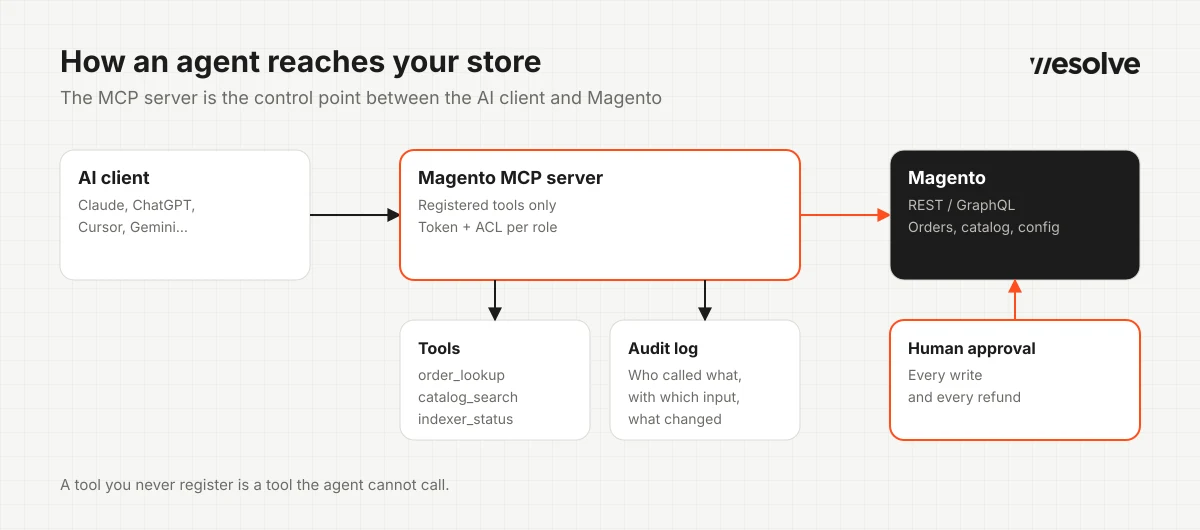
Magento already ships REST and GraphQL APIs. MCP does not replace them. It sits on top of them.
| REST / GraphQL | MCP server | |
|---|---|---|
| Surface | The whole API | A short list of named tools |
| Who decides what to call | A developer, in code | The AI client, from tool descriptions |
| Integration per assistant | Custom work | One server, any MCP client |
| Where you control access | API tokens and ACL | Tokens, ACL and which tools exist |
The last row matters most. A tool you never register is a tool the agent cannot call. That is where your guardrails live.
Three kinds of Magento MCP server
Each kind carries a different risk.
| Kind | Who uses it | What it touches | Risk |
|---|---|---|---|
| Storefront | Shopping assistants | Public catalog data | Low: data quality and abuse |
| Admin | Your staff, through an AI client | Orders, customers, config | High |
| Developer | Coding assistants | Code and project files | Medium: belongs in dev, not production |
Admin servers are the sensitive ones. Every guardrail below applies to them first.
Adobe is moving the same way. It announced agentic tooling for Adobe Commerce at Summit 2026. Whichever server you choose, the same questions apply.
Realistic use cases
Skip the demos. These fit how a Magento operation actually works.
- Support lookups. “Where is order 100234, and what did the customer buy?” The assistant calls a read-only order tool and answers. No admin login. A strong first use case: read-only, obvious value.
- Catalog gaps. An agent with read access finds thin descriptions and missing attributes. With write access, it drafts fixes. A person reviews every draft before it reaches a live page.
- Reporting questions. “Which categories dropped week over week?” Treat the answer as a starting point. Verify anything that drives a decision.
- Cron and indexer checks. An agent that can read cron status and indexer state points at the likely cause faster than scrolling logs. Keep it read-only. Letting it reindex on its own is a separate decision. See Magento cron jobs.
Agentic shopping: product data is the asset
AI assistants are becoming a discovery channel. Shoppers ask them what to buy and narrow a list before they open a store.
Adobe’s own guidance says shoppers use AI assistants for discovery and comparison, but still prefer brand-owned storefronts to complete a purchase. Google announced the Universal Commerce Protocol in January 2026. The direction is clear. The standards are still settling.
Two practical conclusions:
- Product data decides how assistants describe you. Complete attributes, clear titles, accurate stock. This is PIM work, not AI work. See Magento PIM integration.
- Checkout stays yours. Your payment flow, your fraud rules, your customer accounts. Do not hand checkout to an agent you cannot audit.
Risks and guardrails
Take this section to your security lead.
The core risk is prompt injection. The agent reads untrusted text and treats it as an instruction. A support email, a product review or a supplier feed can carry hidden instructions that make an assistant expose data or change things.
For remote servers, the MCP specification uses OAuth 2.1 for authorisation. But teams often connect agents faster than they write the rules.
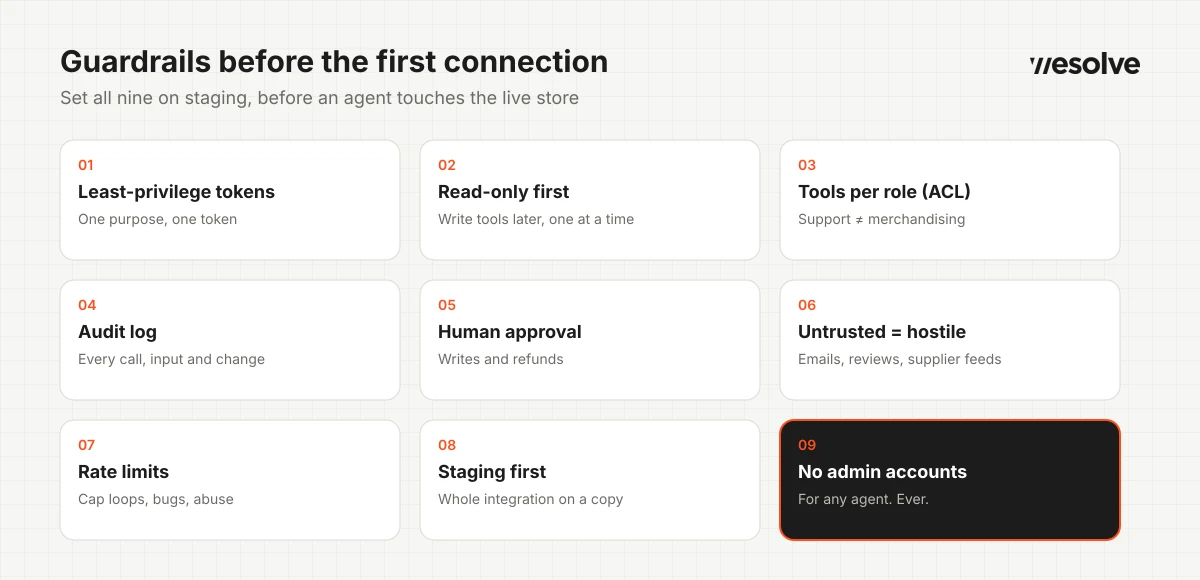
Set these before the first connection:
- Least-privilege tokens. One purpose, one token.
- Read-only first. Add write tools one at a time, later.
- Tools per role (ACL). Support does not need catalog writes. Merchandisers do not need customer data.
- An audit log of every call. Who or what called which tool, with what input, and what changed.
- Human approval for writes and refunds. The agent proposes. A person approves.
- Untrusted content is hostile. An agent that reads emails or reviews must not also hold powerful write tools.
- Rate limits. They cap the damage from loops, bugs and abuse.
- Staging first. Run the whole integration on a copy before production.
- No admin accounts for agents. Ever.
Expect ACL and audit logging from whatever server you pick, open source or commercial. Check them in the current documentation.
Basic hygiene comes first too. An agent is one more path into the store. Keep up with Magento security patches and two-factor authentication.
A short rollout plan
Keep it boring. Boring is safe.
- Start read-only on staging. Connect the server to a staging environment, not production.
- Pick two or three low-risk tools. Order lookup, catalog search, indexer status.
- Confirm the audit log works before you trust any results.
- Review after two weeks. What did people ask? What failed? What surprised you?
- Expand one tool at a time. Write tools only with human approval. Production only after staging behaves.
If a tool needs custom behaviour, build it as a proper module with tests. See Magento custom module development.
Where wesolve fits
We do not sell an MCP product. We help you scope, secure and stage an agent integration. The team that writes the code also runs the servers, so when an agent-assisted change goes wrong, the people who can roll it back are already on it.
FAQ
Does MCP replace the REST and GraphQL APIs? No. It exposes chosen tools on top of them.
Is it safe to connect an agent to a production store? It can be, with controls: narrow tokens, read-only tools first, ACL per role, an audit log and human approval for writes. Start on staging.
Should an agent get admin credentials? No. Issue narrow tokens scoped to specific tools.
Will AI assistants take over checkout? Plan for discovery through assistants and checkout on your own store.
The bottom line
A Magento MCP server gives AI agents a clean way into your store. That helps with support, reporting, diagnostics and product data. It is also a new access path to customer and order data.
Go slow. Start read-only on staging. Log everything. Keep people in front of writes and refunds.