

This is a replatforming project, not a data export. You move from a hosted platform, where the vendor runs everything, to a stack someone on your side owns: servers, security patches, upgrades, uptime. In return, you control checkout, catalog, integrations and performance.
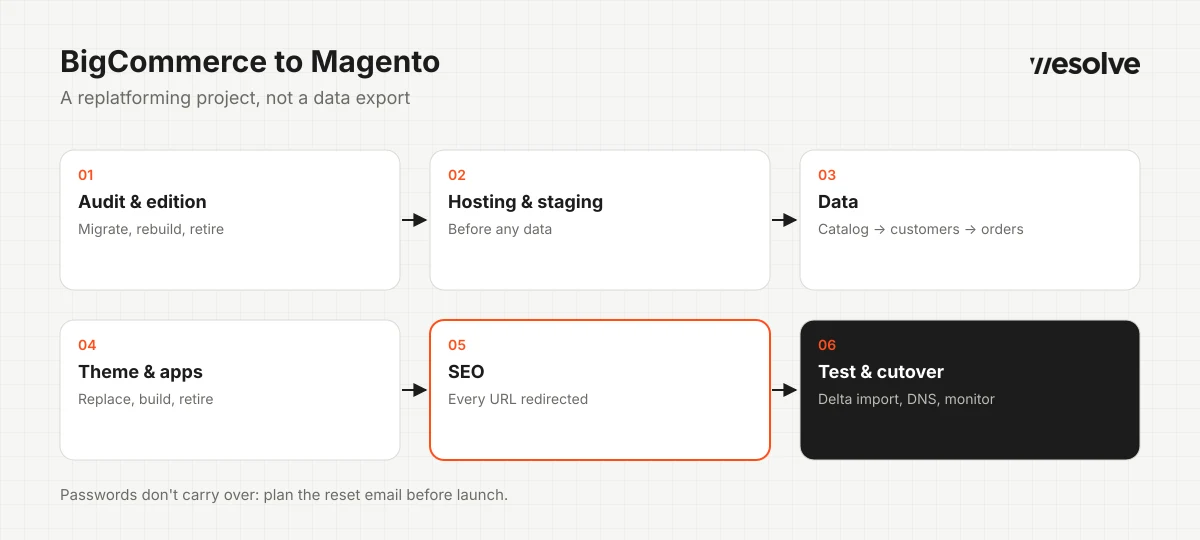
Step 1: Audit and choose the edition
Inventory everything, and mark each item migrate, rebuild or retire:
- Catalog: products, variants, options, custom fields, bundles, digital products
- Categories and URLs, and which pages earn organic traffic
- Customers: accounts, groups, addresses
- Orders: how much history you need
- Apps and integrations: ERP, payments, shipping, email, analytics
- Content: pages, blog, existing redirects, metadata
- Custom logic: pricing rules, B2B features, tax
A migration is the cheapest moment to drop dead apps and stale products.
Edition: Magento Open Source covers most stores; price out Adobe Commerce for heavy B2B, many storefronts or advanced merchandising (Adobe Commerce pricing). Decide now: switching mid-project means rework.
Step 2: Hosting and staging first
Build staging and production before migrating anything, as identical as possible: same PHP, search, cache and configuration. Magento needs a tuned app server, database, search, Redis, Varnish and a CDN (server requirements, managed hosting). Confirm backups, monitoring and a rollback path before step 3.
Step 3: Map and import data
Order matters: catalog → customers → orders (orders reference both).
- Export products, categories, customers and orders; keep the raw files untouched.
- Map categories and attributes: decide where each custom field and option goes, or drop it.
- Rebuild variants as configurable products with simple children; check every SKU, price, weight and stock level.
- Move images, keeping filenames and alt text.
- Import customers. Passwords don’t carry over: plan a reset flow and tell customers before launch, so the email doesn’t look like phishing.
- Import orders, mapping statuses, tax lines and shipping methods.
- Trial import on staging: compare counts, spot-check products and orders, fix the mapping.
Run a delta import right before cutover for orders and customers created since the first load (product import).
Step 4: Theme, apps and integrations
Your theme doesn’t carry over. Rebuild it, designed for speed from day one (speed optimisation).
For each BigCommerce app: replace it with a maintained Magento extension, build a module, or retire it. Vet every extension: it runs inside your code (custom module development).
Reconnect integrations in order: payments, shipping and tax first (checkout depends on them), then ERP, stock feeds, email, analytics and ad tags. Test each with real test orders, not just an API ping (payment gateways, ERP integration).
Step 5: Protect SEO
| Asset | What to do | Check |
|---|---|---|
| Product URLs | Set URL keys; 301 old paths | One final URL each, no chains |
| Category URLs | Match old structure where possible | Paging and filters handled |
| Content pages | Same path or 301 | No 404s on linked pages |
| Titles, descriptions | Import to Magento meta fields | None blank or duplicated |
| Canonicals | Configure for products and categories | One per page |
| Sitemap | Generate and submit | Only live, indexable URLs |
Build the redirect map from every indexed URL, test it in bulk on staging, and keep redirects long after launch (Magento SEO).
Step 6: Test, launch, monitor
Before cutover:
- Data parity: counts match; prices, stock and images spot-checked
- Checkout with every payment method, shipping option and tax case
- Emails: confirmations, shipping, password resets
- Speed under realistic load
- Redirects: no chains, loops or 404s
Cutover: content freeze → delta import → DNS TTL lowered a day ahead → switch → keep the old store reachable until orders flow. If something blocks checkout, switch back (launch checklist).
After launch, daily for the first weeks: Search Console errors, rankings and landing pages vs baseline, orders reaching ERP and fulfilment, checkout completion.
At wesolve, the team that migrates your store also hosts and runs it, so launch-day problems have one owner. Talk to us.
FAQs
How long does it take? It depends on catalog size, integrations and custom features. The audit gives you the scope for a realistic plan.
Will I lose rankings? Not if every old URL redirects properly and metadata carries over. Expect some movement; monitor closely.
Can I keep BigCommerce apps? No. Replace, rebuild or retire each one.
Is an automated migration tool enough? For the data, sometimes. It won’t rebuild your theme, integrations or SEO.